2 - 10 Symbol LS4208 Product Reference Guide
Scanning with Intellistand
When the scanner is placed in the Intellistand, the scan pattern selected in hand-held triggered mode continues
(see Scan Pattern on page 4-6).
To operate the scanner in Intellistand:
1. Ensure the scanner is properly connected to the host (see the appropriate host chapter for information on host
connections).
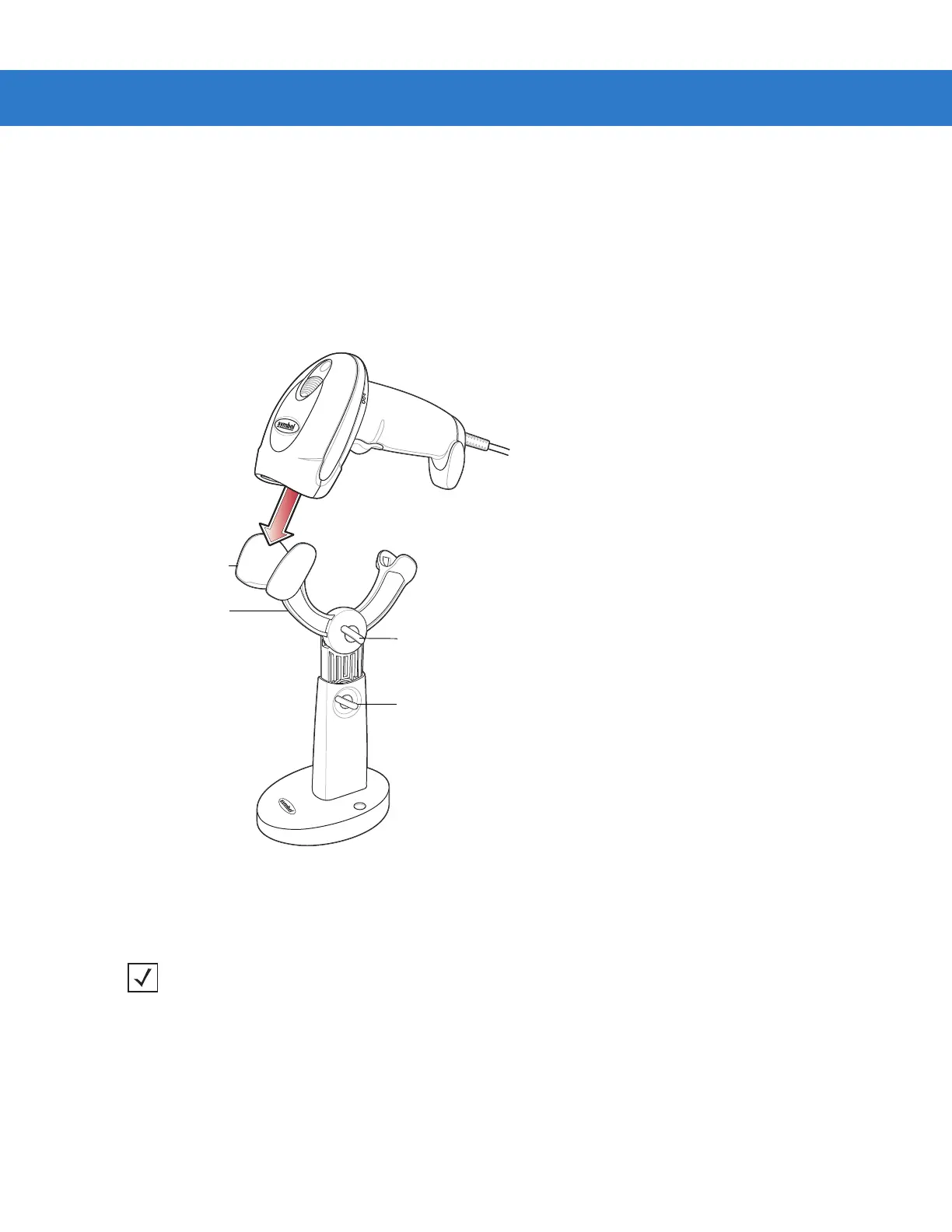
2. Insert the scanner in Intellistand by placing the front of the scanner into the stand’s “cup.”
Figure 2-13
Inserting the Scanner in the Intellistand
3. Use the Intellistand’s adjustment knobs to adjust the height and angle of the scanner.
4. Present the bar code.
5. Upon successful decode, the scanner beeps and the LED turns green. For more information about beeper and
LED definitions, see Table 2-1 and Table 2-2.
Scanner Holder
Height Adjustment Knob
Angle Adjustment Knob
Cup
NOTE When the bar code is in view, the scanner emits a full scan line. After 3 minutes, the
scanner automatically switches to a reduced scan line. After 1 hour, the scanner automatically
switches to blink mode.



 To Next Page