MC1000 User Guide1-6
Getting Started
To get the MC1000 up and running:
• install the rechargeable Li-ion battery or the AAA batteries
• charge the battery (rechargeable battery only)
• start the mobile computer.
Main Battery Installation
The MC1000 uses either a rechargeable 1800 mAh Li-ion battery or three standard alkaline AAA batteries. Charge the Li-ion battery
before using the mobile computer. If the Li-ion battery is not charged, see Battery Charging on page 1-8.
Li-ion Battery Installation
To install the Li-ion battery:
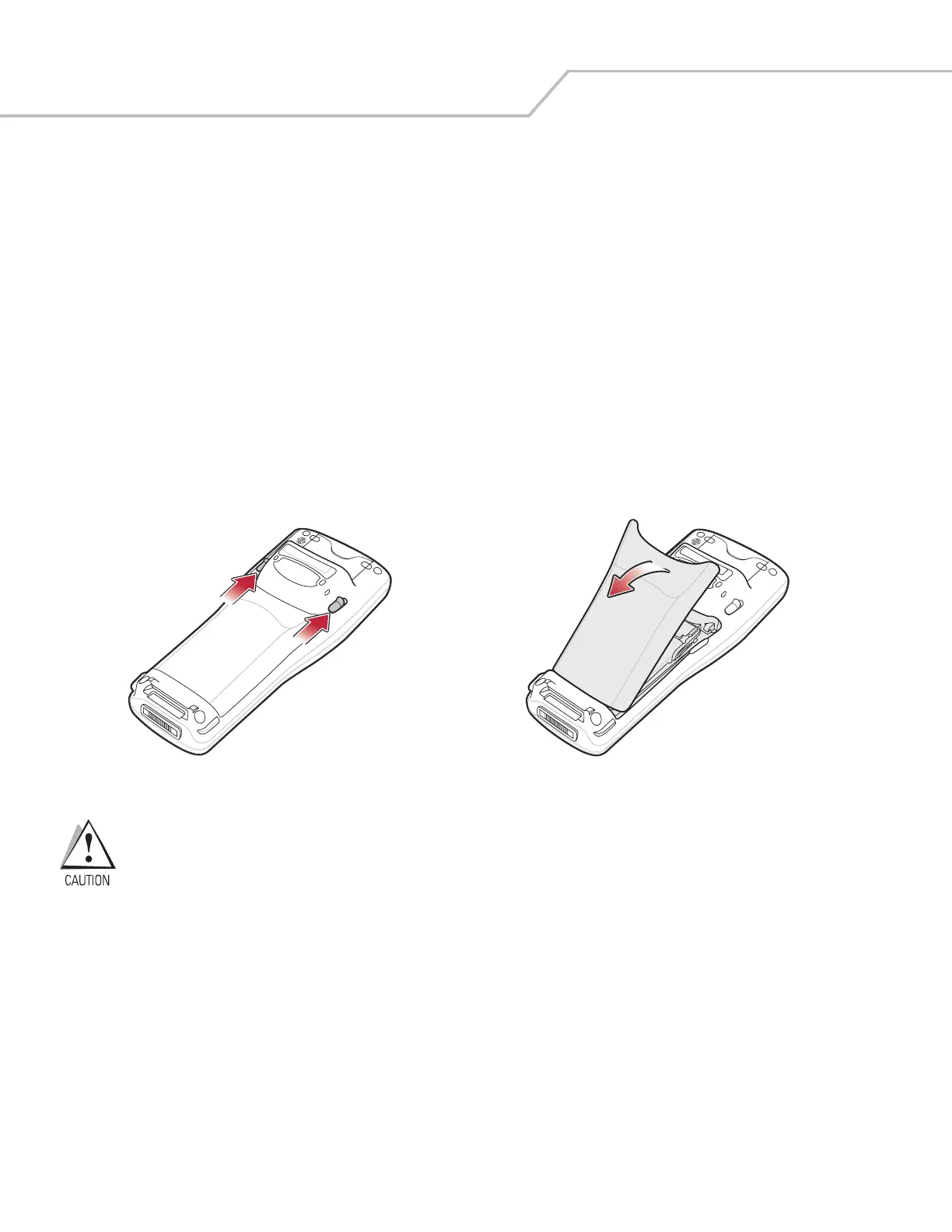
1. Pull back the two battery door latches.
2. Lift the battery door.
Figure 1-2. Battery Door Removal
Ensure the battery adapter clip is positioned correctly or damage to the battery adapter clip and battery door
may occur.
Avoid touching the contacts when positioning the battery adapter clip.
3. With your index and middle fingers holding the sides of the battery adapter clip, push toward the top of the mobile computer
until it is latched in the up position.


 To Next Page