Getting Started 1-7
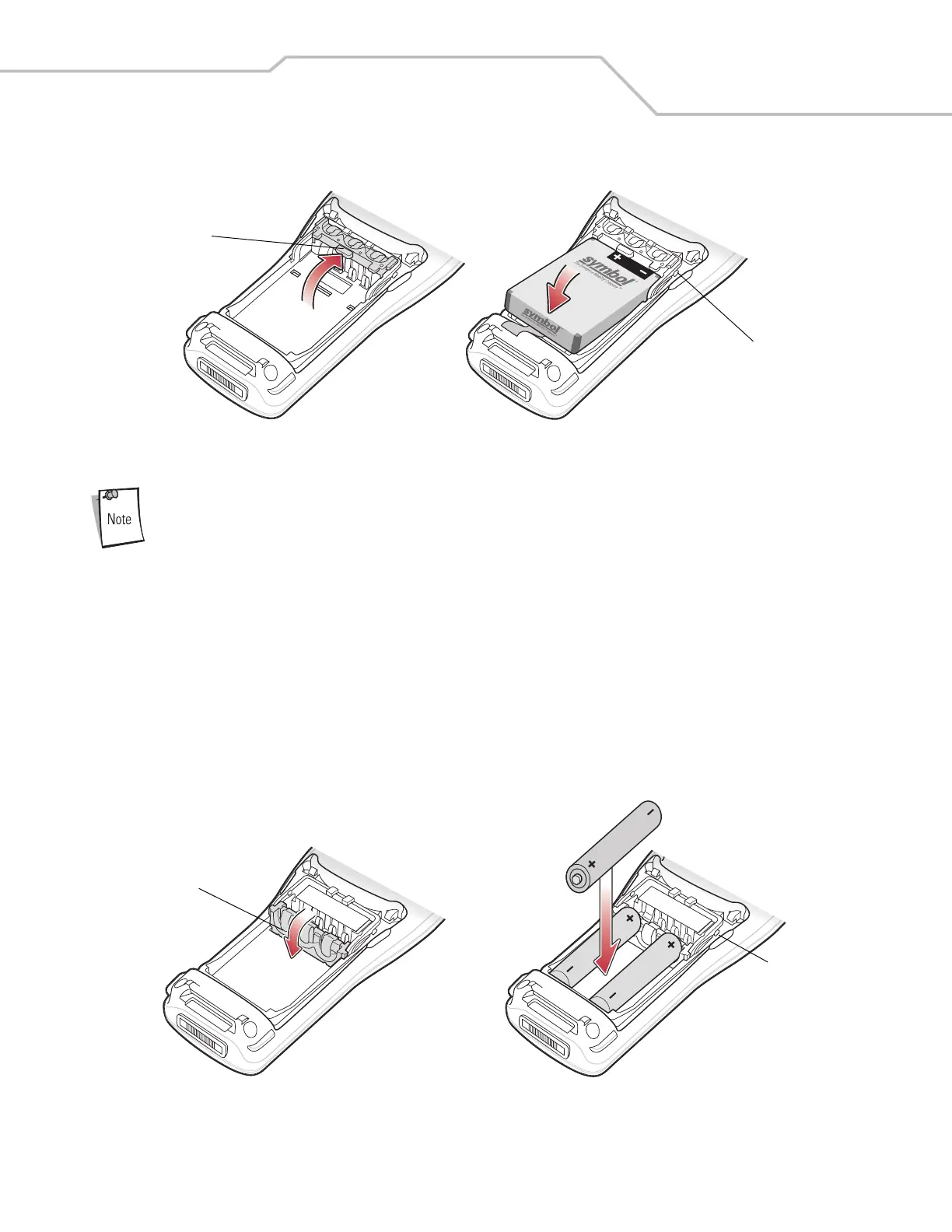
4. Insert the battery into the battery well top first.
Figure 1-3. Li-ion Battery Insertion
The battery door switch detects if the battery door is installed properly. The mobile computer does not turn
on if the battery door is not in place.
5. Replace the battery door bottom first and press down until it snaps into place.
AAA Battery Installation
To install the AAA batteries:
1. Pull back the two battery door latches.
2. Lift the battery cover.
3. With your index and middle fingers holding the sides of the battery adapter clip, push toward the bottom of the mobile
computer until it is latched in the down position.
4. Insert the three AAA batteries into the battery well, noting the positions of the batteries.
Figure 1-4. AAA Battery Installation
Battery Adapter Clip
Battery Door Switch
Battery Adapter Clip
Battery Door Switch



 To Next Page