MC1000 User Guide2-8
• Status Icons
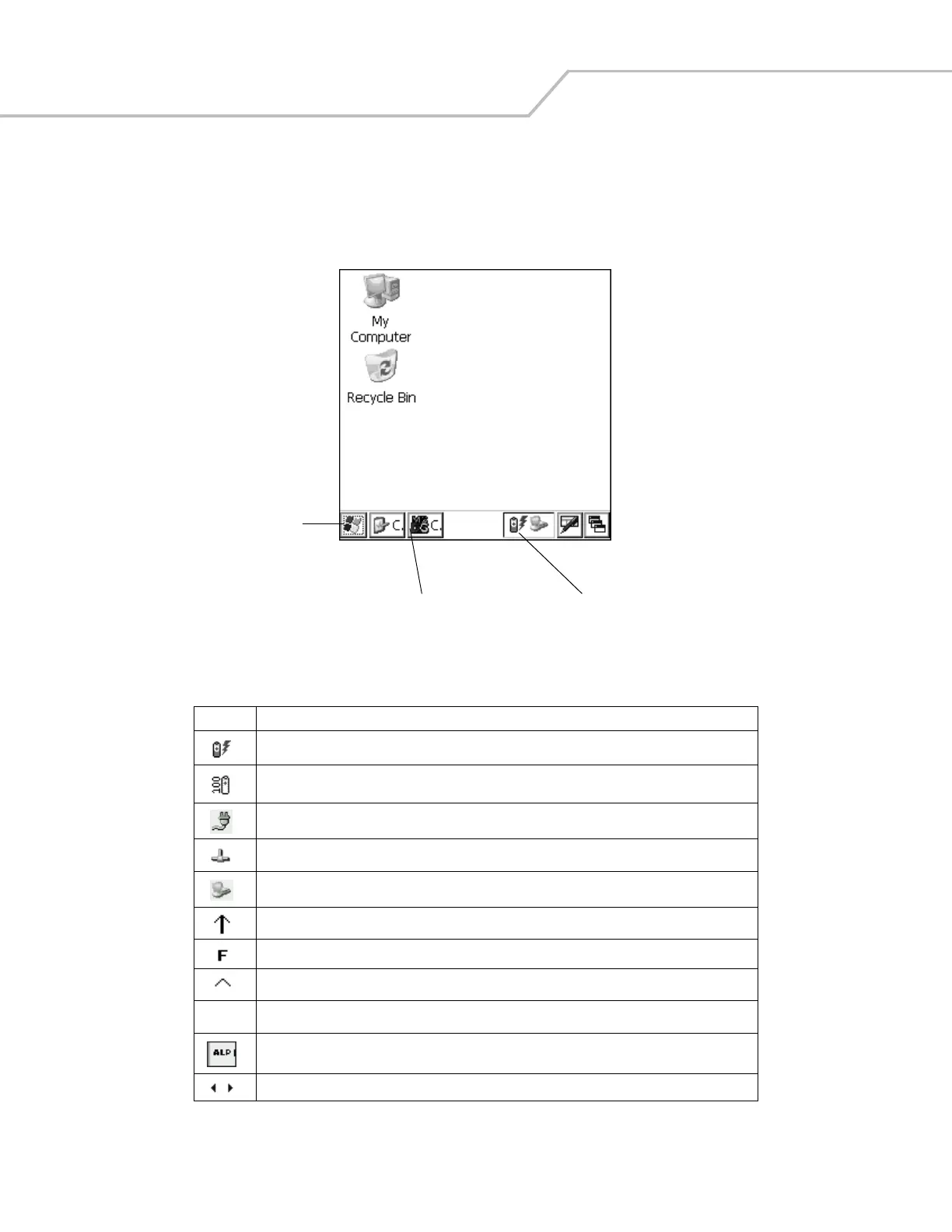
The keypad mode icons indicate the function key status. If the F, A, SHIFT, or CTRL functions are active the appropriate icon
appears in the taskbar. The power status icons indicate if the mobile computer is connected to an AC power source, if it is
charging, or the remaining power of the battery.
Figure 2-4. Taskbar
Table 2-3. Status Icons
Icon Description
Indicates that the mobile computer is charging.
Indicates the battery charge status in 10% increments from 10% to 100%.
Indicates that the battery is fully charged and the mobile computer is running on external AC power.
Indicates IP status. Only displays when the mobile computer is in emulation mode.
Indicates that the ActiveSync application is running.
Indicates that the SHIFT character function is selected.
Indicates that the F key (function) is selected.
Indicates that the CTRL character function is selected.
Indicates that the ALT character function is selected.
Indicates that the mobile computer is in alpha mode.
Use the scroll arrows to scroll left or right to reveal hidden program and status icons.
Start Button
Application and Status Icons
Active Programs
ALT


 To Next Page