User Code Setup (Cont'd)
37
ACTION SCREEN
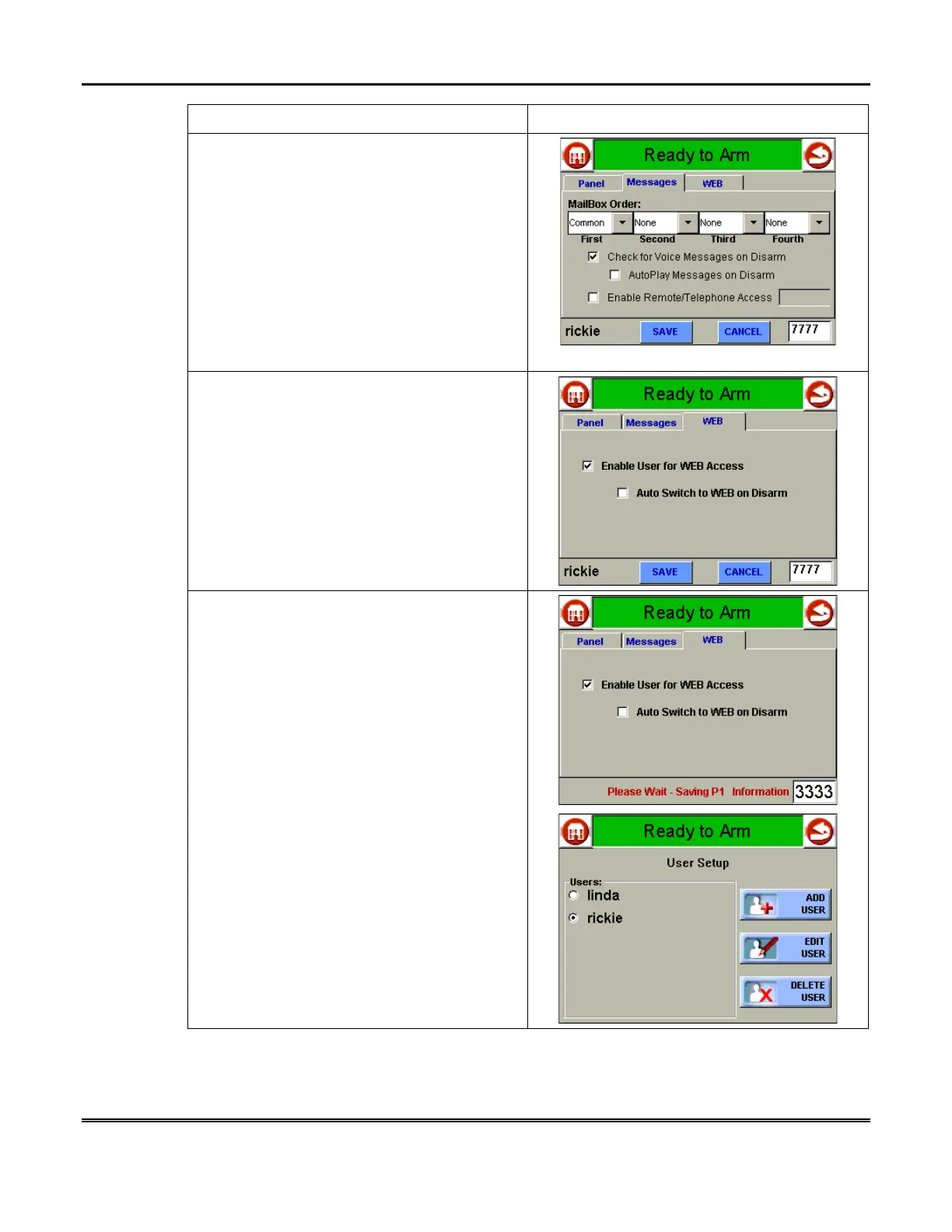
7. Press the
Messages
tab on the “User
Options” screen. The “Messages access”
screen is displayed.
Select the Mailbox Order options for this user
and select
Check for Voice Mail Messages
on Disarm, AutoPlay Messages on Disarm,
and/or
Enable Remote/Telephone Access
options for this user.
NOTE:
If this user is to have security access
and Message Center access only, press the
SAVE
button at this time. If the user will also
have Internet access, go to step 8.
8. Press the
WEB
tab on the “User Options”
screen. The “WEB access” screen is
displayed.
To provide this user with Internet access press
the box next to
Enable User for Web Access
until a check appears. You may also select the
Auto Switch to WEB on Disarm
option at this
time.
9. Press the
SAVE
button. The system will
save the configuration. When the save is
complete, the
User Setup
screen is displayed
with the new user’s name shown.



 To Next Page