What’s in this guide? Getting started Making calls Using the phone book In-call features Video conferencing
18
D1403405 USER GUIDE VIDEO ENDPOINTS MXP ENGLISH—SEPTEMBER 2009
Making calls
Video vs. telephone calls
Before you make a video or telephone
call, make sure the system call type is
set up accordingly.
What type of calls the system has
been set up to right now is indicated
by a little icon to the left of the Call
Settings field:
This icon shows that video calls
are expected to be made.
This icon shows that telephone
calls are expected to be made.
In order to change the setting, you
must navigate to that icon:
Press the OK key on the remote control
to display the submenu:
Assuming that you would like to make
a telephone call in this example, you
must navigate down to Telephone call
to change it from Video Call. Press the
OK key to put the changes into effect.
Repeat to select the other setting.
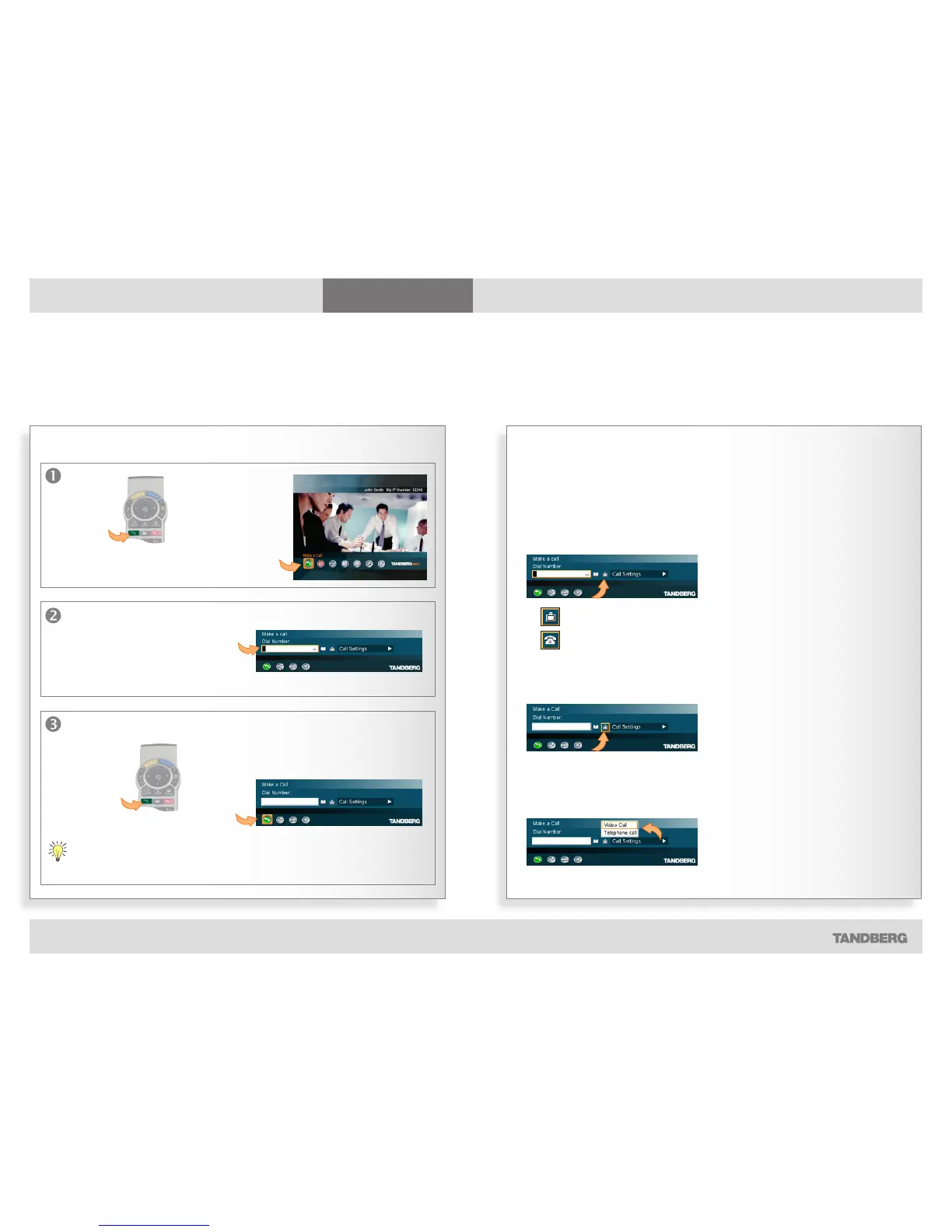
To make a call dialing the number
Making a call
… or select
the Call icon of
the main menu
before you
press OK key.
The Call menu is then displayed…
Enter the “number” here (it
may consist of digits as well
as letters) using the remote
control.
Start by
pressing
the green
Call key on
the remote
control…
Once you have finished entering the number, start calling by: …
… pressing
the green
Call key on
the remote
control…
55987602
… or by navigating down to the green Call
icon and pressing the OK key.
Instead of navigating down to the Call icon, you may also just press the OK key
twice to start calling.



 To Next Page