What’s in this guide? Getting started Making calls Using the phone book In-call features Video conferencing
24
D1403405 USER GUIDE VIDEO ENDPOINTS MXP ENGLISH—SEPTEMBER 2009
Making calls
Setting up for streaming…
S
treaming lets you broadcast your
meeting to participants on the
web. The web participants can view
the meeting, listen to the meeting,
see snapshots, but not participate
themselves. Snapshots of current stream,
selfview, far end and dual video streams
are accessible via http.
The streaming source setting is not
available when streaming only is
supported outside a call.
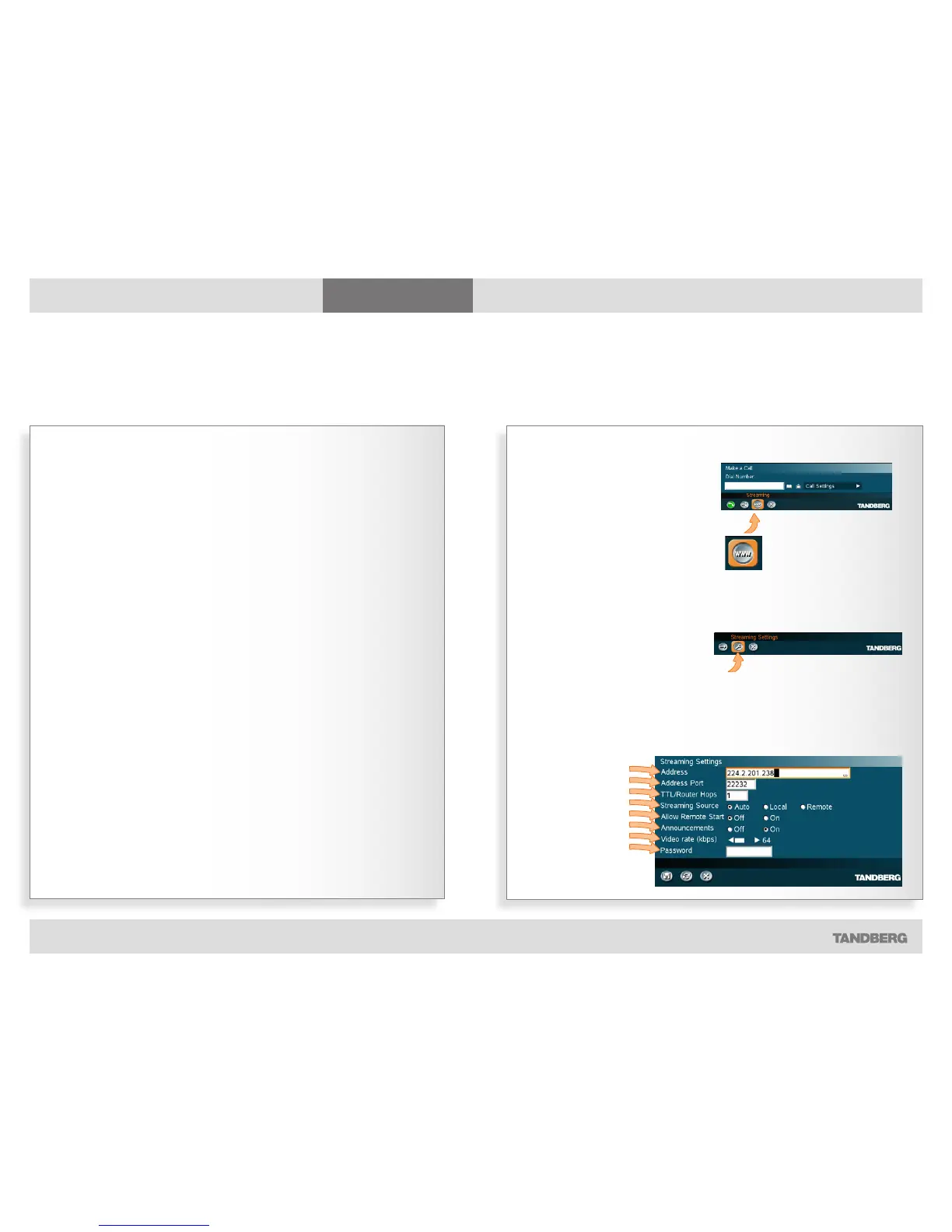
Streaming settings
Address. This is defined as the
IP-address of a streaming client,
streaming server or a multicast
address. Giving an address in the
range 224.0.0.1–239.255.255.255 will
broadcast the stream to any host that
has joined the specified multicast group.
Specifying normal broadcast address
255.255.255.255 will broadcast to any
members on the LAN.
Address Port. If several codec’s are
streaming to the same IP-address,
different ports have to be used in order
for the client to know which stream to
receive. If the first codec streams on
port 2240 and the second codec on port
2250, the client has to specify which port
to listen to. Video is transmitted on the
specified port; audio is transmitted on the
port number 4 greater than the specified
video port, in this case 224444 and 2254.
TTL/Router Hops. This is used for
streaming data to limit how many
routers the data should pass before it is
rejected. If TTL is set to 2, data will not
traverse more than 2 router hops.
Streaming Source. The source used for
streaming.
Auto: Enables streaming of both local
and far end video. Selection of which
site to be streamed is done using
voice switching (the site that speaks is
streamed).
Local: Only the local video will be
streamed.
Remote: Only the far end video will be
streamed.
Local and far end audio is always
streamed.
Streaming
Part 1: Setting up to broadcast your meeting to participants on the web
In the Make a Call menu, select
the streaming icon and press the
OK key on the remote control…
Select Streamer Settings
and press the OK key
again…
Address
Address Port
TTL/Router Hops
Streaming Source
Allow remote Start
Announcements
Video rate
Password
The Streamer Settings will now be displayed…



 To Next Page