What’s in this guide? Getting started Making calls Using the phone book In-call features Video conferencing
35
D1403405 USER GUIDE VIDEO ENDPOINTS MXP ENGLISH—SEPTEMBER 2009
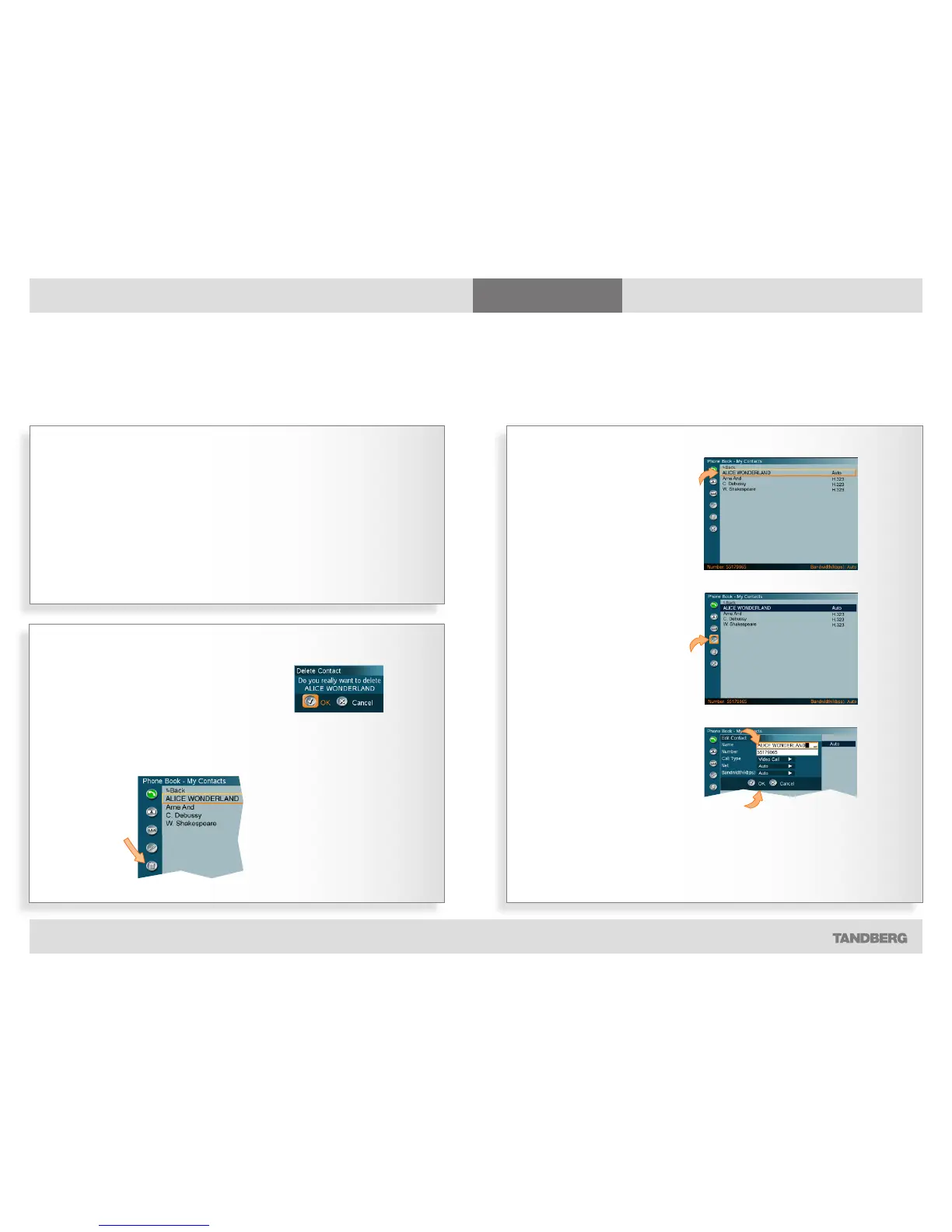
Using the phone book
Editing an entry…
Discarding an entry
Entries in My Contacts and in any of the
call logs may be discarded at any time.
Do as follows:
1. Go to where the entry to be
discarded resides, this can only be
one of the call logs or My Contacts.
2. Navigate to that particular entry.
3. From that entry navigate left and
down to the Delete icon:
Once you
have selected
the entry to
be discarded,
move to this
icon and press
the OK key.
4. Press the OK key and the following
dialog box will appear:
5. Press the OK key to leave menu
undoing any changes.
Y
ou may edit and delete entries in My
Contacts any time. Since updates
in the corporate phone book(s) made
by your system administrator will not
affect My Contacts, you may have to
use this feature from time to time when
corporate phone book changes are
made.
Observe that you cannot edit any other
parts of your phone book except the
contents of your call logs, all of which
entries can be copied to My Contacts
(as described on the previous page) or
they can be discarded.
Editing existing entries
Contact information can be updated or removed from the phone book
Editing can only take place among
entries in My Contacts.
Start by selecting the entry to
edit…
…then navigate to the
left and down to the
Edit icon and press the
OK key…
Edit the contact…
Navigate down to the OK and press the OK key to leave
the menu putting changes into effect.
Or, navigate to Cancel and press the OK key to leave
menu undoing any changes.



 To Next Page