EasyManua.ls Logo

Tascam 388 Studio 8 - Page 32

Tascam 388 Studio 8
139 pages
Print Icon
To Next Page IconTo Next Page
To Previous Page IconTo Previous Page
Loading...
ff
—
\3
\
«w
-
.31
32
33
34
35
36
37
38
t
TASCAM
388
STUDIO
8
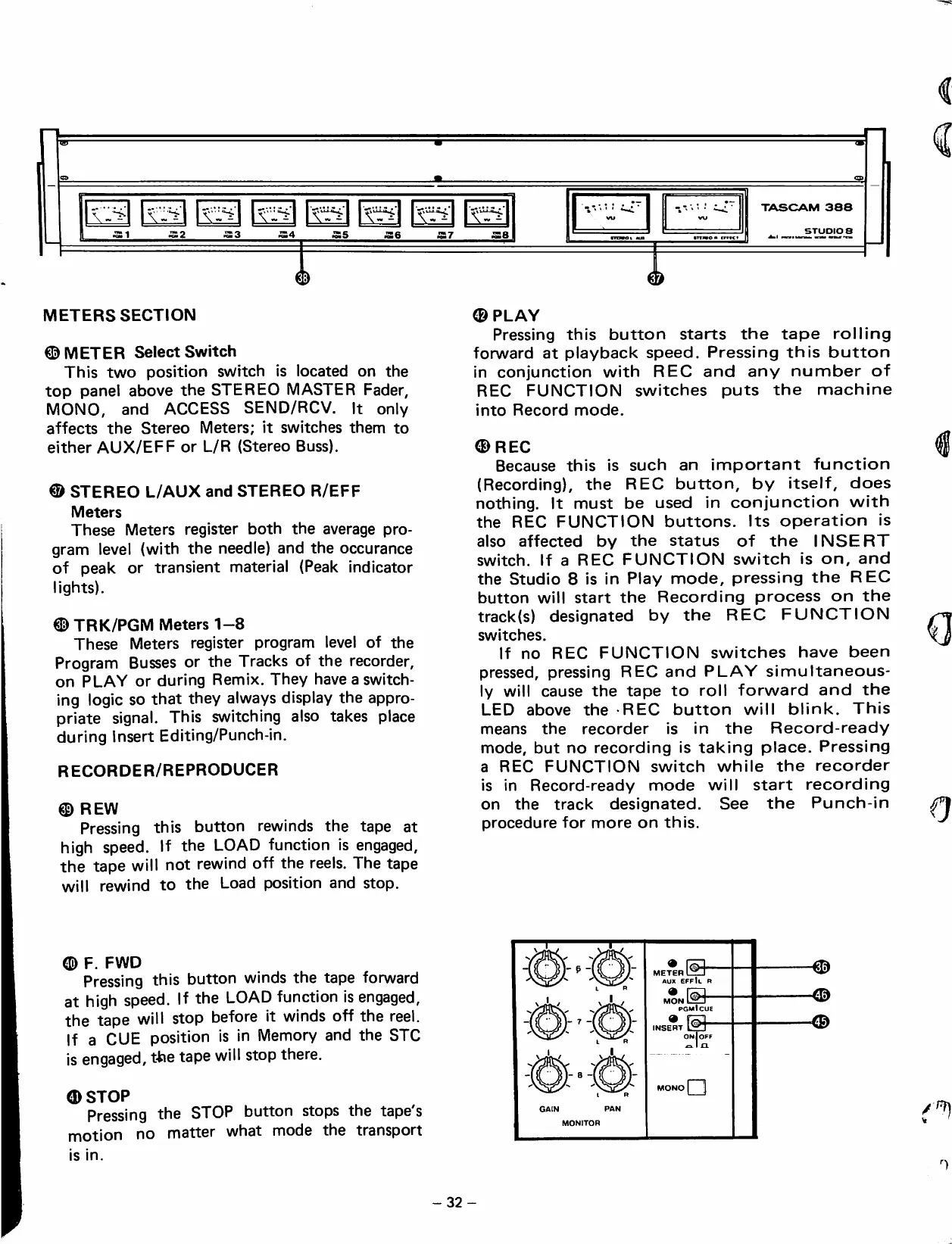
METERS
SECTION
©METER
SelectSwitch
This
two
position
swrtch
¡s
located
on
the
top
panel
above
the
STEREO
MASTER
Fader,
MONO,
and
ACCESS
SEND/RCV.
It
oniy
affects
the
Stereo
Meters;
it
switches
them
to
either
AUX/EFF
or
L/R
(Stereo
Buss).
®
STEREO
L/AUX
and
STEREO
R/EFF
Meters
These
Meters
register
both
the
average
pro-
gram
leve)
(with
the
needle)
and
the
occurance
of
peak
or
transient
material
(Peak
indicator
lights).
©
TRK/PGM
Meters
1-8
These
Meters
register
program
leve!
of
the
Program
Busses
or
the
Tracks
of
the
recorder,
on
PLAY
or
during
Remix.
They
have
a
switch-
ing
logic
so
that
they
always
dispiay
the
appro-
priate
signa!.
This
switching
aiso
takes
place
during
Insert
Editing/Punch-in.
RECORDER/REPRODUCER
©
REW
Pressing
this
button
rewinds
the
tape
at
high
speed.
If
the
LOAD
function
is
engaged,
the
tape
will
not
rewind
off
the
reels.
The
tape
will
rewind
to
the
Load
position
and
stop.
©PLAY
Pressing
this
button
starts
the
tape
rolling
forward
at
playback
speed.
Pressing
this
button
in
conjunction
with
REO
and
any
number
of
REC
FUNCTION
switches
puts
the
machine
into
Record
mode.
©REO
Because
this
is
such
an
important
function
(Recording),
the
REC
button,
by
itseif,
does
nothing.
It
must
be
used
in
conjunction
with
the
REC
FUNCTION
buttons.
Its
operation
is
aiso
affected
by
the
status
of
the
INSERT
switch.
If
a
REC
FUNCTION
switch
is
on,
and
the
Studio
8
is
in
Play
mode,
pressing
the
REC
button
will
start
the
Recording
process
on
the
track(s)
designated
by
the
REC
FUNCTION
switches.
If
no
REC
FUNCTION
switches
have
been
pressed,
pressing
REC
and
PLAY
simultaneous-
ly
will
cause
the
tape
to
roll
forward
and
the
LED
above
the
REC
button
will
blink.
This
means
the
recorder
is
in
the
Record-ready
mode,
but
no
recording
is
taking
place.
Pressing
a
REC
FUNCTION
switch
while
the
recorder
is
in
Record-ready
mode
will
start
recording
on
the
track
designated.
See
the
Punch-in
procedure
for
more
on
this.
©
F.
FWD
Pressing
this
button
winds
the
tape
forward
at
high
speed.
If
the
LOAD
function
is
engaged,
the
tape
will
stop
before
it
winds
off
the
reel.
If
a
CUE
position
is
in
Memory
and
the
STC
is
engaged,
tfne
tape
will
stop
there.
©STOP
Pressing
the
STOP
button
stops
the
tape's
motion
no
matter
what
mode
the
transport
is
in.
GAIN
PAN
MONITOR
ME®R@-
Aux
effIl
r
nSn©-
pgmIcue
INSE*T
OnIoff
a
-<&
-32

Table of Contents