EasyManua.ls Logo

Tascam 388 Studio 8 - Page 33

Tascam 388 Studio 8
139 pages
Print Icon
To Next Page IconTo Next Page
To Previous Page IconTo Previous Page
Loading...
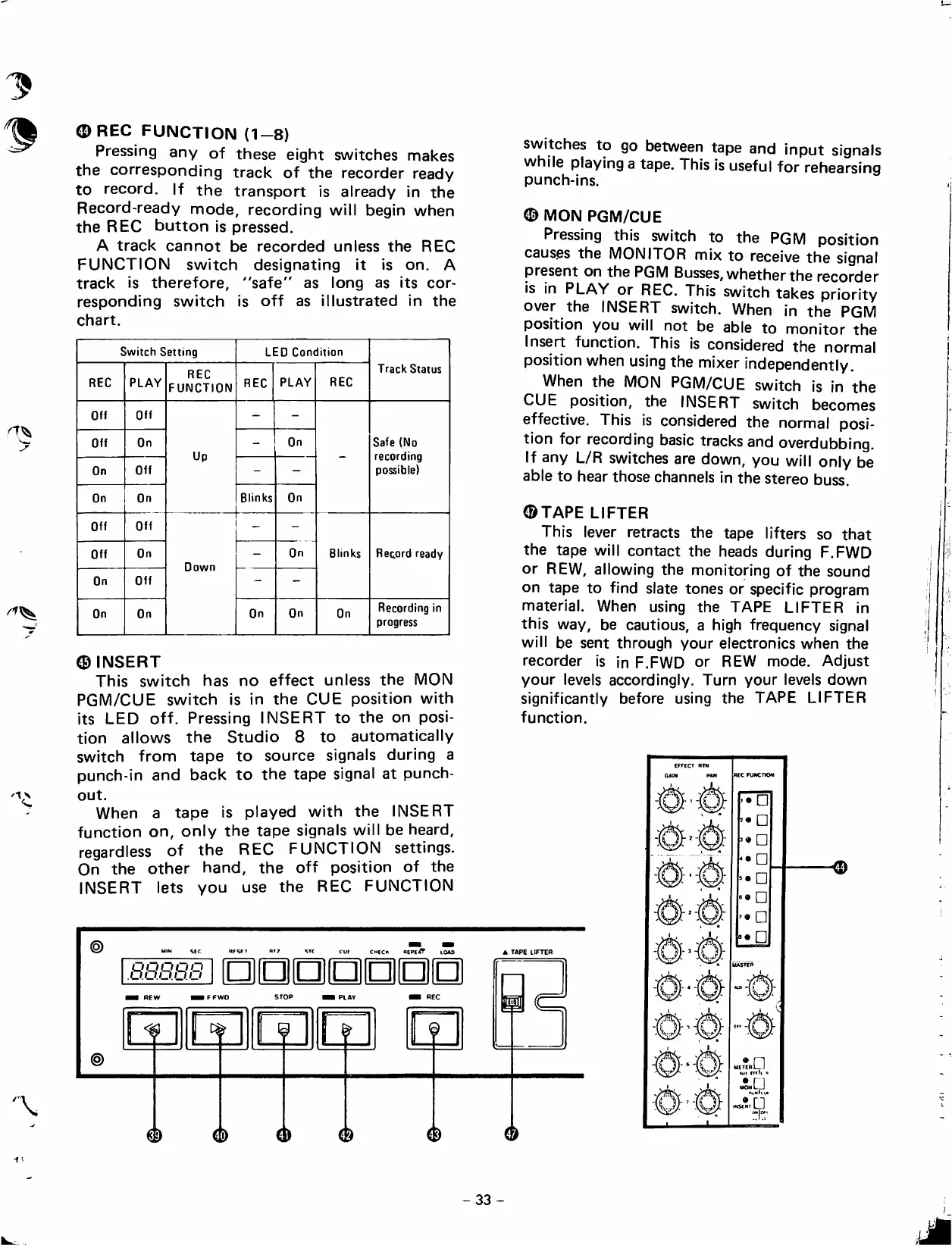
<DREC
FUNCTION
(1-8)
Pressing
any
of
these
eight
switches
makes
the
corresponding
track
of
the
recorder
ready
to
record.
If
the
transport
¡s
already
in
the
Record-ready
mode,
recording
will
begin
when
the
REC
button
is
pressed.
A
track
cannot
be
recorded
unless
the
REC
FUNCTION
switch
designating
it
is
on.
A
track
is
therefore,
"safe"
as
long
as
its
cor
responding
switch
is
off
as
illustrated
in
the
chart.
Switch
Setting
LED
Condition
REC
PLAY
REC
FUNCTION
REC
PLAY
REC
Track
Status
Off
Off
-
-
Off
On
Up
-
On
Safe
(No
recording
possible)
On
Off
-
-
On
On
Blinks
On
Off
Off
-
-
Off
On
Down
-
On
Blinks
Record
ready
On
Off
-
-
On
On
On
On
On
Recording
in
progress
®INSERT
This
switch
has
no
effect
unless
the
MON
PGM/CUE
switch
is
in
the
CUE
position
with
its
LED
off.
Pressing
INSERT
to
the
on
posi
tion
allows
the
Studio
8
to
automatically
switch
from
tape
to
source
signáis
during
a
punch-in
and
back
to
the
tape
signal
at
punch-
out.
When
a
tape
is
played
with
the
INSERT
function
on,
oniy
the
tape
signáis
wil
l
be
heard,
regardiess
of
the
REC
FUNCTION
settings.
On
the
other
hand,
the
off
position
of
the
INSERT
lets
you
use
the
REC
FUNCTION
SEC
RfSFT
CMfCH
REPEíÍT
lOAD
UQQiDO
oJd.o.o.o
1
1
1
1
1
1
1
1
1
1
I
1 1
REW
FFWD
STOP
H
PLAY
Mi
REC
f
k
f
n
r
i
D
(
)
(
^
(
í)
switches
to
go
between
tape
and
input
signáis
while
playing
a
tape.
This
is
useful
for
rehearsing
punch-ins.
<D
MON
PGM/CUE
Pressing
this
switch
to
the
PGM
position
caus.es
the
MONITOR
mix
to
receive
the
signal
present
on
the
PGM
Busses,
whetherthe
recorder
is
in
PLAY
or
REC.
This
switch
takes
priority
over
the
INSERT
switch.
When
in
the
PGM
position
you
will
not
be
able
to
monitor
the
Insert
function.
This
is
considered
the
normal
position
when
using
the
mixer
independentiy.
When
the
MON
PGM/CUE
switch
is
in
the
CUE
position,
the
INSERT
switch
becomes
effective.
This
is
considered
the
normal
posi
tion
for
recording
basic
tracks
and
overdubbing.
If
any
L/R
switches
are
down,
you
will
oniy
be
able
to
hear
those
channeis
in
the
stereo
buss.
©TAPE
LIFTER
This
lever
retracts
the
tape
lifters
so
that
the
tape
will
contact
the
heads
during
F.FWD
or
REW,
allowing
the
monitoring
of
the
sound
on
tape
to
find
slate
tones
or
specific
program
material.
When
using
the
TAPE
LIFTER
in
this
way,
be
cautious,
a
high
frequency
signal
will
be
sent
through
your
electronics
when
the
recorder
is
in
F.FWD
or
REW
mode.
Adjust
your
leveis
accordingly.
Turn
your
leveis
down
significantly
before
using
the
TAPE
LIFTER
function.
A
TAPE
LIFTER
é
33
-

Table of Contents