EasyManua.ls Logo

Tascam 388 Studio 8 - Page 34

Tascam 388 Studio 8
139 pages
Print Icon
To Next Page IconTo Next Page
To Previous Page IconTo Previous Page
Loading...
©PITCH
CONTrol
This
knob
allows
you
to
adjust
the
speed
of
the
Studio
8
by
plus
or
minus
15%
In
either
PLAY
or
REC.
You
can
use
this
speed
control
to
accommodate
minor
changas
necessary
in
the
length
or
relativa
pitch
of
your
program
material.
If
you're
making
a
30
second
radio
commercial
and
it
runs
a
littie
long,
you
can
speed
it
up
enough
to
drop
out
the
extra
seconds.
When
tape
runs
faster
than
the
speed
at
which
it
was
recordad,
the
material
on
itwill
raise
in
pitch.
This
can
sometimes
be
used
in
a
creativa
way
to
save
parts
that
are
a
littie
out-
of-tune,
or
to
create
sound
effects
such
as
flang-
ing.
If
you
record
with
the
PITCH
CONTrol
at
its
máximum
or
minimum
settings,
you
will
NOT
have
the
ability
to
make
further
adjust-
ment
in
that
direction
upon
playback.
©VARI/FIX/EXT
This
three
position
switch
controls
the
status
of
the
PITCH
CONTrol
function.
In
the
VARI
position,
the
PITCH
CONTrol
knob
will
func
tion
and
an
LED
will
indícate
that
it
is
on.
In
the
FIX
position
the
PITCH
CONTrol
will
be
locked
off,
it
will
not
function.
In
the
EXT
position,
the
transport
speed
of
the
recordar
will
be
controlled
by
a
device
plugged
into
the
ACCESSORY
jack
on
the
back
panel.
SMPTE
Controllers
and
Synchronizers
will
normally
be
used
with
this
function.
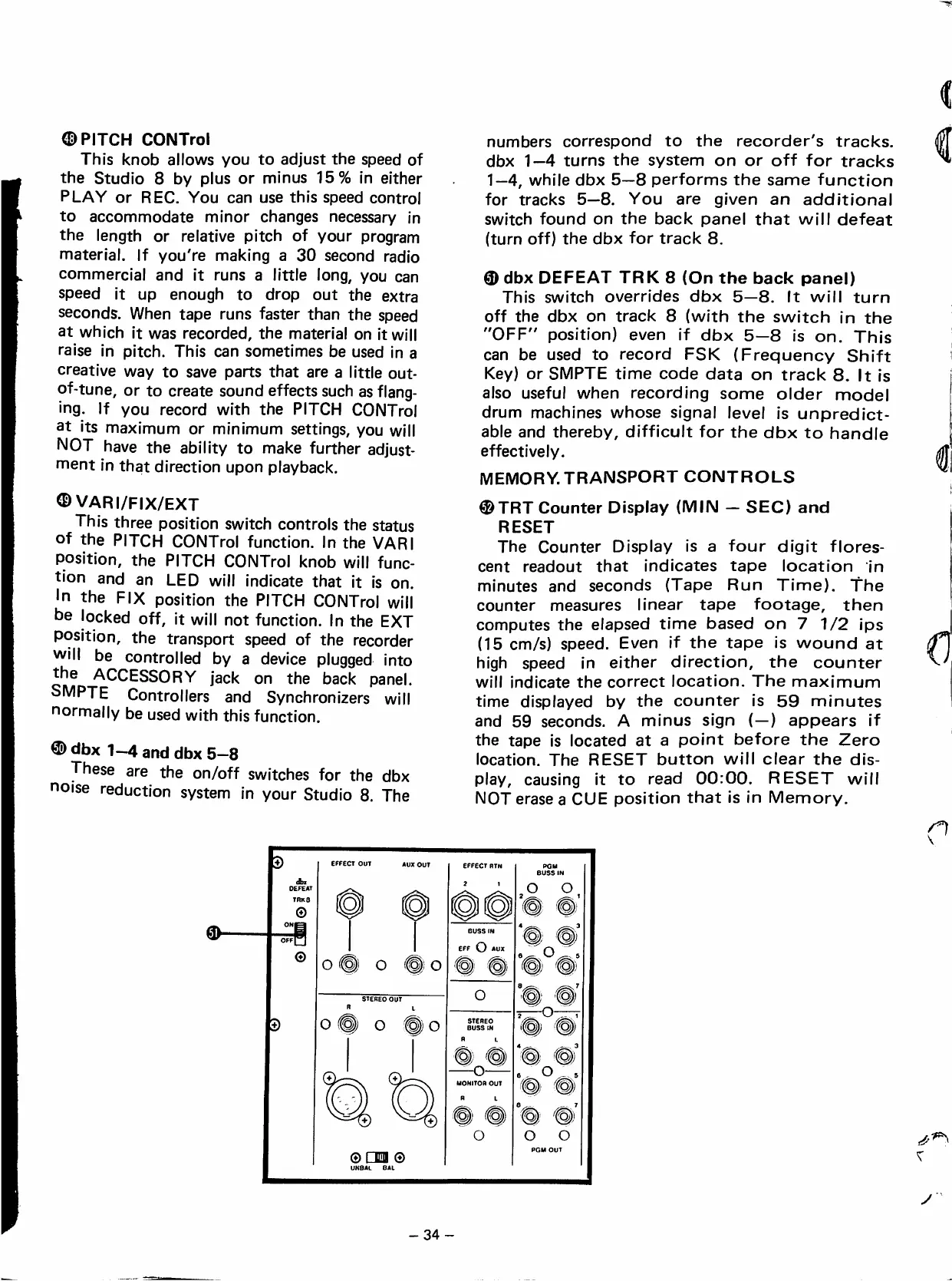
dbx
1-4
and
dbx
5-8
These
are
the
on/off
switches
for
the
dbx
noise
reduction
system
in
your
Studio
8.
The
numbers
correspond
to
the
recorder's
tracks.
dbx
1—4
turns
the
system
on
or
off
for
tracks
1—4,
while
dbx
5—8
performs
the
same
function
for
tracks
5—8.
You
are
given
an
additional
switch
found
on
the
back
panel
that
will
defeat
(turn
off)
the
dbx
for
track
8.
®
dbx
DEFEAT
TRK
8
(On
the
back
panel)
This
switch
overrides
dbx
5—8.
It
will
turn
off
the
dbx
on
track
8
(with
the
switch
in
the
"OFF"
position)
even
if
dbx
5—8
is
on.
This
can
be
used
to
record
FSK
(Frequency
Shift
Key)
or
SMPTE
time
code
data
on
track
8.
It
is
aiso
useful
when
recording
some
eider
model
drum
machines
whose
signal
level
is
unpredict-
able
and
thereby,
difficult
for
the
dbx
to
handie
effectively.
MEMORY.
TRANSPORT
CONTROLS
®
TRT
Counter
Display
(MIN
SEO)
and
RESET
The
Counter
Display
is
a
four
digit
flores-
cent
readout
that
indicates
tape
location
in
minutes
and
seconds
(Tape
Run
Time).
The
counter
measures
linear
tape
footage,
then
computes
the
elapsed
time
based
on
7
1/2
ips
(15
cm/s)
speed.
Even
if
the
tape
is
wound
at
high
speed
in
either
direction,
the
counter
will
indícate
the
correct
location.
The
máximum
time
displayed
by
the
counter
is
59
minutes
and
59
seconds.
A
minus
sign
(—)
appears
if
the
tape
is
located
at
a
point
before
the
Zero
location.
The
RESET
button
will
olear
the
dis
play,
causing
it
to
read
00:00.
RESET
will
NOT
erase
a
CUE
position
that
is
in
Memory.
EFFECT
OUT
AUX
OUT
5TERE0
OUT
O
O
o
Q
o
©
LJlIl
®
EFFECT
RTN
2
1
POM
BUSS
IN
O
o
BUSS
IN
EFF
O
O
STEREO
BUSS
m
R
L
MONITOR
OUT
R
L
O
"
"
a
©)
o
o
PGM
OUT
y
-34-

Table of Contents