EasyManua.ls Logo

Tascam 388 Studio 8 - Page 35

Tascam 388 Studio 8
139 pages
Print Icon
To Next Page IconTo Next Page
To Previous Page IconTo Previous Page
Loading...
®
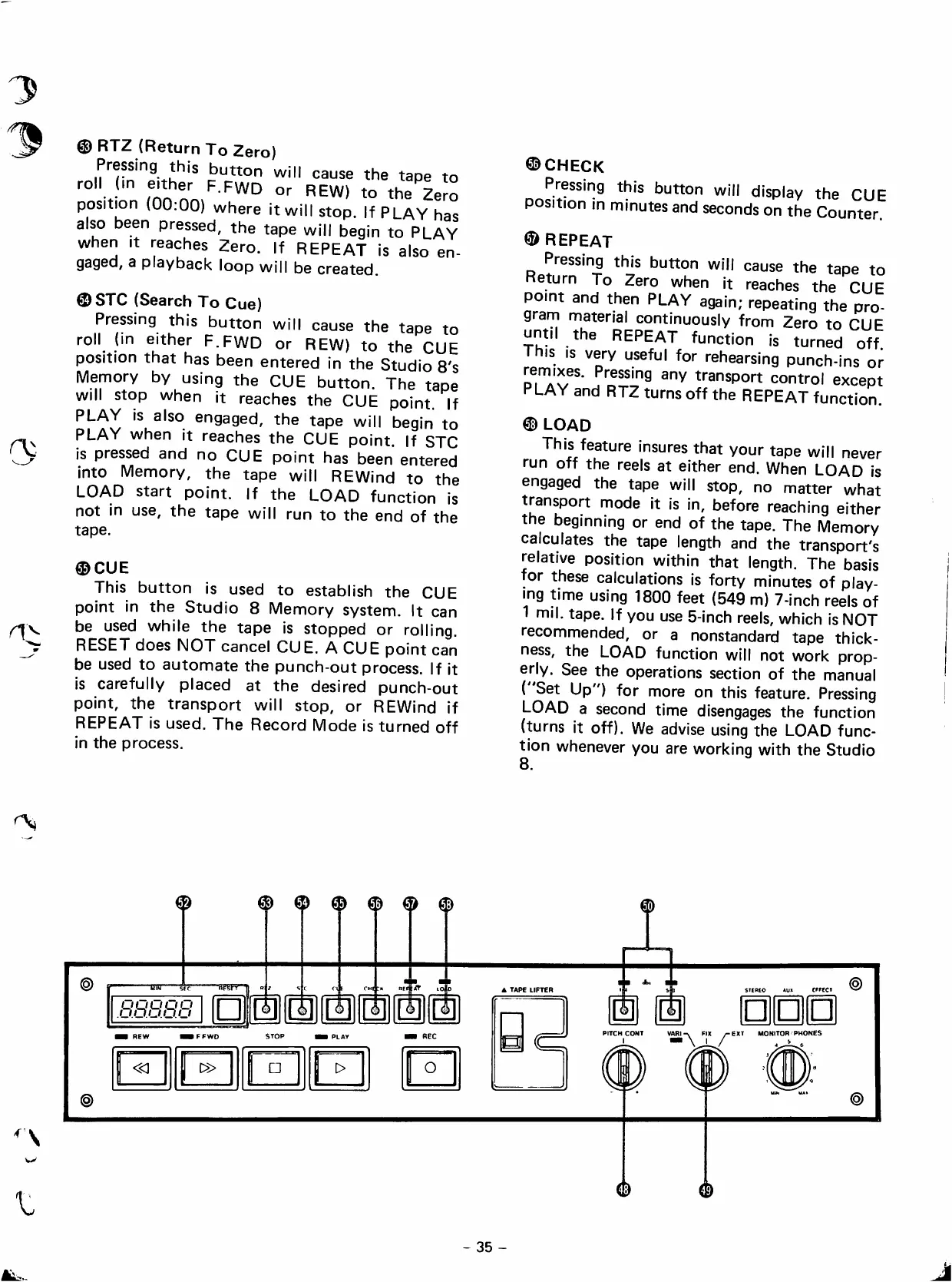
RTZ
(Return
To
Zero)
Pressing
this
button
will
cause
the
tape
to
/nn
F.FWD
or
REW)
to
the
Zero
position
(00:00)
where
it
will
stop.
If
PLAY
has
aiso
been
pressed,
the
tape
will
begin
to
PLAY
when
It
reaches
Zero.
If
REPEAT
is
aiso
en-
gaged,
a
playback
loop
will
be
created.
®STC
(Search
To
Cue)
Pressing
this
button
will
cause
the
tape
to
roll
(¡n
either
F.FWD
or
REW)
to
the
CUE
position
that
has
been
entered
in
the
Studio
8's
Memory
by
using
the
CUE
button.
The
tape
will
stop
when
it
reaches
the
CUE
point.
If
PLAY
is
aiso
engaged,
the
tape
will
begin
to
PLAY
when
it
reaches
the
CUE
point.
If
STC
¡s
pressed
and
no
CUE
point
has
been
entered
into
Memory,
the
tape
will
REWind
to
the
LOAD
start
point.
If
the
LOAD
function
is
not
in
use,
the
tape
will
run
to
the
end
of
the
tape.
®CUE
This
button
is
used
to
establish
the
CUE
point
in
the
Studio
8
Memory
system.
It
can
be
used
while
the
tape
is
stopped
or
rolling.
RESET
dees
NOT
cancel
CUE.
A
CUE
point
can
be
used
to
automate
the
punch-out
process.
If
it
is
carefully
placed
at
the
desired
punch-out
point,
the
transport
will
stop,
or
REWind
if
REPEAT
is
used.
The
Record
Mode
is
turned
off
in
the
process.
®CHECK
Pressing
this
button
will
display
the
CUE
Position
in
minutes
and
seconds
on
the
Counter.
©REPEAT
Pressing
this
button
will
cause
the
tape
to
eturn
To
Zero
when
it
reaches
the
CUE
point
and
then
PLAY
again;
repeating
the
pro-
gram
material
continuously
from
Zero
to
CUE
until
the
REPEAT
function
is
turned
off
This
IS
very
useful
for
rehearsing
punch-ins
or
remixes.
Pressing
any
transport
control
except
PLAY
and
RTZ
turns
off
the
REPEAT
function.
®
LOAD
This
feature
insures
that
your
tape
will
never
run
off
the
reeis
at
either
end.
When
LOAD
is
engaged
the
tape
will
stop,
no
matter
what
transport
mode
it
is
in,
before
reaching
either
the
beginning
or
end
of
the
tape.
The
Memory
caiculates
the
tape
length
and
the
transport's
relative
position
within
that
length.
The
basis
for
these
calculations
is
forty
minutes
of
play-
mg
time
using
1800
feet
(549
m)
7-inch
reeIs
of
1
mil.
tape.
If
you
use
5-inch
reeIs,
which
is
NOT
recommended,
or
a
nonstandard
tape
thick-
ness,
the
LOAD
function
will
not
work
prop-
erly.
See
the
operations
section
of
the
manual
(
Set
Up")
for
more
on
this
feature.
Pressing
LOAD
a
second
time
disengages
the
function
(turns
it
off).
We
advise
using
the
LOAD
func
tion
whenever
you
are
working
with
the
Studio
8.
® ®
®
®
^
m
-uw
-Sf"
-BPSFf—
.8.8.8.8.8
1
CM|
:n
REf
-ÍT
lolo
IFFWO
STOP
«I
t>
O
@
A
TAPE
LIFTER
a
i|
1
1
I
PITCHCONT
VARI-.
FIX
^E*T
MONITOR
PHONES
\
JL/
é
35
-

Table of Contents