83-517-000 Rev. A
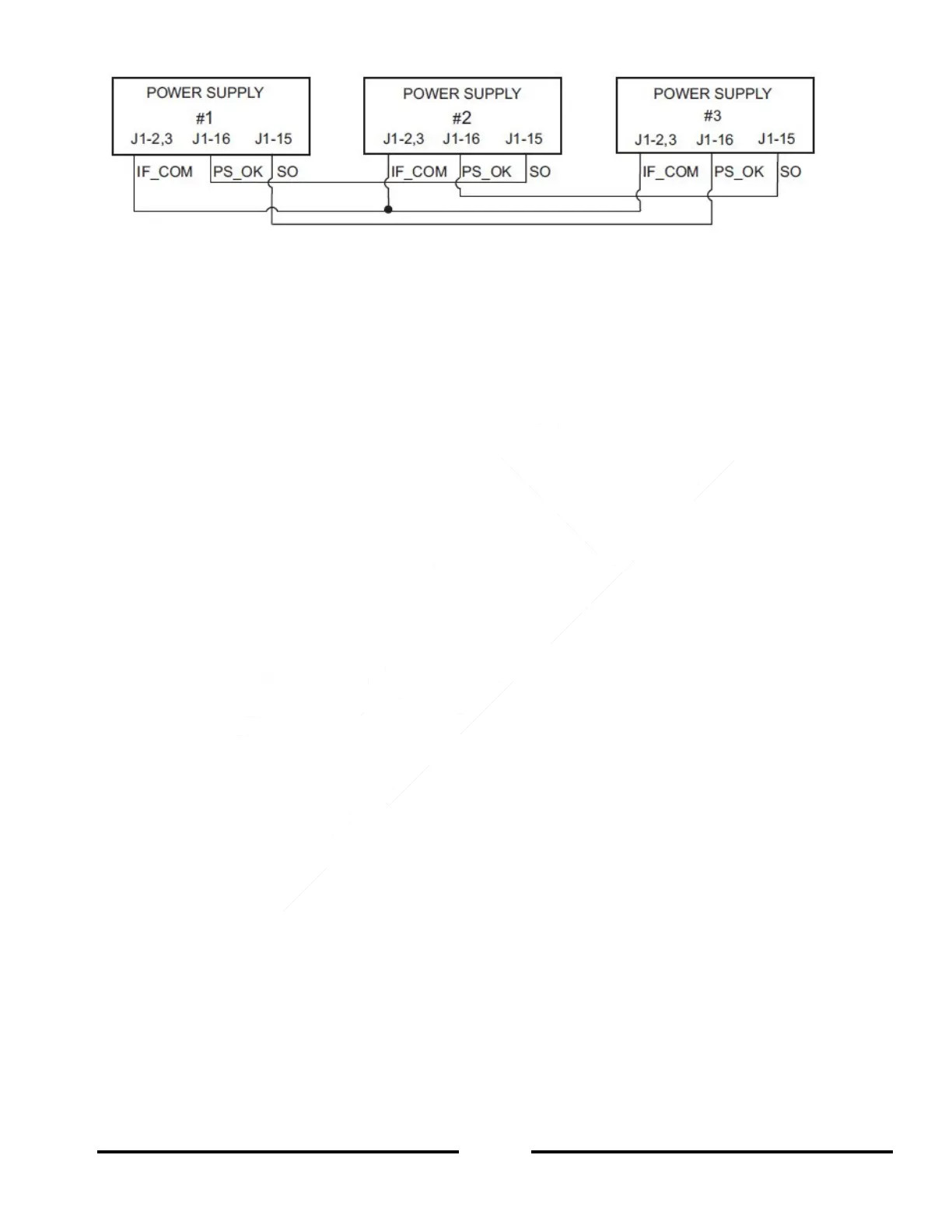
Figure 5-6: Daisy-Chain Connection
5.17 FRONT PANEL LOCKING
The front panel controls can be locked to protect from accidental power supply parameter change. Press and
hold the PREView button to have the VOLTAGE meter cycle between “Locked Front panel” (LFP) and
“Unlocked Front Panel” (UFP). Releasing the PREView button while one of the modes is displayed, selects that
operating mode.
Unlocked Front Panel
5.17.1
In this mode, the front panel controls are Enabled so that the user is able to program and monitor the power
supply parameters.
Locked Front Panel 5.17.2
In this mode the following front panel controls are Disabled:
VOLTAGE and CURRENT encoders
FOLD button
OUT button
The power supply will not respond to attempts to use these controls and the VOLTAGE meter will display “LFP”
to indicate that the front panel is locked.
The OVP/ UVL button is active to PREView the OVP and UVL settings.
Use the PREView button to display the Output voltage and Output current limit settings or to unlock the front
panel.













 To Next Page