6. LSServer, Scanner Shell and Download
6-4 Operating Manual for the LS Series Scanner No. 30001798 Rev. No. 1.5 2004-11
6.2 Tecan LS Scanner Interface
6.2.1 Overview
The Tecan LS Scanner Interface is a dialog box in which the options for
connecting to instruments such as the Tecan LS Series Scanner can be set.
The next chapters describe how to:
• Set Communication port
• Choose Instrument type
• Work in Demo mode
6.2.2 Starting LS Scanner Interface
Port Setup
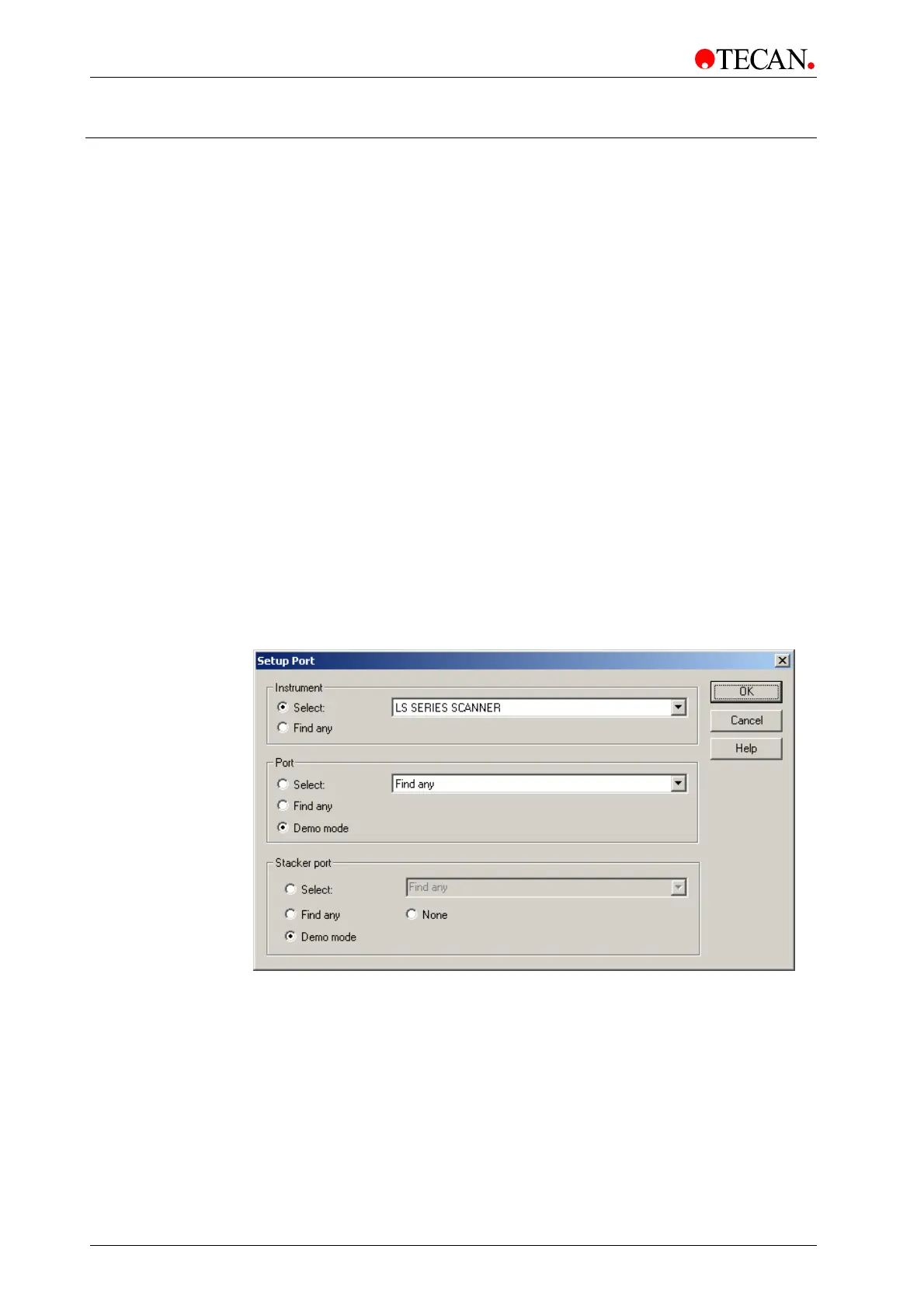
The Port Setup dialog box serves to set up options for connecting instruments:
The desired instrument and the communication port are chosen. The demo
mode provides the possibility to simulate any Tecan instrument.
To open the Port Setup dialog box:
• In Tecan LSA Software, Acquire menu select Tecan Scanner... or
• In Scanner Shell Software, Setup menu select Setup Port… or
• In LSDownload, Instrument menu select Connect…
The Port Setup dialog box:
In the Port Setup dialog box the instrument type and the communication port
are selected.
Alternatively, select Find any and the LSServer can automatically search for a
connected instrument.
Click OK to save changes and close the dialog box.



 To Next Page