61
Operation
Status Icons
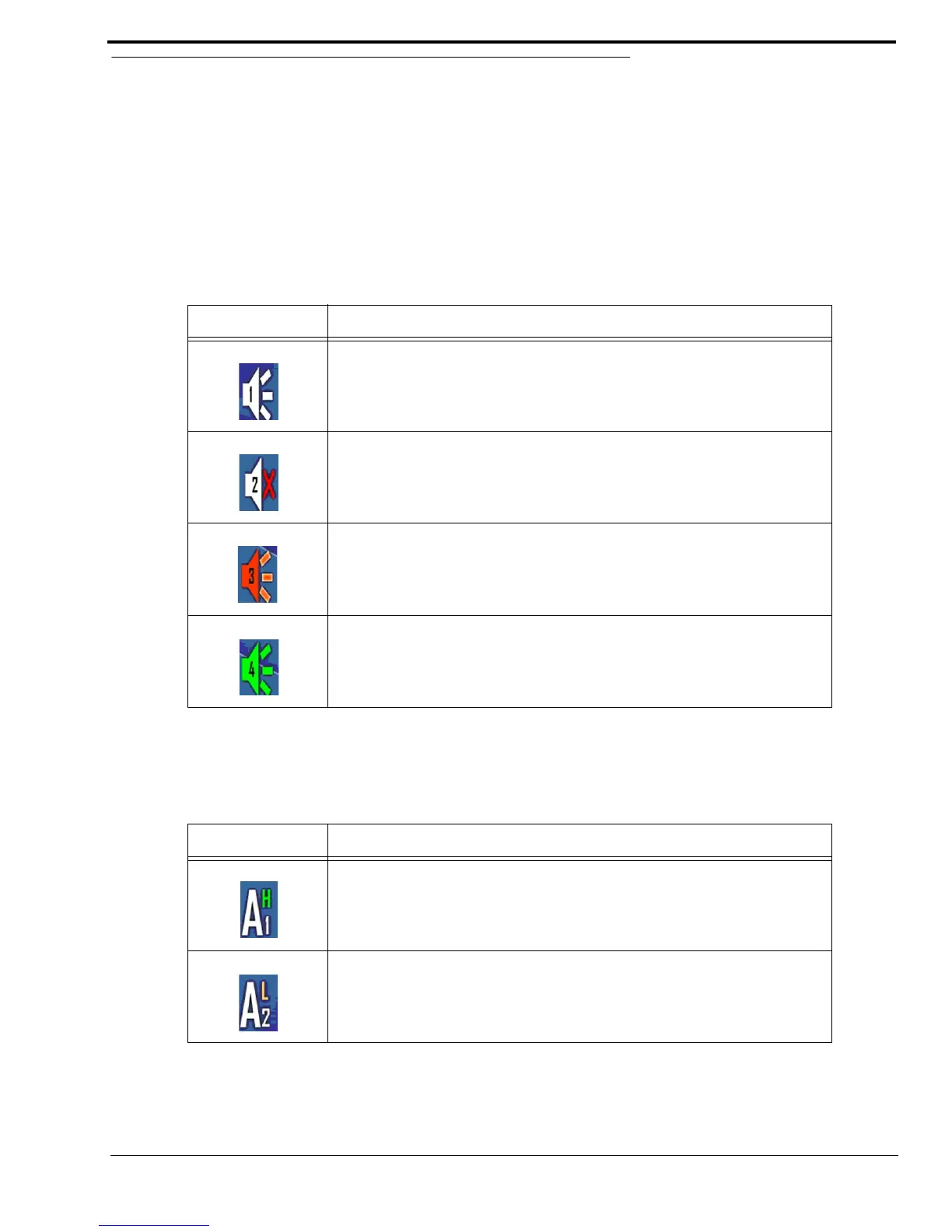
The Status icons provide user-feedback about when and what type of audio sources are connected, and if they are active.
NOTE: Speaker volume is controlled from the console position.
Speaker Status Icons
Speaker Status icons indicate speaker’s status and input number.
NOTE: When no speaker icon appears on the display, no speaker is connected.
AUX Status Icon
The AUX Status icon indicates the auxiliary device’s status and input number.
TABLE 4. Speaker Status Icon Descriptions
Icon Status Description
When the speaker icon is white, the speaker specified by the number on the
icon is connected.
When the speaker icon has a red X to its right, the speaker specified by the
number on the icon is muted.
When the speaker icon is red, the speaker specified by the number on the icon
is min-muted.
For more information, see “Speakers 1–6 Field” on page 55.
When the speaker icon is green, the speaker specified by the number on the
icon is currently playing audio.
TABLE 5. Auxiliary Status Icon Descriptions
Icon Status Description
When the auxiliary icon has a green H on the upper right, the state of the
auxiliary device specified by the number on the icon is high.
When the auxiliary icon has a yellow L on the upper right, the state of the
auxiliary device specified by the number on the icon is low.



 To Next Page