13
Tempest900 2-Channel Operating Manual
11- LCD
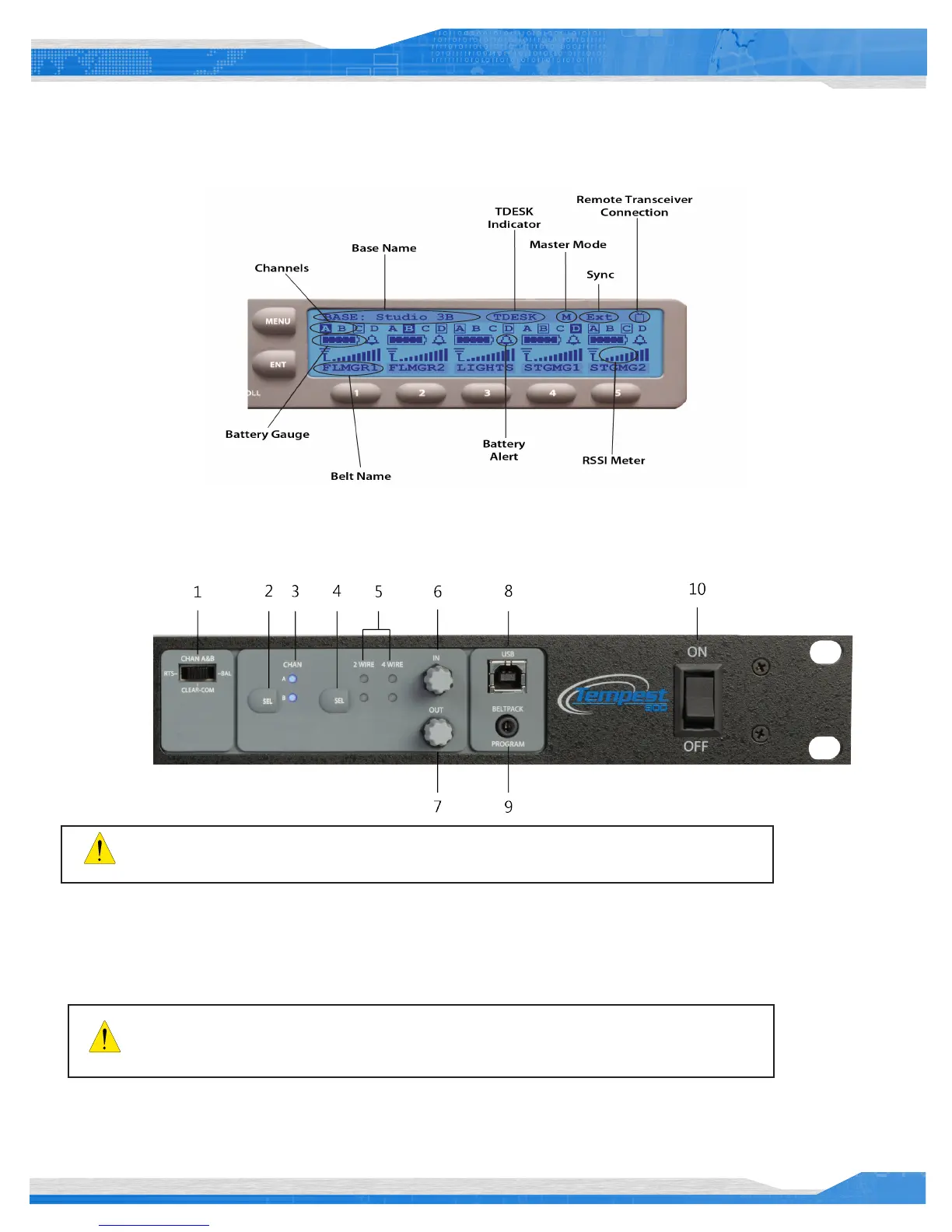
While in Operational Mode, the LCD displays the status of all wireless BeltStations that are currently communicating with the BaseStation
including the name of the BeltStation, RF strength, battery level, and other data. The LCD contrast and backlight intensity can be adjusted
from the LCD Adjustments menu screen.
BaseStation LCD - Operational Mode
Front Panel Right
1- 2-Wire Intercom Type Slide Switch A&B
The 2-Wire Intercom Type slide switch congure the BaseStation for the type of intercom that will be connected to the corresponding 2-Wire
connectors on the rear panel of the BaseStation. Clear-Com, RTS, or BAL (AudioCom) can be selected. This switch only affects 2-Wire
operation and not 4-Wire operation. The A&B switch selects the 2-Wire system type for both the A and the B intercom channels.
The Front Panel Right controls 1 – 7, will normally be used together to congure the Tempest
BaseStation for 2-Wire or 4-Wire operation.
Select the appropriate 2-Wire switch setting prior to connecting the 2-Wire intercom. Do not switch
between 2-Wire types while connected to a 2-Wire system and powered ON. The different voltages in
each system may damage equipment.



 To Next Page