19
Tempest900 2-Channel Operating Manual
5- LCD
While in Operational Mode, the LCD displays the status of the BeltStation including the name of the currently communicating BaseStation, RF
strength, battery level, and other data. The LCD backlight and contrast can be adjusted from the LCD Adjustments menu screen under the LCD/
LED section of the BeltStation menu.
6- CALL Button
The CALL Button sends a 2-Wire compatible call signal to any wireless BeltStation and any hard wired intercom device on the intercom channel.
The Call signal will be routed to intercom channels indicated by the user’s active Talk button(s).
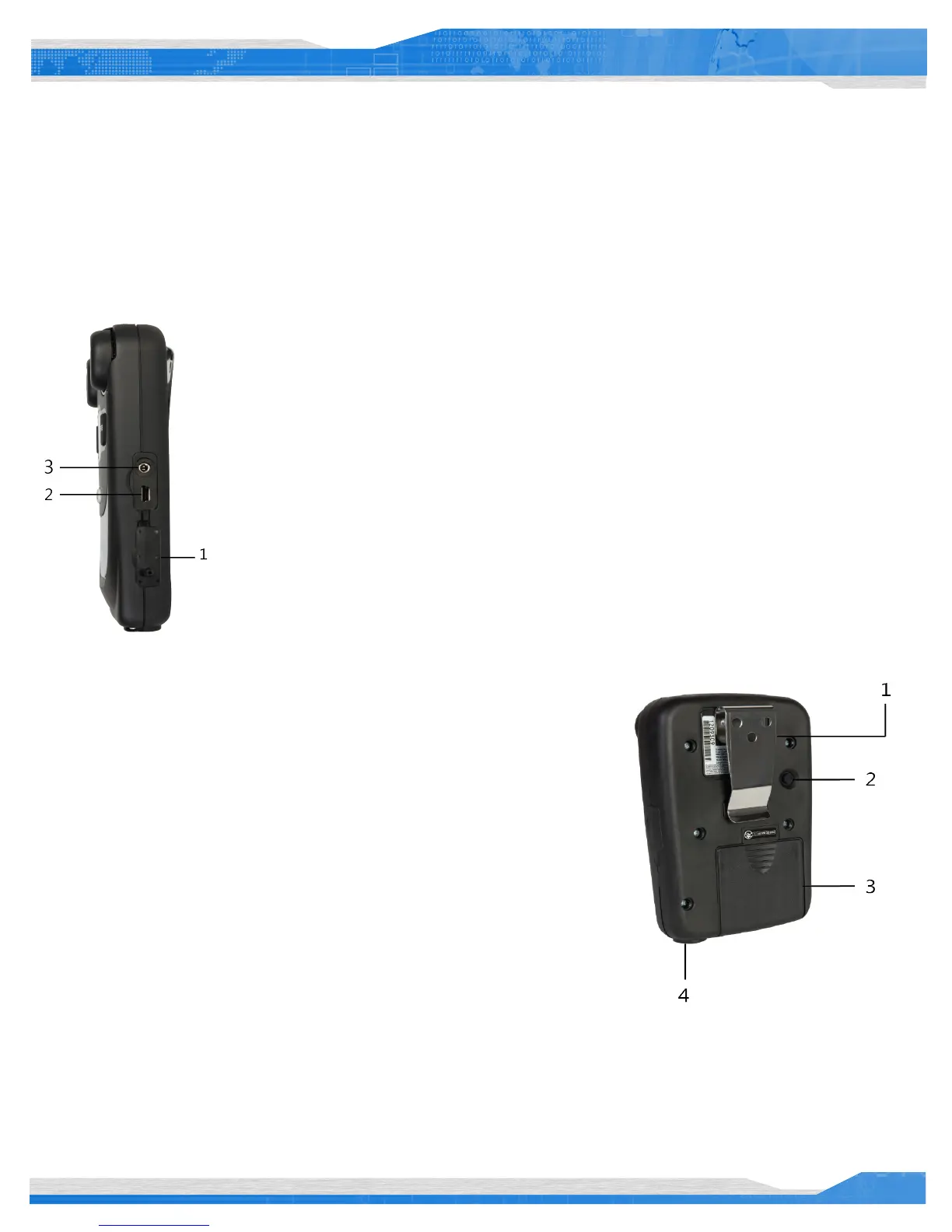
Side
1- Rubberized Access Cover
The Rubberized Access Cover helps prevent dust, dirt and liquid from entering the BeltStation through the USB
or the BeltStation pairing connector. Keep this cover securely closed at all times to ensure the best possible
seal.
2- USB Mini B Connector
The USB Connector is used to charge the BeltStation with the supplied wall charger. In addition, the USB
connect is used to update the rmware of the BeltStation.
3- BeltStation Pairing Connector
The BeltStation Pairing Connector is used to pair the BeltStation with BaseStations using the supplied 1/8”
stereo mini connector.
Back
1- Belt Clip
The Belt Clip enables the BeltStation to be worn on the user’s belt or other clothing
item.
2- Power ON/OFF Button
The Power ON/OFF button is used to turn the BeltStation ON or OFF. Press and hold
the Power ON/OFF button for two seconds to turn the BeltStation ON. Press for four
seconds to turn the BeltStation OFF.
3- Battery Compartment
The Battery Compartment holds either one Tempest Lithium-Polymer rechargeable
battery or (3) standard alkaline AA cells. To remove the battery door, press down on
the thumb markings and pull the battery door toward the bottom of the BeltStation.
To remove batteries from the battery compartment turn the BeltStation battery side down and tap the bottom of the BeltStation on the palm
of your other hand. Please be careful to insert alkaline AA batteries according to the marked polarity. All of the alkaline AA cells face the same
direction. If the battery cover does not t or close properly, the battery may not be inserted correctly.



 To Next Page