55
7.6 Service
7.6.1 Input Test
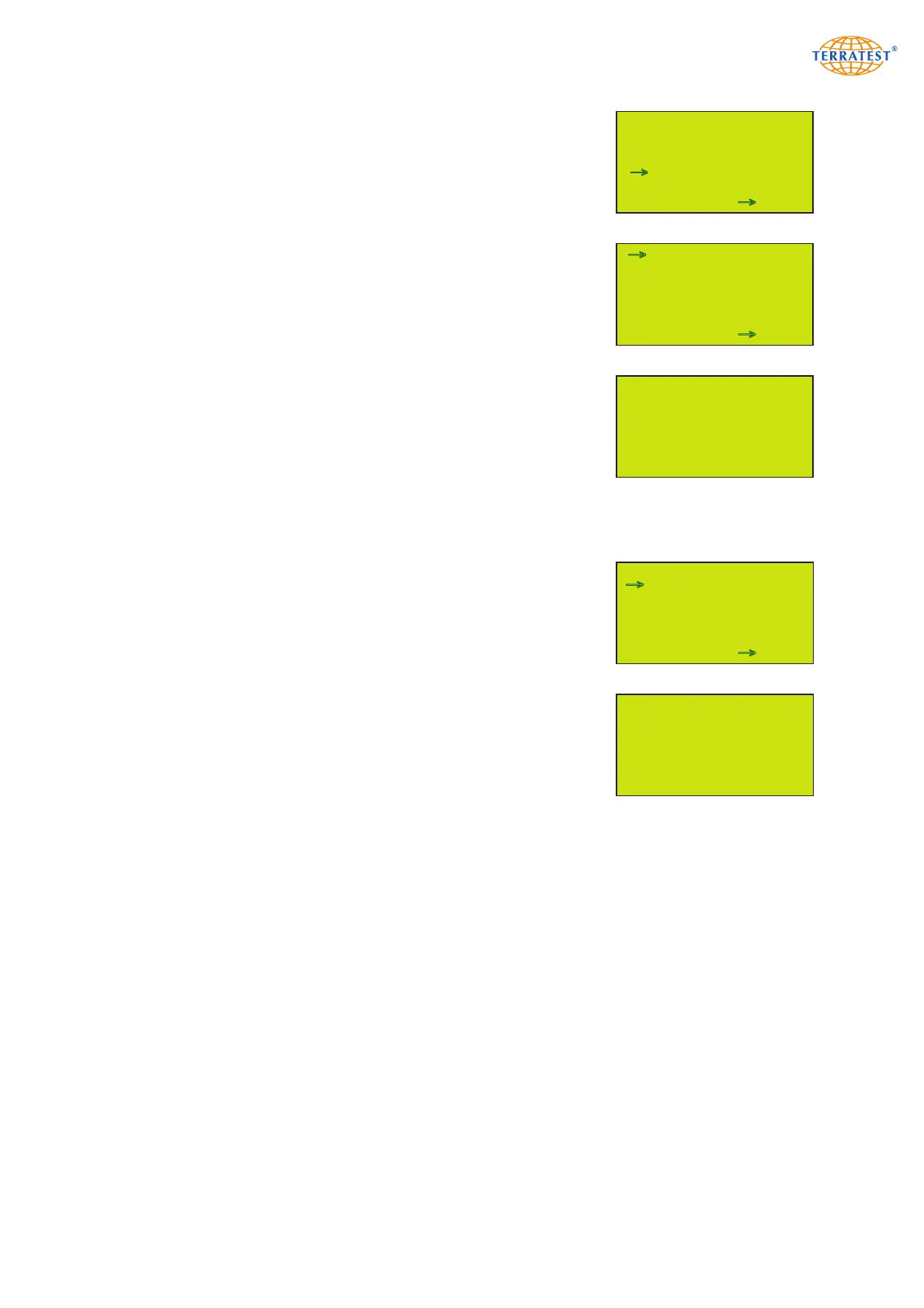
Turn on the device by pressing the ‘START’ button. Enter the ‘MAIN
MENU’ by pressing the ‘SELECT’ button. Use the ‘SELECT’ button to
move the arrow and select ‘SERVICE’ from the menu. Press the ‘START’
button (SET) to enter the ‘SERVICE’ menu.
Use the ‘SELECT’ button to move the arrow and select ‘INPUT TEST’ from
the menu.
Press the ‘START’ button (SET) to enter the ‘INPUT TEST’ menu.
The ‘INPUT TEST’ serves to check the functionality of the device and
shows important function parameters of the device components.
Press the ‘RESET/OFF’ button (EXIT) to return to the ‘SERVICE’ menu.
Press the ‘RESET/OFF’ button (EXIT) again to return to the ‘MAIN MENU’.
Press the ‘RESET/OFF’ button (EXIT) again to return to the ‘STATUS
REQUEST’. Pressing the ‘START’ button will start the test procedure.
7.6.2 Version
Turn on the device by pressing the ‘START’ button. Enter the ‘MAIN
MENU’ by pressing the ‘SELECT’ button. Use the ‘SELECT’ button to
move the arrow and select ‘SERVICE’ from the menu. Press the ‘START’
button (SET) to enter the ‘SERVICE’ menu.
Use the ‘SELECT’ button to move the arrow and select ‘VERSION’ from
the menu.
Press the ‘START’ button (SET) to enter the ‘VERSION’ menu, where you
will find:
- 12 digit device number
- device type
- last calibration date
- calibration factor
- firmware version
- number of tests performed in the lifetime of the instrument
Press the ‘RESET/OFF’ button (EXIT) to return to the ‘SERVICE’ menu.
Press the ‘RESET/OFF’ button (EXIT) again to return to the ‘MAIN MENU’.
Press the ‘RESET/OFF’ button (EXIT) again to return to the ‘STATUS
REQUEST’. Pressing the ‘START’ button will start the test procedure.
MAIN MENU
SERVICE MENU
USB STICK
LANGUAGE
GPS / TIME
INTERNAL MEMORY
SERVICE
SENSOR
EXIT SET
→
→
INPUTTEST
VERSION
LFG / MFG MODE
DISPLAY CONTRAST
SOUND SERVICE
PRINT DATA
PC-REMOTE
EXIT SET
→
→
SERVICE MENU
INPUTTEST
VERSION
LFG / MFG MODE
DISPLAY CONTRAST
SOUND SERVICE
PRINT DATA
PC-REMOTE
EXIT SET
→
INPUT TEST MENU
Sensor Ox0007 = 00007
UMain 00.72 V
ULade 00,00 V
UBatterie 6.23 V
GPRMC ,171325.714,A,52
52˚ 44.6246’ N
013˚ 15.8313’ E
EXIT
VERSION MENU
DEVICE #300620176046
TYP 300mm LFG 1.0
CAL. DATE: 30.06.17
FACTOR 1: 1.010
FACTOR 2: 1.000
FIRMWARE: 0.19
MEASUREMENTS: 3
EXIT
→


 To Next Page