70
8.2.3.4 Driver Installation Measuring Computer
When the measuring computer is connected to the
PC for the first time, the corresponding driver for
measuring electronics must be installed from unpa-
cked download folder ‘TERRATEST.Utility’, as men-
tioned in section 8.2.3, page 67.
The drivers can be found for Windows XP to
Windows 9 in folder ‘Driver Measuring Electronic
WinXP-Win9’, and a separate driver for Windows
10 under ‘Driver Measuring Electronic Win10’.
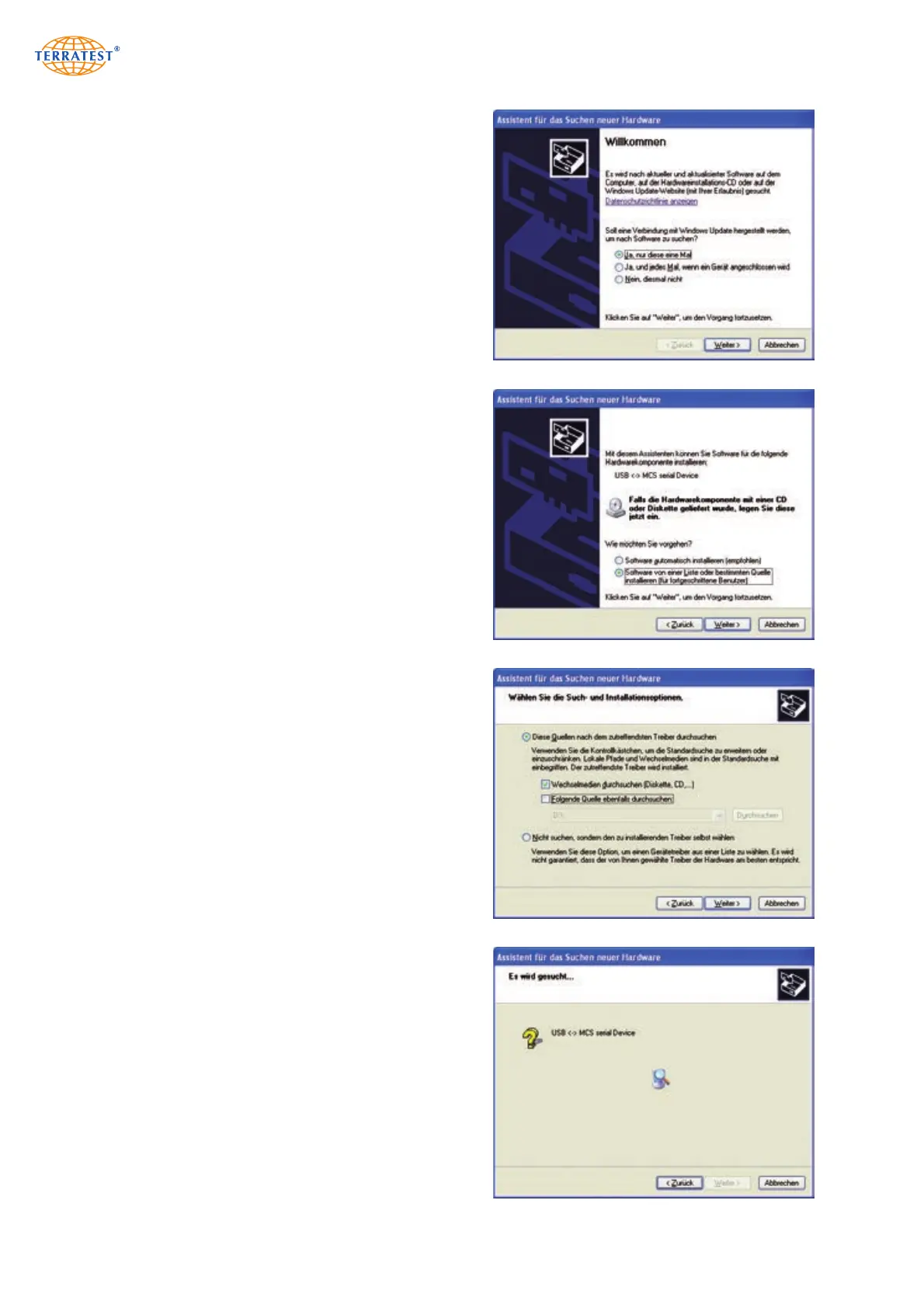
During connection of the measuring computer to
the PC, the system informs the user about necessi-
ty of the driver. In order to install the driver, click
on ‘YES, ONLY THIS TIME’, and then on ‘NEXT’.
In the next window, click on option ‘INSTALL
SOFTWARE FROM A LIST OR FROM A SPECIFIC
SOURCE’, then press ‘NEXT’.
In the next window, click on ‘SEARCH FOR ADE-
QUATE DRIVER IN THESE SOURCES’; then on
‘NEXT’.
Assign to the installation routine (depending on
Windows version) the corresponding folder ‘Driver
Measuring Electronics Win..’ in the unpacked
download folder, activate submenu ‘Include Sub-
folders’ and confirm by ‘NEXT’.


 To Next Page