84
9.1.4 Pairing with Bluetooth
®
load plate (only TERRATEST 5000 BLU)
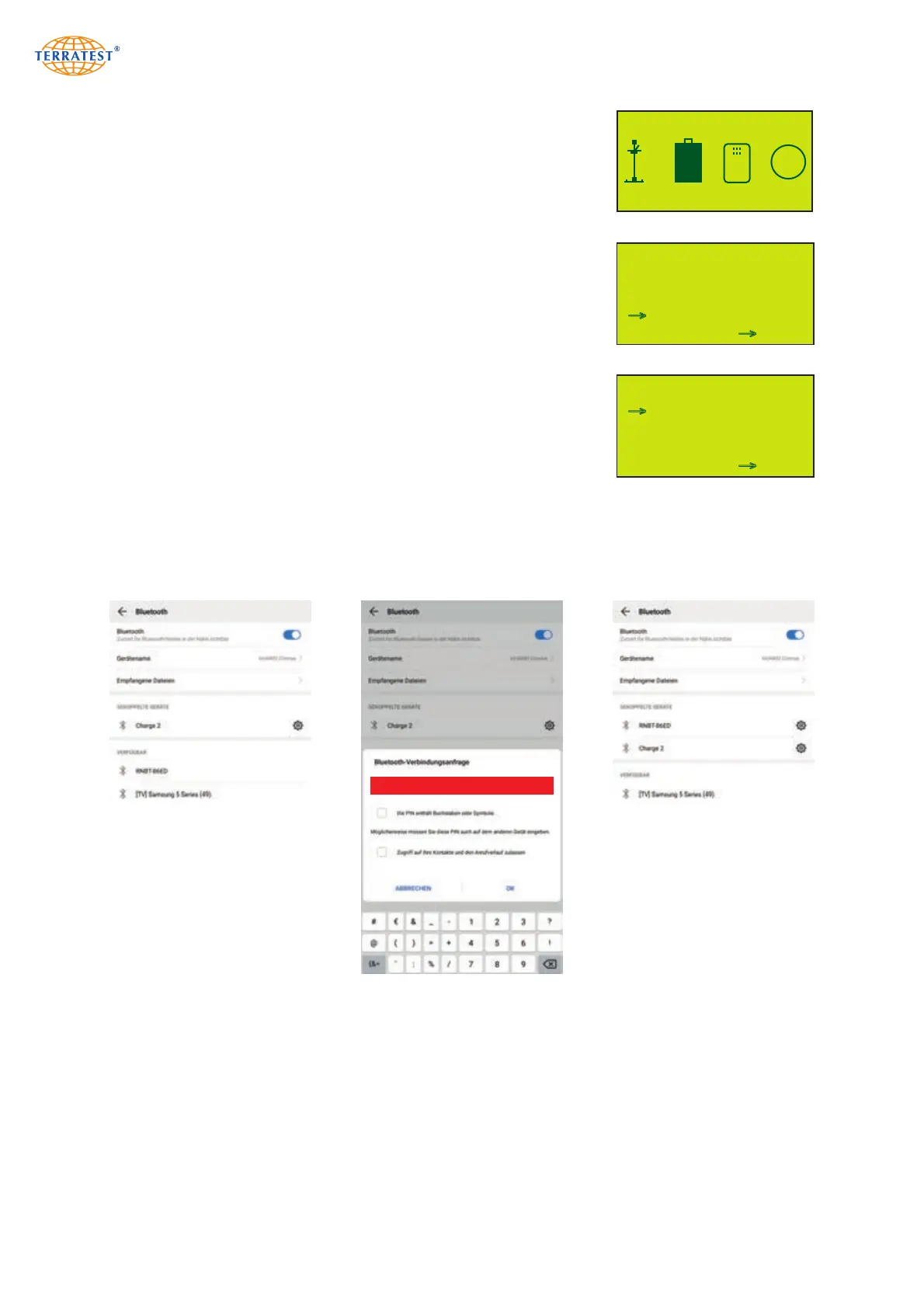
Switch ON Bluetooth
®
load plate by pressing its green button. Open
Bluetooth settings on smartphone/tablet and scan for devices (usually via
‘Settings’ – ‘Bluetooth’ – ‘Scan for Devices’). The designation of the
Bluetooth
®
load plate consists of ‘RNBT-“ or ‘Firefly’, followed by a four-
digit hexadecimal number. Perform the pairing with the device, the
required password is 1234. This pairing between smartphone/tablet and
load plate must be performed once.
MAIN MENU
USB-STICK
LANGUAGE
GPS / TIME
INTERNAL MEMORY
SERVICE
SENSOR
EXIT SET
→
→
MENU LOAD HEAD
STAND-BY TIME
BLUETOOTH PAIRING
SEND DATA TO HEAD
GET DATA FROM HEAD
GET s
EXIT SET
→
→
STATUS DISPLAY
FR 30/06/17 15:50:22
OK
OK
OK
GPS
6,3V
100
Example for the Bluetooth
®
pairing procedure between load plate ‘TERRATEST 5000 BLU’ and Android
smartphone.
1 2 3 4


 To Next Page