59
7.6.6.2 Ev
2
Factor / Ev
1
Factor
Note that it is only possible to activate one single of the conversion data
for Ev
2
or Ev
1
determined by correlation measurement to appear on the
printout of the test protocol. Activation in menu point ‘EV2 FACTOR’ and
‘EV1 FACTOR’ is identical. If one of these values is activated, the other
one is automatically disabled.
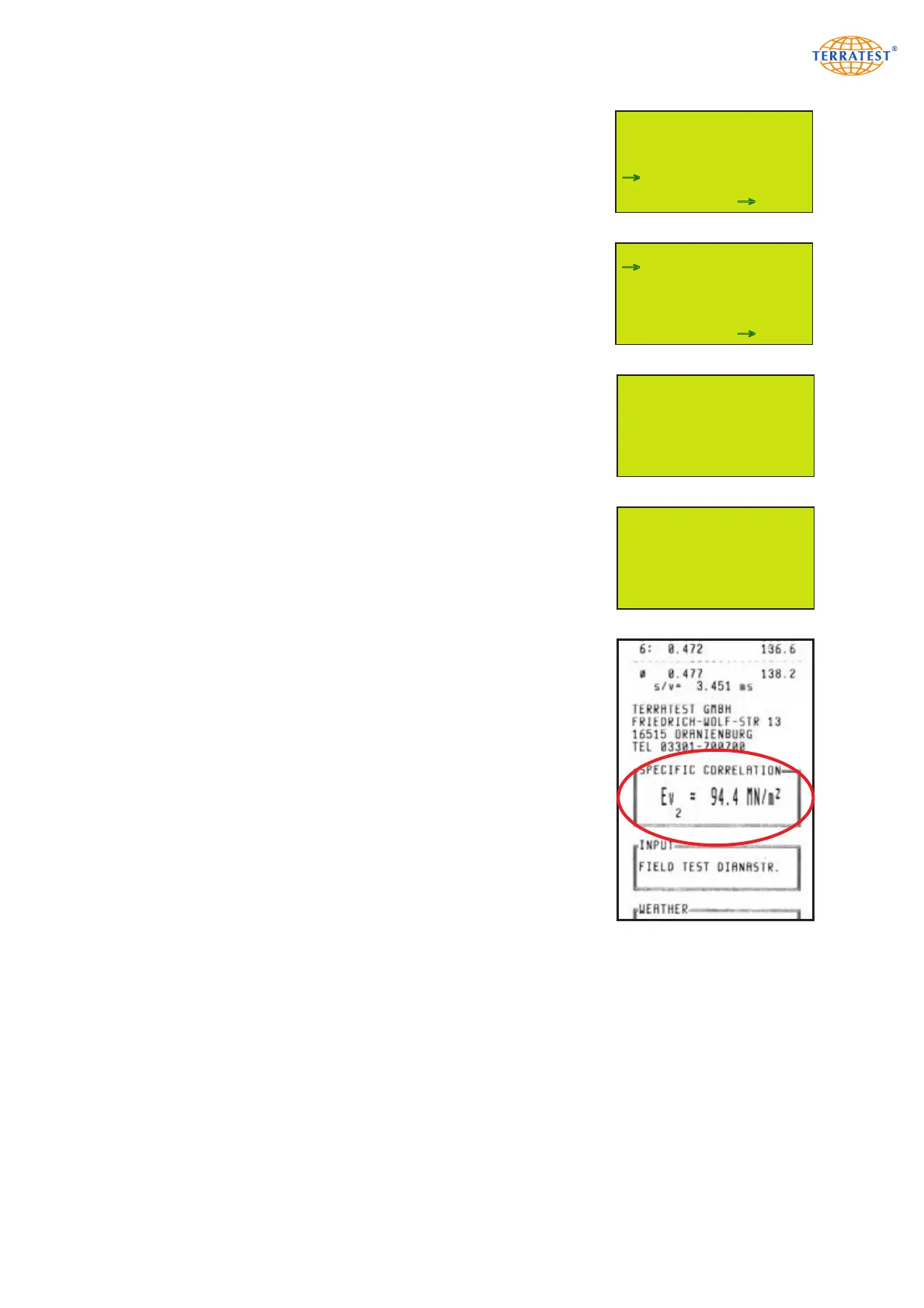
Switch ON the instrument by ‘START’ button; and press ‘SELECT’ to gain
access to the MAIN MENU, and then once more to enter menu point
‘PRINT DATA’. The menu itself is entered by ‘START’ button (SET).
Press ‘SELECT’ to select by arrow ‘EV2 FACTOR’ or ‘EV1 FACTOR’. The
current selection is shown, when ‘START’ button (SET) is pressed.
If the selection is disabled (default configuration) press ‘START’ button
(ON) once more to enter SET mode, and activate printout of the desired
correlation on the test protocol. Default value is 1.0.
Pressing ‘SELECT’ (+) increases, pressing ‘PRINT’ lowers that value in
steps of tenths.
Press ‘START’ button (OFF) to disable this output on printout.
‘RESET/OFF’ button (EXIT) on the other hand confirms data input, and
menu ‘PRINT DATA’ is opened again.
After activation, data converted by specified Ev
2
or Ev
1
factors appear on
the test protocol immediately above handwritten complements.
Press ‘RESET/OFF’ button (EXIT) to automatically return to the ‘SERVICE’
menu. Pressing ‘RESET/OFF’ once more opens the MAIN menu, and
pressing a third time returns to ‘STATUS REQUEST’. Press ‘START’ to initi-
ate measurement.
7.6.7 PC-Remote
The function PC REMOTE is reserved for factory settings and calibration
mode, accessible only for TERRATEST personnel.
Specific Ev2 Correlation
Ev2 = Evd * 1,8
EXIT - + OFF
Ev2 IS OFF
EXIT ON
MENU SERVICE
INPUTTEST
VERSION
LFG / MFG MODE
DISPLAY CONTRAST
SOUND SERVICE
PRINT DATA
PC-REMOTE
EXIT SET
→
→
MENU PRINT DATA
HEADER
EV2 FACTOR
EV1 FACTOR
EXIT SET
→
→


 To Next Page