9.2. Operation
9.2.1 Operating Elements of ‘TERRATEST’ App
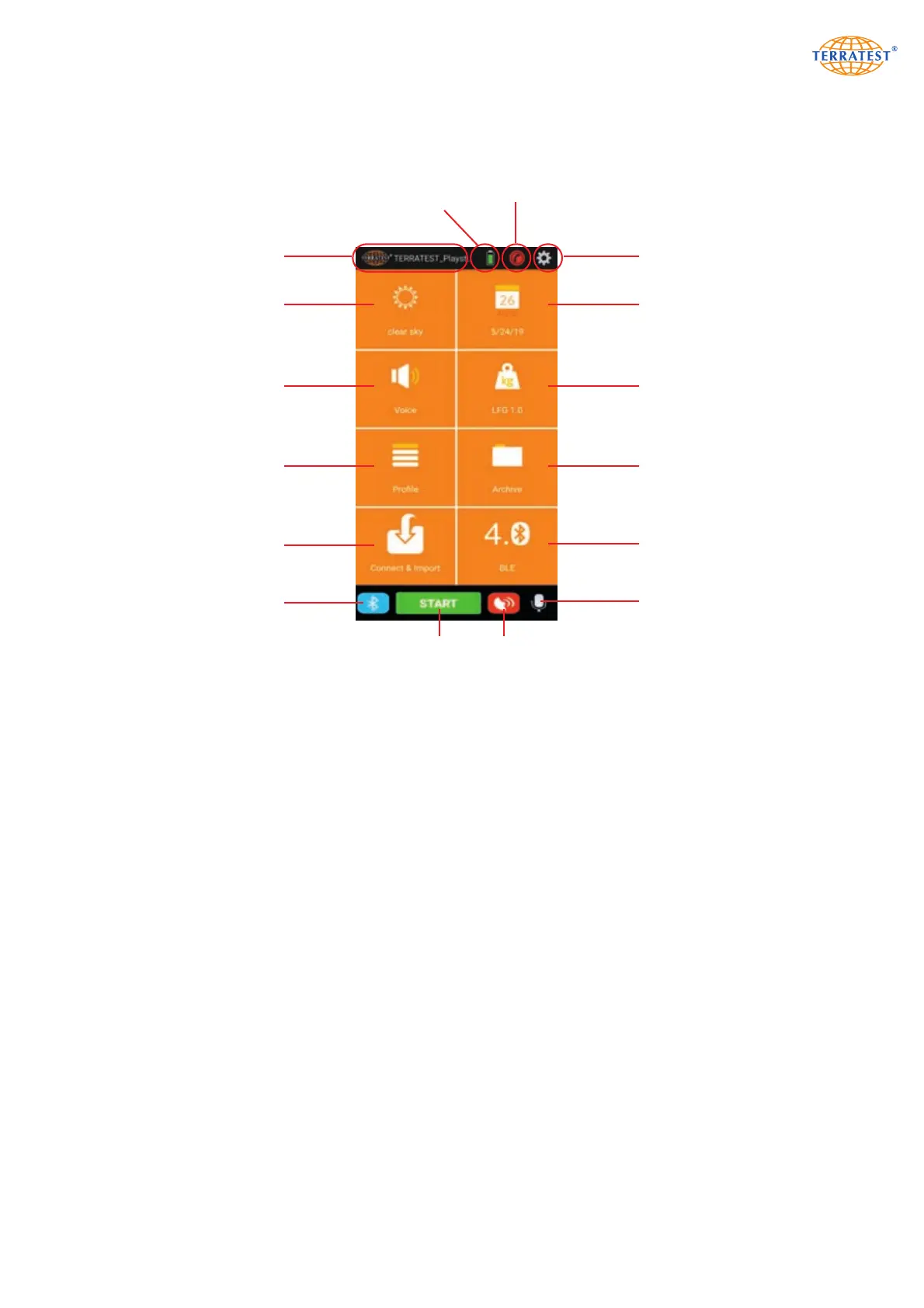
The interface of ‘TERRATEST’ App is subdivided into 3 zones:
Upper zone:
- Button for navigation to initial screen
- Charging status of battery for Bluetooth
®
load plate (connection must have been established
beforehand)
- Contact button for TERRATEST GmbH hotline
- Basic settings of ‘TERRATEST’ APP
Center zone:
- Weather information (internet connection required)
- Information/button for time/date
- Information/button for voice navigation / sound output
- Information/button for selection of 10 kg or 15 kg load assembly
- Button for input of site information
- Button for retrieval and editing of data for measurements performed beforehand
- Button for activation of ‘STREAM’ function (only ‘TERRATEST 4000’)
- Information/button for common use with light weight deflectometer TERRATEST 5000 BLU
or TERRATEST 6000 BLE (only Android operating system)
Lower zone:
- Button for establishment of Bluetooth
®
connection to load plate TERRATEST 5000 BLU
- Button for start of measurement
- Button for GPS ON/OFF
- Button for activation of voice assistant
85
Navigation Back
Weather Information
Site Information
STREAM Function
Voice Navigation
or Sound Output
Settings
Charging Status
Bluetooth
®
Load Plate
Contact TERRATEST
Date/Time
Overview of
Measuring Data
Change between
Bluetooth 1.3 and
Bluetooth Low Energy
(only Android)
Change between
10 kg and 15 kg
Load Assembly
Bluetooth
®
Connection
Measurement START
Voice Assistant
GPS ON/OFF


 To Next Page