ACT6000 User Guide – January 2021 Page 23 of 52
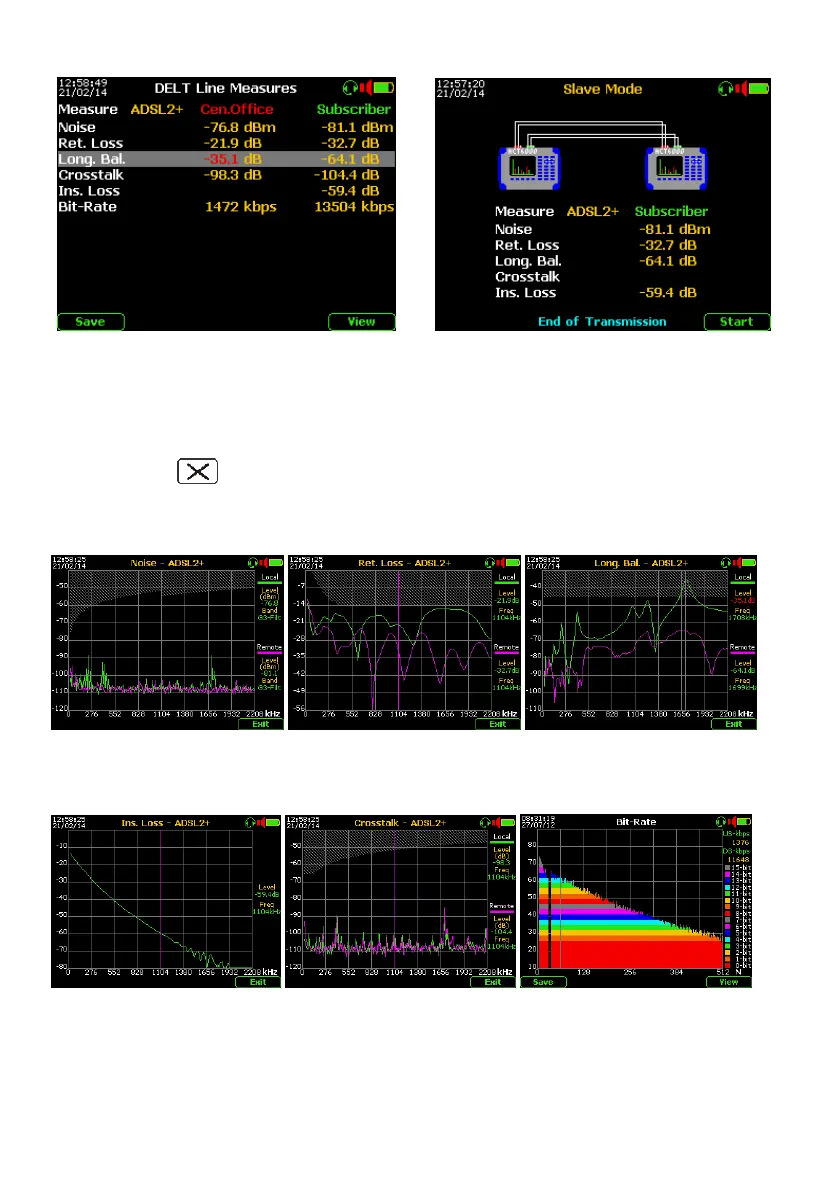
As for the SELT test, Master shows the test summary on the display (Central side and
Subscriber side) of the line under test.
If some measured value is out of the preconfigured threshold limits the value will be shown in red.
Pushing the F1 “Save” key it is possible to save the tests sequence on the internal
memory.
By pushing the “Clear” key, it is possible to export the screen-shot on USB Pen-drive
in .BMP format.
By pushing F5 “View” key and then the arrow it is possible to view the graphs of other
transmissive measurements, as follows:
ACT600 – New DELT mode operation for Base Band –
Noise (“local” and “remote”)
weighed with G3 filter
Local Noise and its remote
estimation transferred to
the presumed noise floor
Return-Loss (“local and
“remote”) - Marker on
1.1MHz freq. reference
Long. Balance-Loss (“local”
and “remote”) - Marker on
worse point.
Insertion-Loss - Marker on 1.1
MHz freq. reference.
NETX / FEXT - Marker on 1.1
MHz freq. reference
Signal-to-Noise Ratio (bit rate),
where are highlighted any
DMT channel amplitude.



 To Next Page