ACT6000 User Guide – January 2021 Page 24 of 52
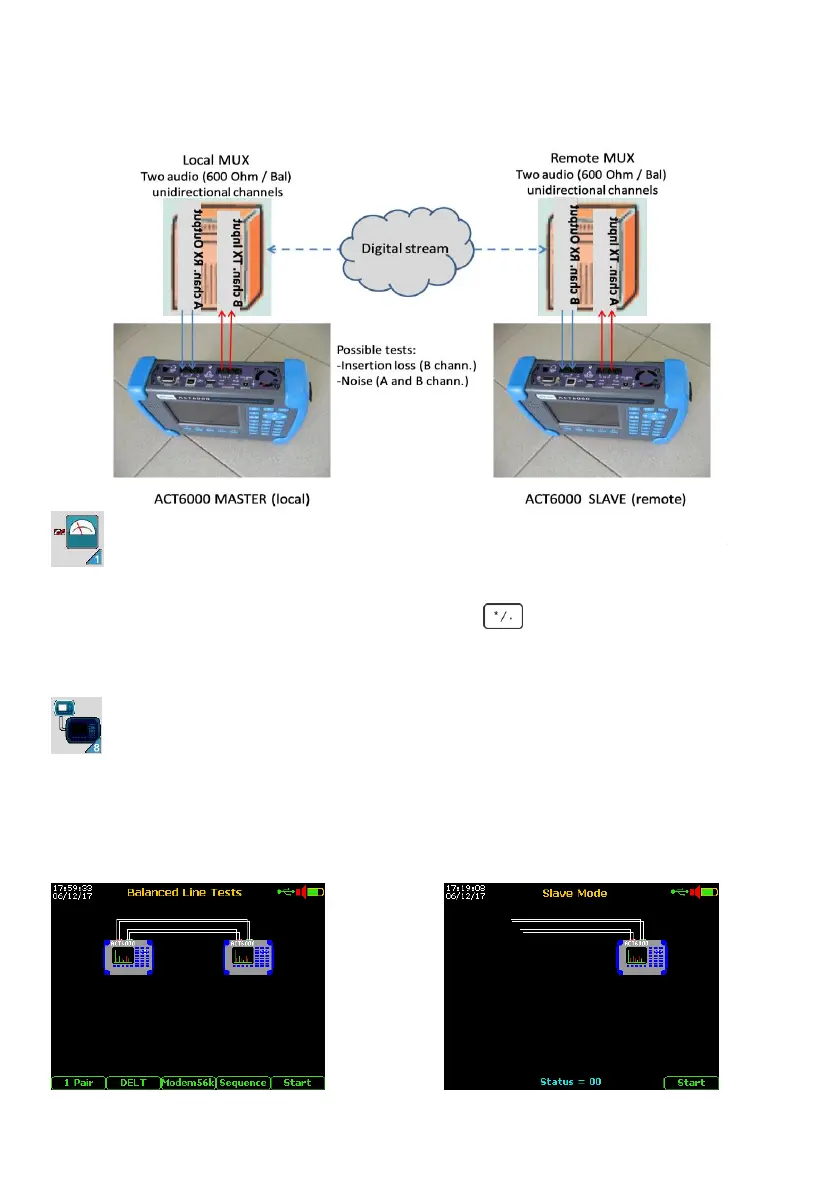
Automatic DELT operation on two unidirectional cannels – EIA-464 4W E&M
MASTER unit configuration and channels connection
- From the Main Menu select and enter on “1 Line Tests” menu;
- Enter on “1. BALANCED LINE TESTS” menu, select “DELT” by F2 key and push Enter;
- Select and enter “Modem56k” by F3 key and push of key-pad.
- Verify the right configuration on the display as the Image 1 below.
- Connect the receiving cannel (600 Ohm) to the a - b points of the RTX connector.
- Connect the transmission cannel (600 Ohm) to the a - b points of the TX connector.
SLAVE unit configuration and channels connection
- From the Main Menu select and enter on “8 Slave Mode” menu (...see at page 22);
- Select and enter on “2. EIA-464 4W E&M TESTS” menu;
- Verify the right configuration on the display as the Image 2 below.
- Connect the receiving cannel (600 Ohm) to the a - b points of the RTX connector.
- Connect the transmission cannel (600 Ohm) to the a - b points of the TX connector;
Image 1 (Local / Master side) Image 2 (remote / subscriber side)



 To Next Page