Chapter 8: Tables
157
7308ENG.DOC CH 8 Tables, English Julie Hewlett Revised: 07/29/98 12:08 PM Printed: 05/19/99 9:01 AM
Page 157 of 14
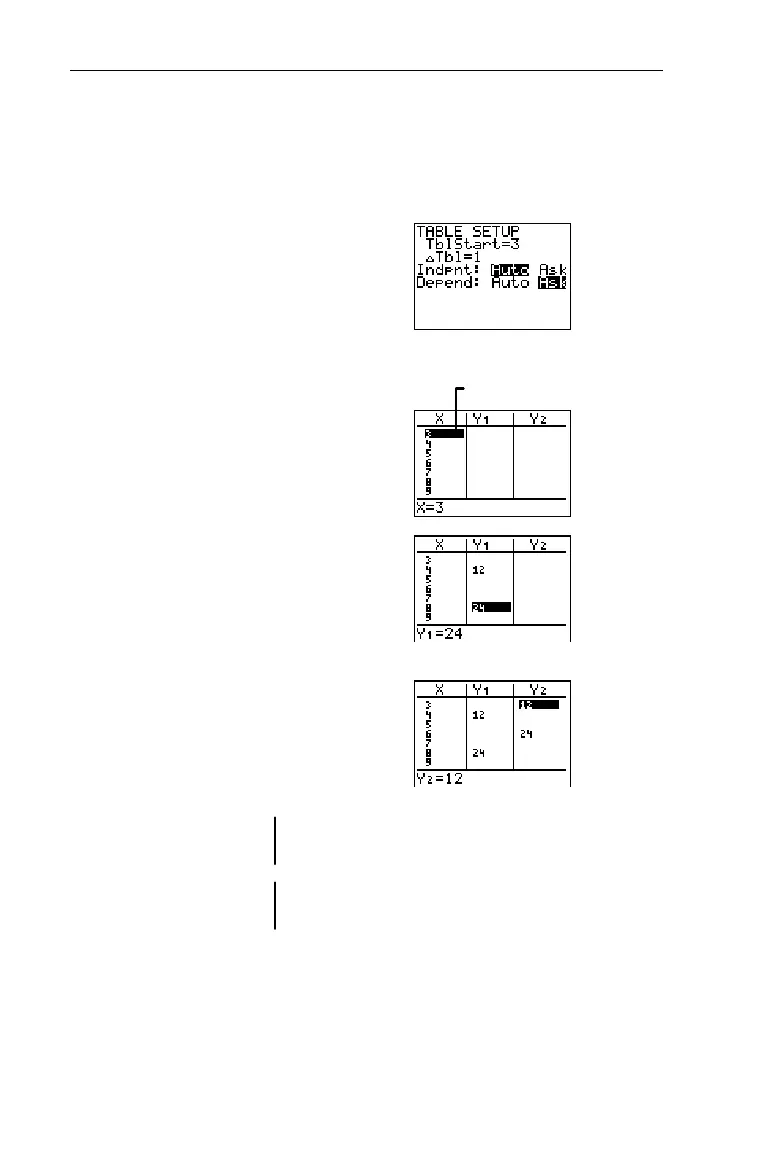
Display the number of times Rover has eaten after 4 days and
8 days, and display the number of times Spot has eaten after 3
days and 6 days. (Refer to the previous example, if necessary.)
1. Setup the table where
TblStart=3
,
@Tbl=1
,
Indpnt=Auto
, and
Depend=Ask
.
-f
3
#
1
#b#"
b
2. Display the table.
-i
3. Display how many times
Rover (
Y
1
) has eaten after 4
and 8 days.
#"b
####b
4. Display how many times
Spot (
Y
2
) has eaten after 3
and 6 days.
"$$b
$$$b
Indpnt=AskIndpnt=Ask
Select these settings on the
TABLE SETUP
screen when you
want to find specific table values, especially those that are not
in chronological order or which span across a large range of
numbers.
TblStart
and
@Tbl
do not apply when
Indpnt=Ask
.
³
X
starts with 3 because
TblStart=3
.
Spot has eaten 12 times.
Rover has eaten 12 times.
After Day 6
After Day 8
Spot has eaten 24 times.
Rover has eaten 24 times.
After Day 3
After Da
4


 To Next Page
 Loading...














