DSM Installation and Configuration Guide
Copyright 2009 - 2020 Thales Group. All rights reserved.
171
Appendix D: Ports
Ports to Configure 171
IPMI Ports 172
This section describes all of the ports that you must configure for your appliance.
Ports to Configure
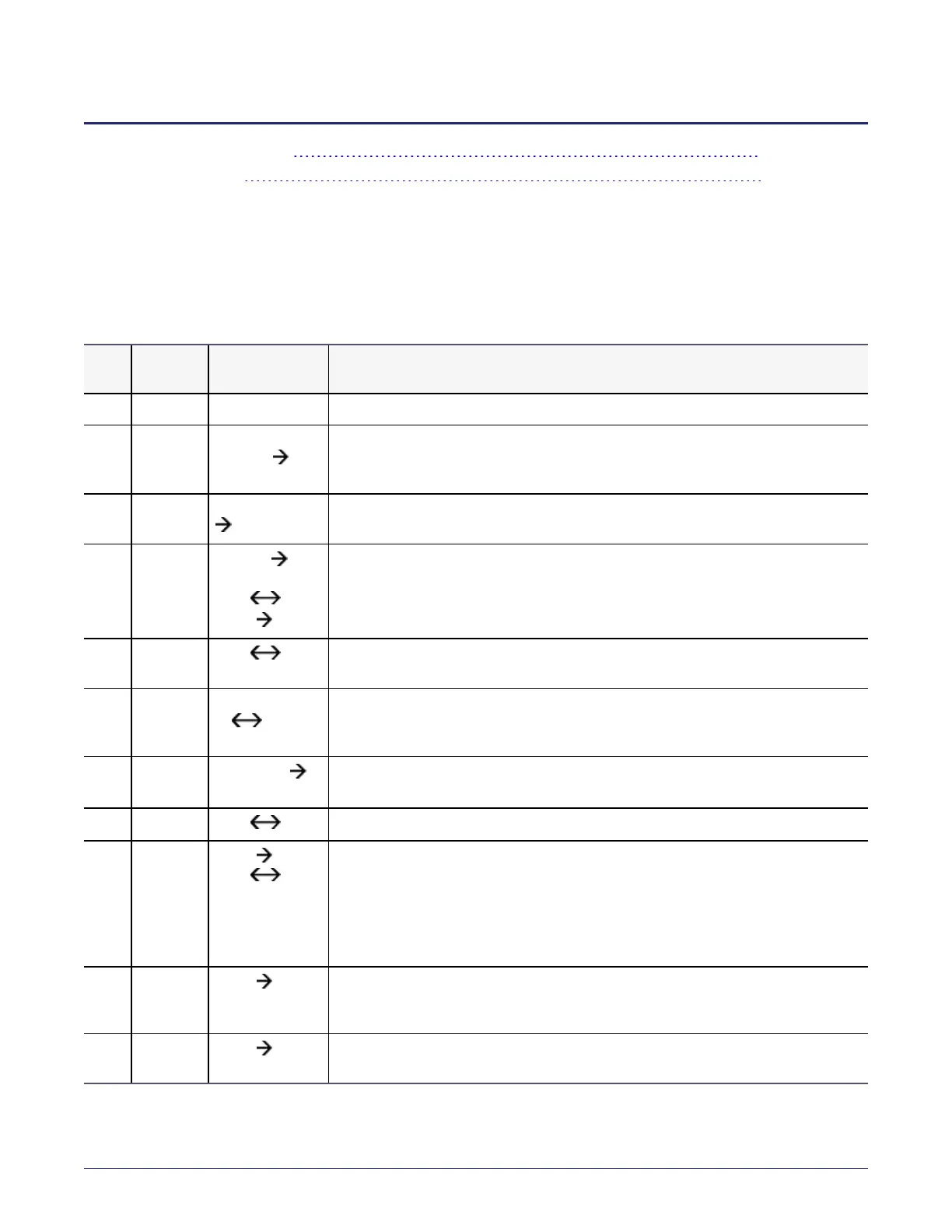
The following table lists the communication direction and purpose of each port you must open.
Port Protocol
Communication
Direction
Purpose
ICMP All ICMP Used for Ping
22 TCP Management
Console
DSM
CLI SSH Access
161 TCP/UDP SNMP Manager
DSM
SNMP queries from an external manager
443 TCP
Browser
DSM
DSM DSM
Agent DSM
Redirects to either port 8445 or 8448 depending on the security mode. (8445 is
used in compatible & RSA modes; 8448 is used in Suite B mode, for secure
communication between DSMs in an HA cluster and for LDT registration.)
1792 TCP
DSM
network HSM
DSM communication with Luna HSM.
5432 TCP DSM (HA node
1) DSM
(HA node n)
HA information exchange.
5696 TCP
KMIP client
DSM
Allows communication between the KMIP client and DSMs
7025 TCP/UDP
DSM DSM
Uses SNMP to get HA node response time.
8080 TCP
Agent DSM
DSM DSM
Port 8080 is no longer used for registration, but you can manually close/open this
legacy port for new deployment, for backward compatibility if you use previous
versions of the agent and need to register to 8080. Default is on (open).
Syntax
0001:system$security legacyregistration
[on | off | show ]
8443 TCP
Agent DSM
RSA TCP/IP port through which the agent communicates with the DSM, in case
8446 is blocked. The agent establishes a secure connection to the DSM, through
certificate exchange, using this port.
8444 TCP
Agent DSM
RSA port via which the Agent log messages are uploaded to DSM, in case 8447 is
blocked.
Table D-1: Ports to Configure



 To Next Page