© Third Dimension Confidential Document D13-1604-GGUSER-EN-3.4
V7.6
11
Manual Lock — The Manual Lock button has
been tapped. The GapGun will not complete the
measurement until the Manual Lock button is
tapped again or the trigger is pulled.
Trigger Lock — The trigger has been pulled. The
GapGun will not complete the measurement until
trigger is released.
Waiting… — The GapGun is waiting for the
sensor or the co-processor to respond. Check that
the sensor is plugged in correctly or that the
network link is still working.
Bad Range—The GapGun is not at the right
distance from the object. This can occur at the start
of measurement in which case point the GapGun
away from the object then re-aim it at the target.
Adjusting Laser—The GapGun is trying to find
the correct power for the laser to obtain the best
image. This may occur on difficult surfaces such as
very dark, very light or irregular surfaces.
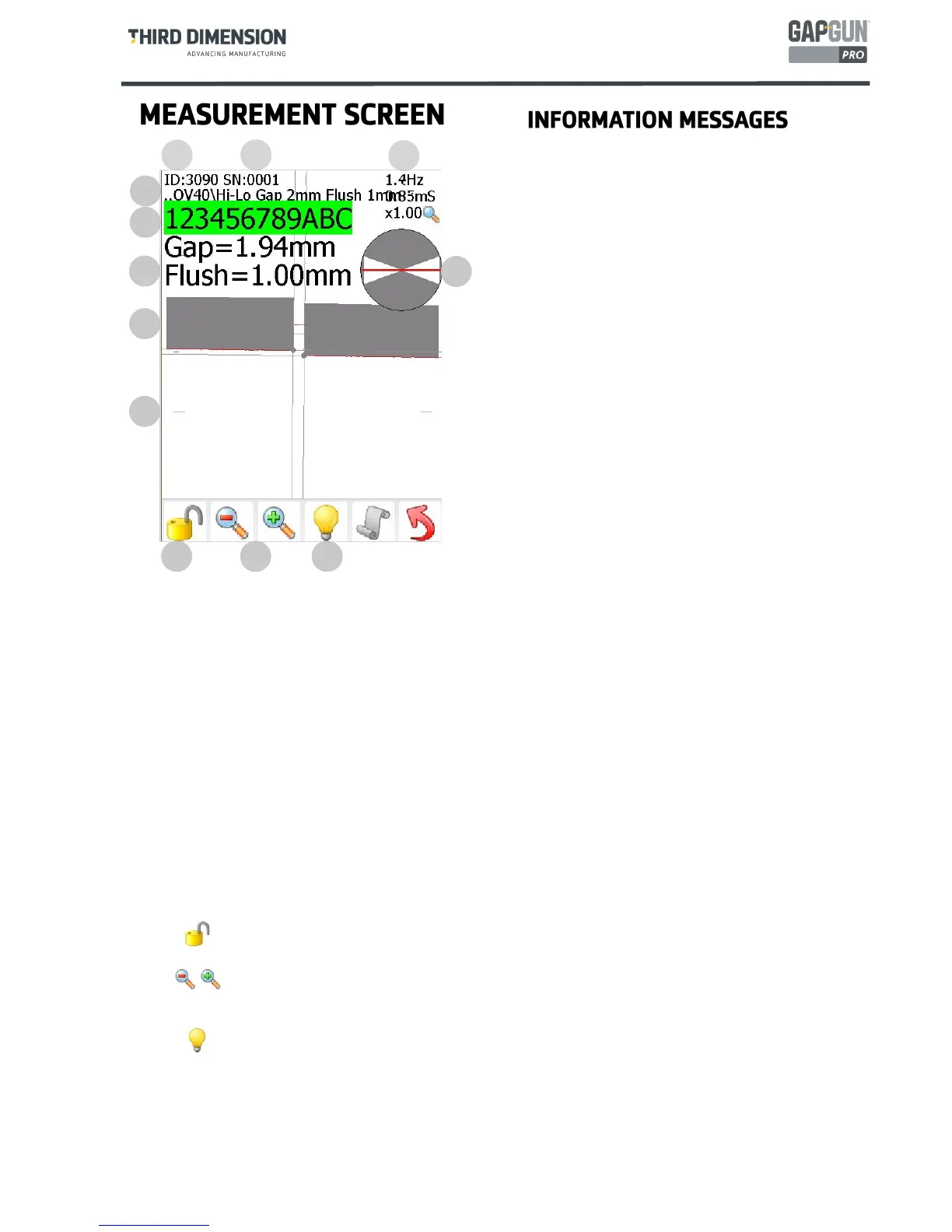
A. The unique ID number of the current measurement.
B. The Serial Number (VIN) of the current job.
C. Instantaneous frame rate, capture time and current zoom setting.
D. Current Feature path
E. Frame record, green for frames which can be processed, red for frames which have failed. The
measurement continues until enough good frames have been gathered.
F. The calculated results from this measurement.
G. Angle indicator, the red line shows the angle of the GapGun relative to the average surface of the artefact,
the white sections show the acceptable angle limits for this Feature. The red line must be in the white
section.
H. Facsimile of the current measurement . The red line is the artefact surface, the grey blocks are the line fits
of the Feature to the data.
I. Minimum range of the measurement (maximum marker is obscured), the red data line must be between
the maximum and minimum range markers
Manual lock, when locked the measurement will not complete until the lock is removed,. The
manual lock can be removed by pulling the trigger.
J.
Zoom, the image data can be zoomed in and out so that the image can be examined more closely. K.
Process control, the GapGun Pro processes frames to calculate results which are instantly displayed
however measurements which fail are not recorded. To aid in debugging processing can be disa-
bled and the failing image data and the failure code returned to SPC3D for analysis.
L
A
B
C
D
E
F
G
H
I
J K L



 To Next Page