© Third Dimension Confidential Document D13-1604-GGUSER-EN-3.4
V7.6
29
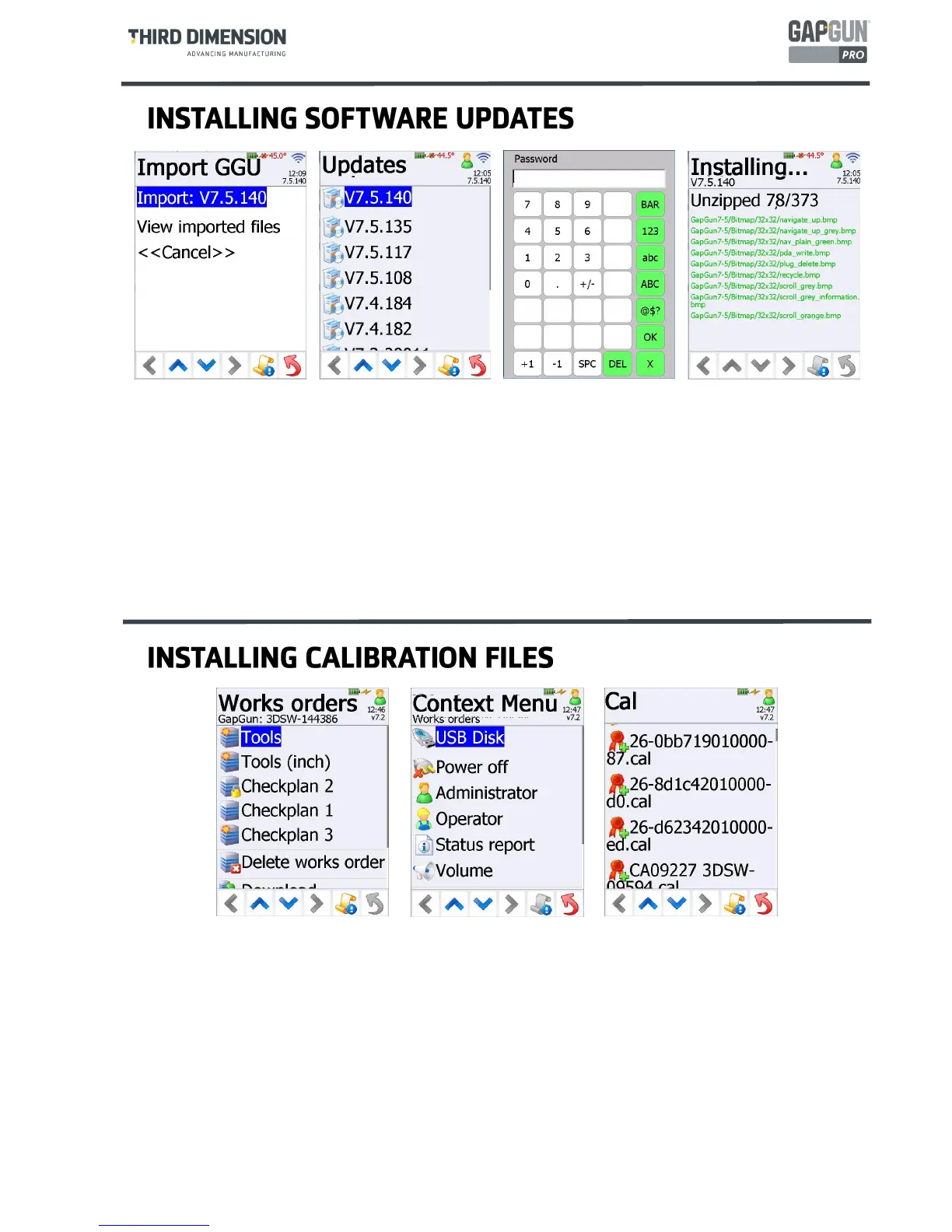
The calibration file for the head fitted to the GapGun will be normally pre-installed. However, when a head is
replaced or recalibrated, a new calibration file will be required.
The calibration file should be copied onto a USB stick. To avoid triggering a software installation, as
described above ,make sure that the autorun.ggm file is not present in the root folder.
The Context icon shows a blue exclamation mark when a USB stick is plugged in. The Context Menu will
have a
USB Disk
item. Tapping on this item displays a list of files on the USB stick.
Calibration files are displayed with a rosette icon. Tapping on the calibration file name will install the file
onto the GapGun.
Software updates for Gapgun are supplied on a USB stick.
Two files are required in the root folder, for example, Autorun.ggm and GapGun_7.5.117.ggu.
The
Import GGU
menu is displayed when the USB stick is plugged in. Tapping on Import copies the new
software to the GapGun.
Once copied to the GapGun, the
Updates
screen prompts the operator for the name of the kit to be installed.
Tapping on the kit name prompts for the Admin password then unpacks the software onto the GapGun.
When the installation is complete the Operator is prompted to reboot the GapGun into the new version of the
software.



 To Next Page