26
© Third Dimension Confidential Document D13-1604-GGUSER-EN-3.4
V7.6
Company wireless networks are frequently configured to be highly secure networks, using digital certificates or
RADIUS servers to authenticate and authorize users and devices, these methods are defined by the IEEE 802.1X
standard. The GapGun Pro provides support for the most common methods of providing this level of security:
To gain access to the network the user must supply a username and password to a RADIUS server which authorizes
access to that user. Each user is given an individual username/password rather than using a single shared password as
used by the personal Wi-Fi security mechanisms.
In addition to the username and password, the root certificate from the CA that issued the server’s digital certificate
must be installed on the GapGun.
This method relies on the exchange of digital certificates alone. A client-side digital certificate must be issued to the
user and this personal certificate and the root certificate from the CA that issued the server’s digital certificate must
be installed on the GapGun.
Both of these authentication methods should be deployed through the WPA2 authentication mechanism using AES
encryption.
Parts of the configuration requires access to the Support Menu, please contact Third Dimension or your distributor for
more details.
NOTE: Setting up a secure wireless network is beyond the scope of this manual. The information below assume that
the necessary infrastructure is already in place.
SUPPORT MENU ACCESS REQUIRED
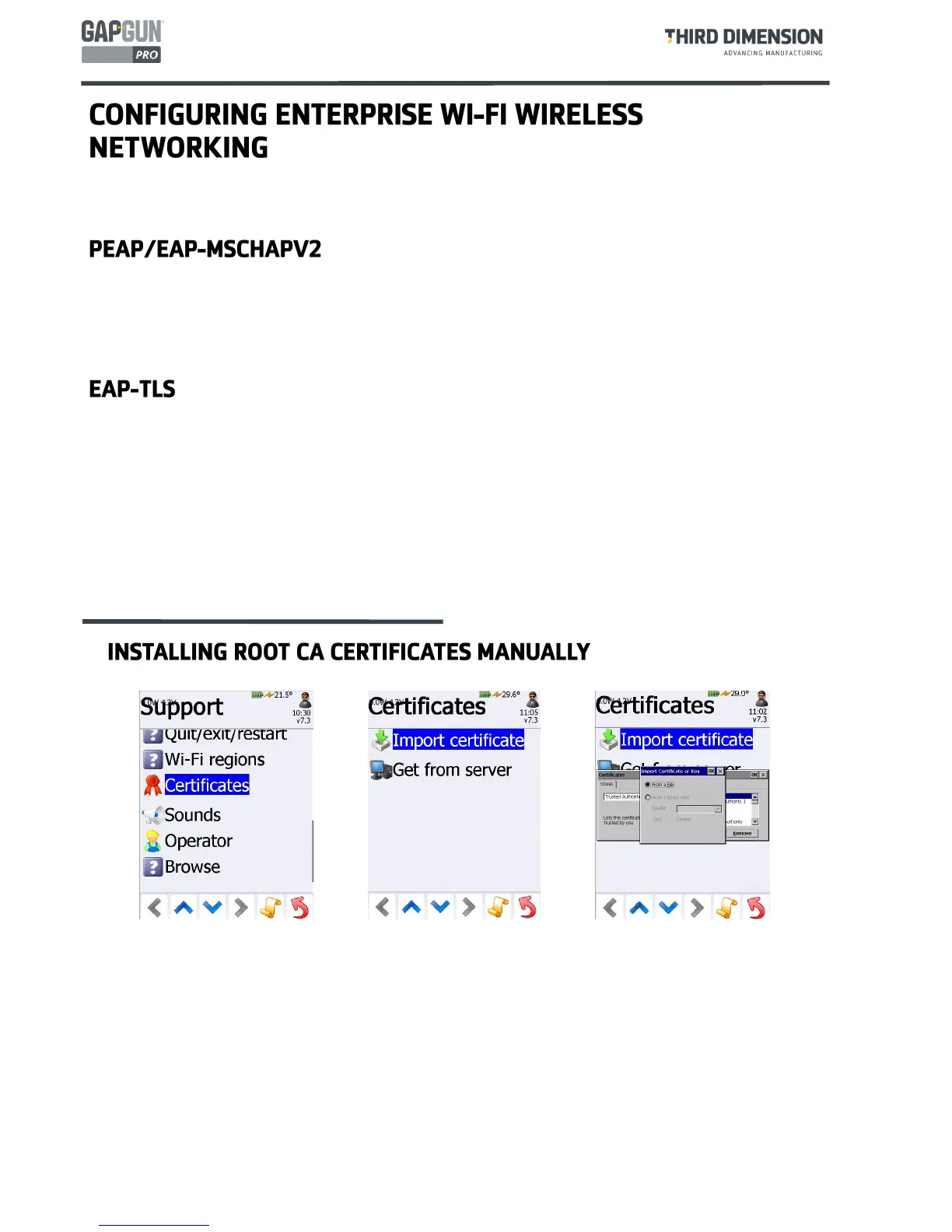
Root Certificates from many commercial Certificate Authorities are already installed on the GapGun however where
the server uses a self-signed certificate, this certificate will need to be installed.
Export the x509 certificate file (.cer) onto a USB stick and plug it into the GapGun.
Tap
Import certificate,
select
Trusted Authorities
and tap
Import…
Locate the .cer certificate file , the USB stick appears as “
Hard Disk
” in the
Select a Certificate File dialog
.
Note: having a USB keyboard plugged into the GapGun can be helpful otherwise use the on-screen keyboard to
interact with the Windows dialog boxes.



 To Next Page