© Third Dimension Confidential Document D13-1604-GGUSER-EN-3.4
V7.6
15
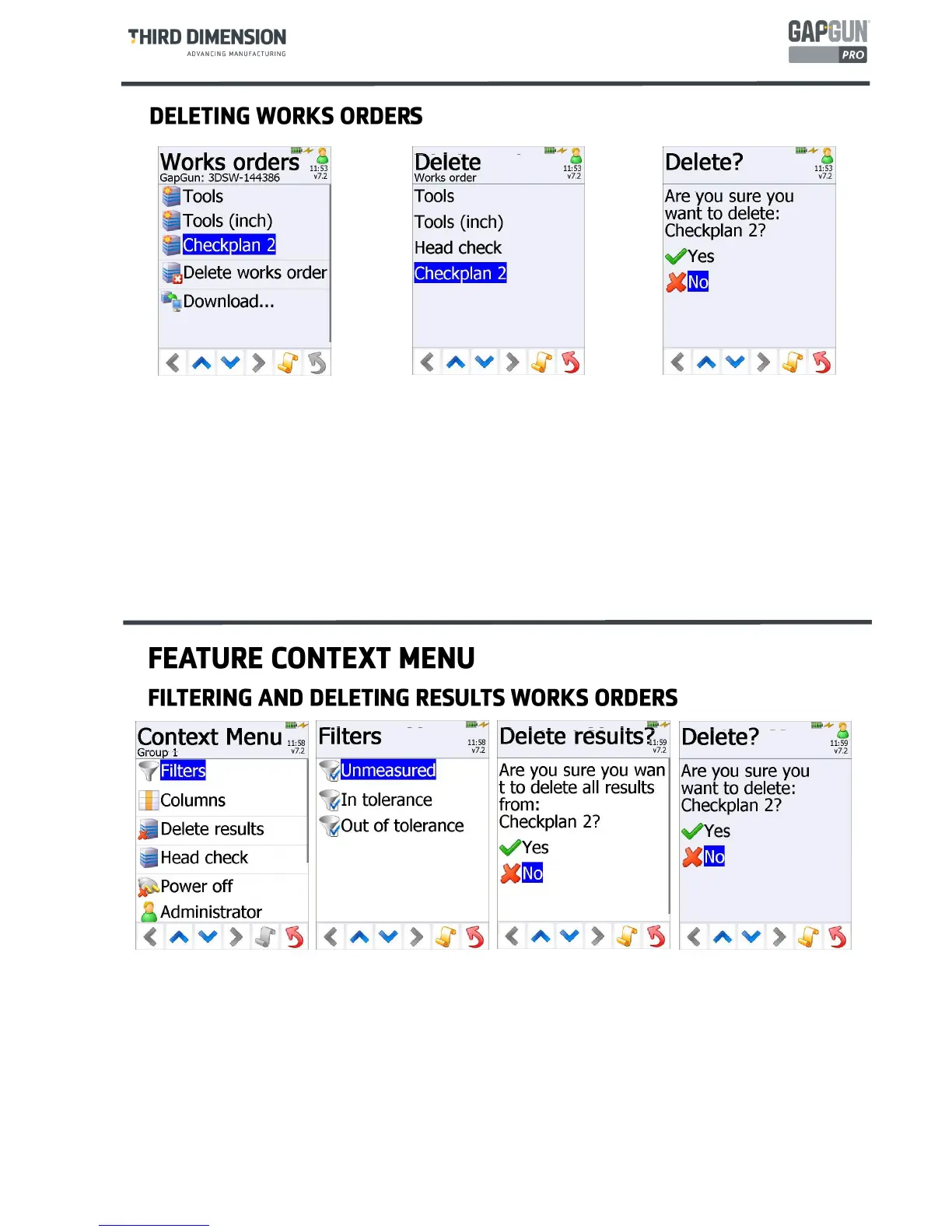
A Works Orders is normally deleted from the GapGun when it is completed and the results uploaded to SPC3D.
To delete it before this point requires Administrator Mode privileges, notice the Admin Icon in the top right
corner.
The new menu item
Delete works order
is tapped and the list of Works orders currently loaded on the
GapGun is shown.
Tapping the Works Order to be removed displays a prompt to confirm the action before deleting the
Works Order and any results associated with it.
Note: The
Tools
and
Head check
Works Orders should not normally be deleted.
Filters allows the Operator to only display subsets of Features such as all unmeasured features, all in-tolerance
features or all out-of-tolerance features.
Delete results allows the Operator to delete all the results measured so far in this Works order. If this is called
from the Groups or Features screens then the results from a single job only will be deleted. This allows wrongly
entered serial number to be corrected without losing all other results in this Works Order. If this is called from the
Jobs screen then ALL results associated with this Works Order will be deleted.
Delete works order allows the Administrator to delete the whole Works order from the GapGun.
Note: The
Tools
and the
Head Check
Works Orders should not normally be deleted.



 To Next Page