© Third Dimension Confidential Document D13-1604-GGUSER-EN-3.4
V7.6
27
SUPPORT MENU ACCESS REQUIRED
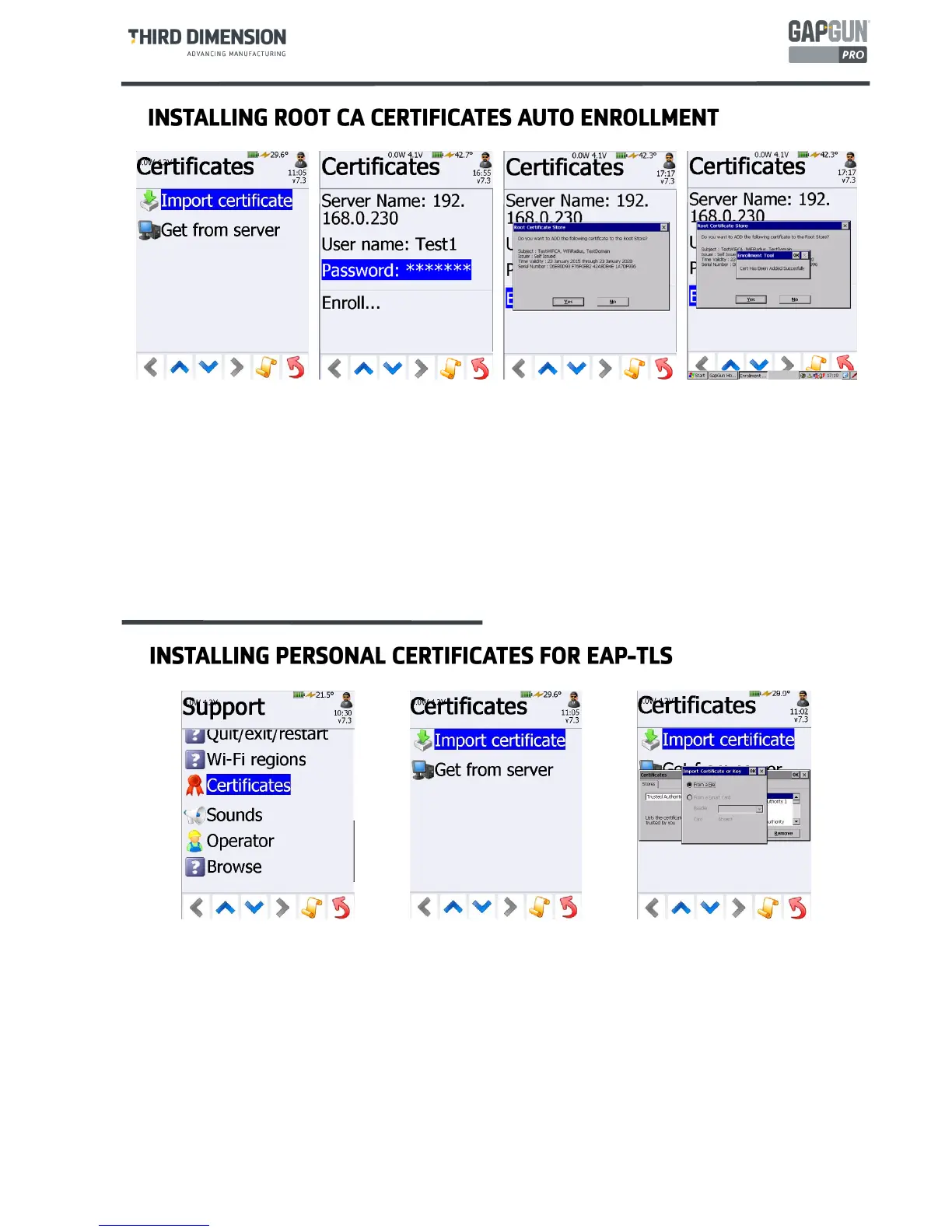
If the certificate server has been set up to permit auto-enrollment then the process can be simplified:
Tap
Get from server
Enter the server IP address, username and password of the user
Tap
Enroll…
Tap
Add
to load the certificate into the Trusted Authorities store
SUPPORT MENU ACCESS REQUIRED
In addition to Root CA certificates EAP-TLS authentication requires that personal certificates must be
installedonto the GapGun. The process is similar to installing Root CA Certificates manually.
Export the x509 certificate file (.cer) onto a USB stick and plug it into the GapGun.
Tap
Import certificate,
select
My Certificates
and tap
Import…
Locate the .cer certificate file , the USB stick appears as “
Hard Disk
” in the
Select a Certificate File dialog
.
Note: having a USB keyboard plugged into the GapGun can be helpful otherwise use the on-screen
keyboard to interact with the Windows dialog boxes.



 To Next Page