24
© Third Dimension Confidential Document D13-1604-GGUSER-EN-3.4
V7.6
Authentication type Open Shared WPA-PSK WPA2-PSK
Default Encryption Disabled WEP TKIP AES
Pass key None 10 hex character key Minimum 8 characters Minimum 8 characters
Extra configuration Set Key index to match the
Access Point.
Set 802.1x disabled Set 802.1x disabled
Notes No security,
all data is
visible.
WEP is easily compromised
and offers no security.
Provided for legacy com-
patibility.
WPA can be compromised,
it offers minimal security.
Provided for legacy com-
patibility.
Best security option.
1
2
3
4
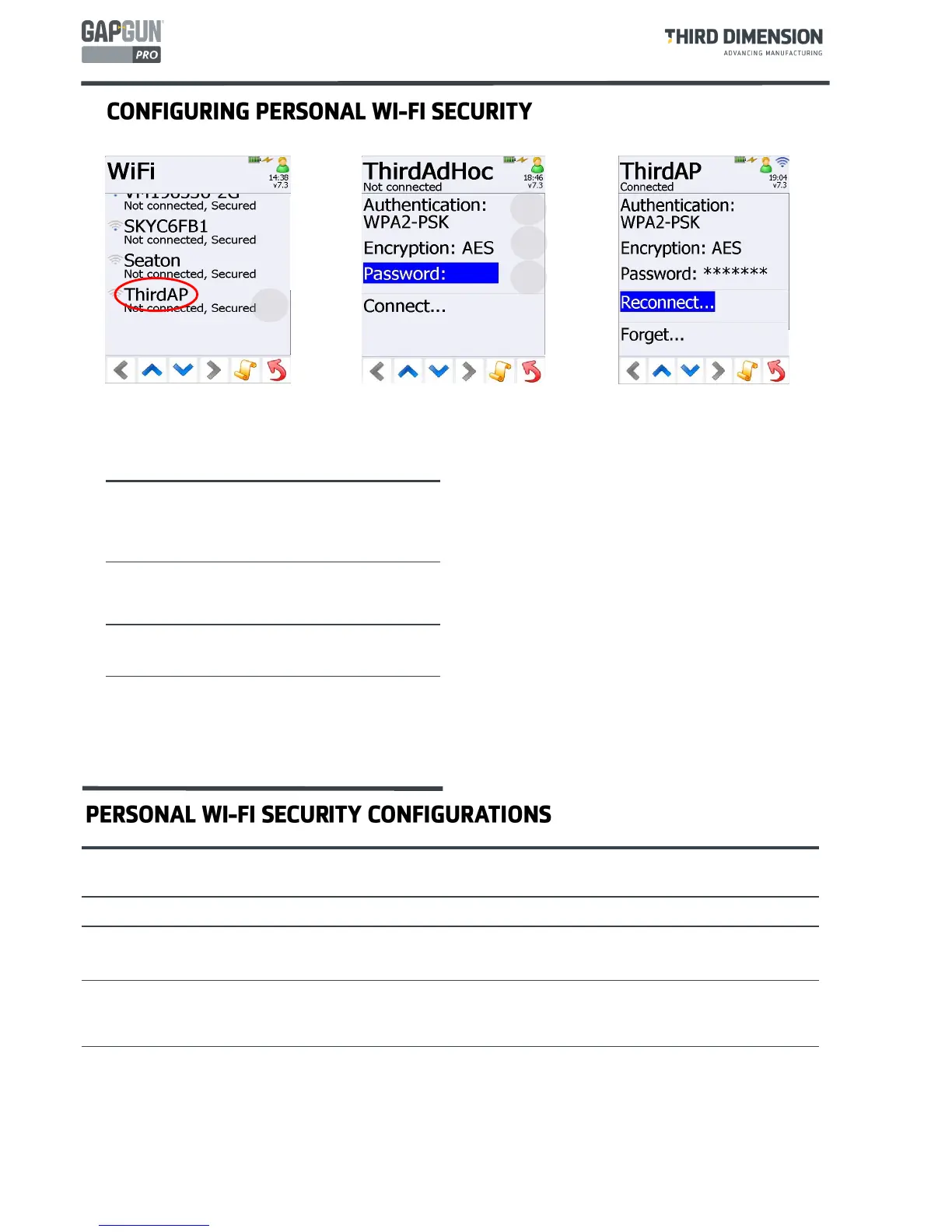
To configure Wi-Fi personal security methods four settings are needed, these settings are specific to the access
point. Contact your Network Manager or examine the configuration for the Access Point to obtain the details.
In the Wi-Fi Connections menu:
1. Tap on the required SSID
2. Set the Authentication type
3. Set the Encryption type
4. Set the password using the keypad
Tapping
Connect...
will attempt to make the
connection to the chosen Access Point. The wireless
icon appears in the top right corner of the display.
The GapGun will try to connect to this Access Point at
all times even after a reboot.If the connection fails tap
Reconnect...
to connect manually. Tap
Forget…
to
delete the configured settings.
SSID name The name broadcast by the
Access point, selected from the
Wi-Fi Connections menu.
Authentication Open, Shared, WEP, WPA-PSK
or WPA2-PSK
Encryption Disabled, WEP, TKIP or AES
Password The “Wi-Fi” password



 To Next Page