© Third Dimension Confidential Document D13-1604-GGUSER-EN-3.4
V7.6
17
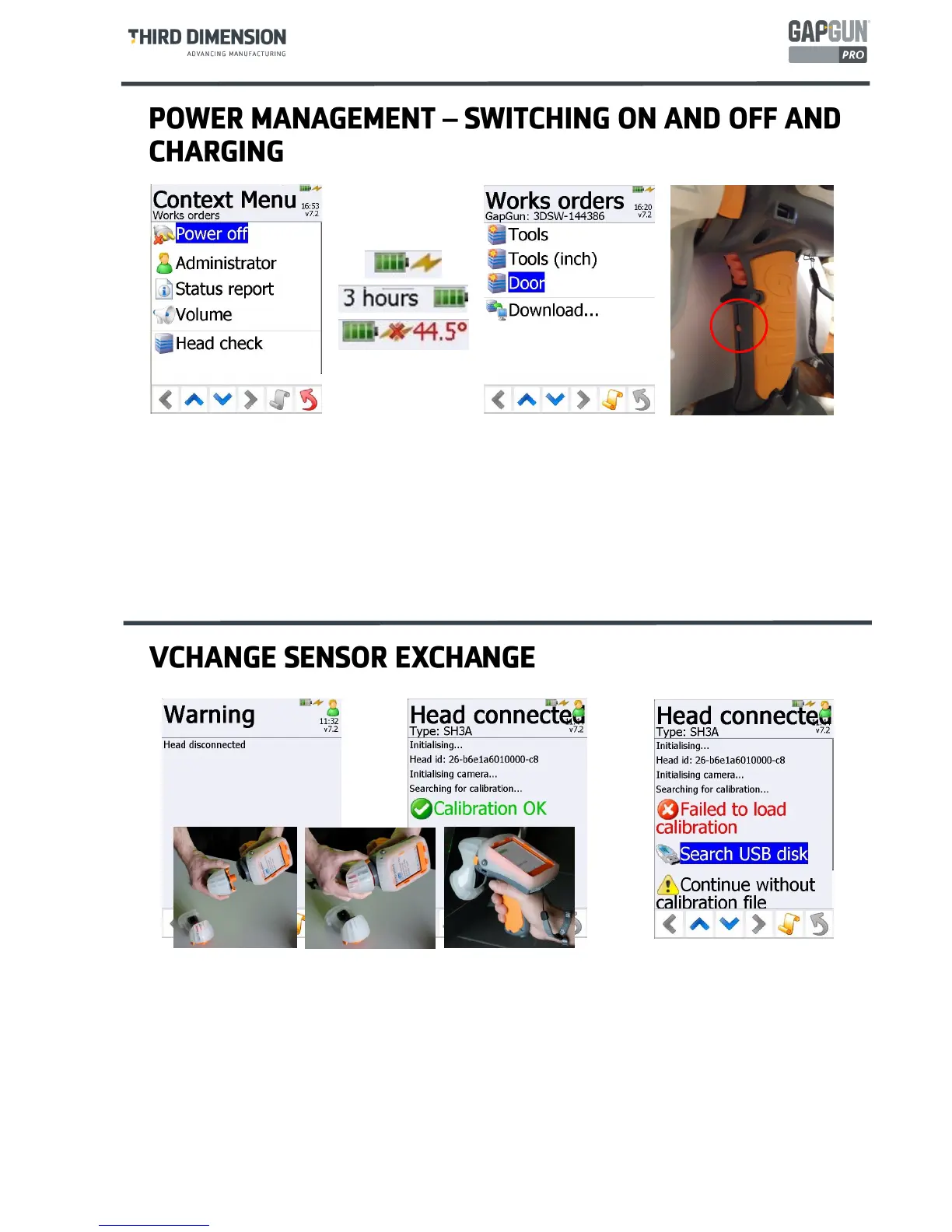
The GapGun can be turned on and off switch using the button below the trigger guard. The GapGun can also be
turned off by tapping the Power off option on the Context menu.
The battery icon indicates the charge remaining in the internal battery, an estimate of the remaining battery life is
displayed when the GapGun is running on its internal battery.
The battery will recharge from any external source such as a Docking station or a clip-on battery pack. It will
display a yellow flash to show that it is recharging.
The battery will not recharge if the internal temperature rises above 43°C, the temperature and a red cross are
displayed to shown when this condition occurs, charging recommences once the temperature drops below 43°C
again.
The Vchange sensors can be exchanged at any time in normal operation other than when in a measurement.
The GapGun registers that the sensor has been removed;
The GapGun registers that a new sensor has been mounted;
The GapGun tries to load the calibration data for the new sensor. If a no calibration file is found, the GapGun
will search a mounted USB stick for the required file. The calibration file must be loaded before it can be used
for measurement.
If the calibration file has expired, a warning message is given and the option to continue or search for a newer
calibration file is offered. The GapGun will probably continue to measure accurately which can be checked by
performing a Head Check but is technically out of calibration.



 To Next Page