20
© Third Dimension Confidential Document D13-1604-GGUSER-EN-3.4
V7.6
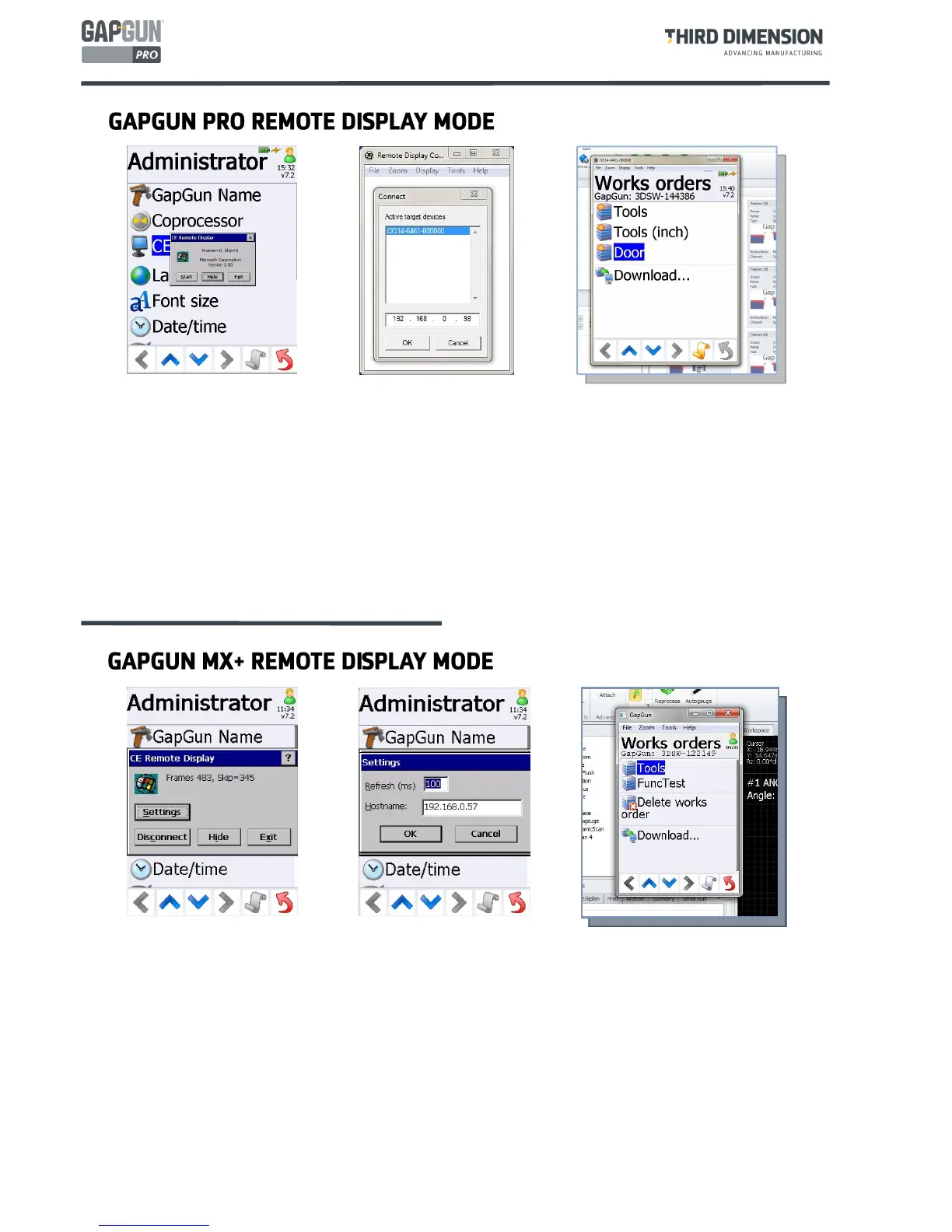
To control the GapGun MX+ via CERDISP uses a slightly different method the the GapGun Pro.
On the PC the program to run is: C:\Program Files (x86)\Third Dimension\SPC3d7\Utils\CERHOSTGG4.EXE
On the GapGunMX+, CERDISP requests the IP address of the PC on which CERHOSTGG4 is being run.
The utility can then be hidden by tapping the
Hide
button. Tapping CERDISP again will display the dialog
to allow the utility to be closed down.
On the PC a live image of the GapGun screen is displayed and this can be used to control the GapGun
interactively using the mouse and keyboard.
The GapGun can be accessed remotely from a Windows PC. Tap CERDISP on the Administrators Menu on the
GapGun.
To control a GapGun Pro, on the PC run: C:\Program Files (x86)\Third Dimension\SPC3d7\Utils\CERHOSTGG5.EXE
1. Run CERDISP from the Administrator Menu to advertise the GapGun on the network.
2. Run CERHOSTGG5, select
File->Connect
, select the target GapGun and click OK.
3. CERHOSTGG5 displays a live image of the GapGun screen. The GapGun can be used to controlled
interactively using the mouse and keyboard through this program.



 To Next Page