34
© Third Dimension Confidential Document D13-1604-GGUSER-EN-3.4
V7.6
Occasionally the operating system running on the GapGun must be upgraded. OS updates, GapGun functionality en-
hancements and bug fixes can all need an update. To update the operating system the GapGun must be booted into
a special update mode and a PC running special update software will then download the new operating system files.
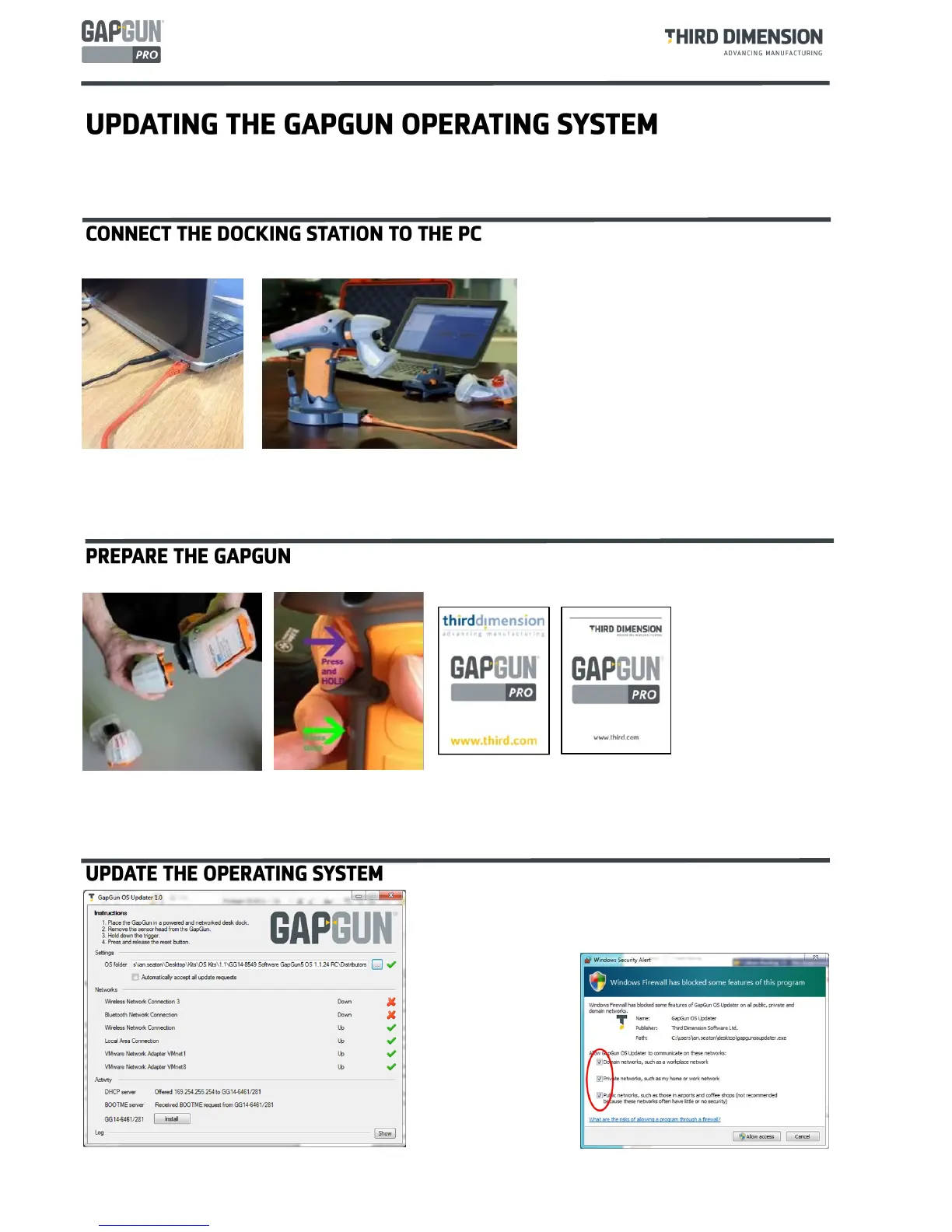
Using an RJ45 cable, connect the Docking Station directly to the network port on your PC.
The Docking Station should be powered throughout the process. If it is not the GapGun will need to be manu-
ally restarted after the download of each of the three files.
Mount the GapGun onto the Docking Station.
Remove the sensor head from the GapGun. If this is not done you will not be able to boot the GapGun into the
splash screen as described in the next step.
Reboot the GapGun, HOLDING THE TRIGGER ON throughout the boot process. The GapGun should boot into
the splash screen and stop there.
Start the GapGunOsUpdater.exe program. The main win-
dow should be displayed.
The first time the program is run the firewall on your com-
puter may ask to allow
the program access to the
network.
Click all the boxes
particularly Private and
Public.
The image shows the
Windows Firewall. Other
products will have a dif-
ferent interface.
NOTE: If the GapGun app / OS
and firmware are incompatible,
the GapGun app banner will turn
red and the sensor will not load.
The correct combination must be
installed to correct the issue.



 To Next Page