12
© Third Dimension Confidential Document D13-1604-GGUSER-EN-3.4
V7.6
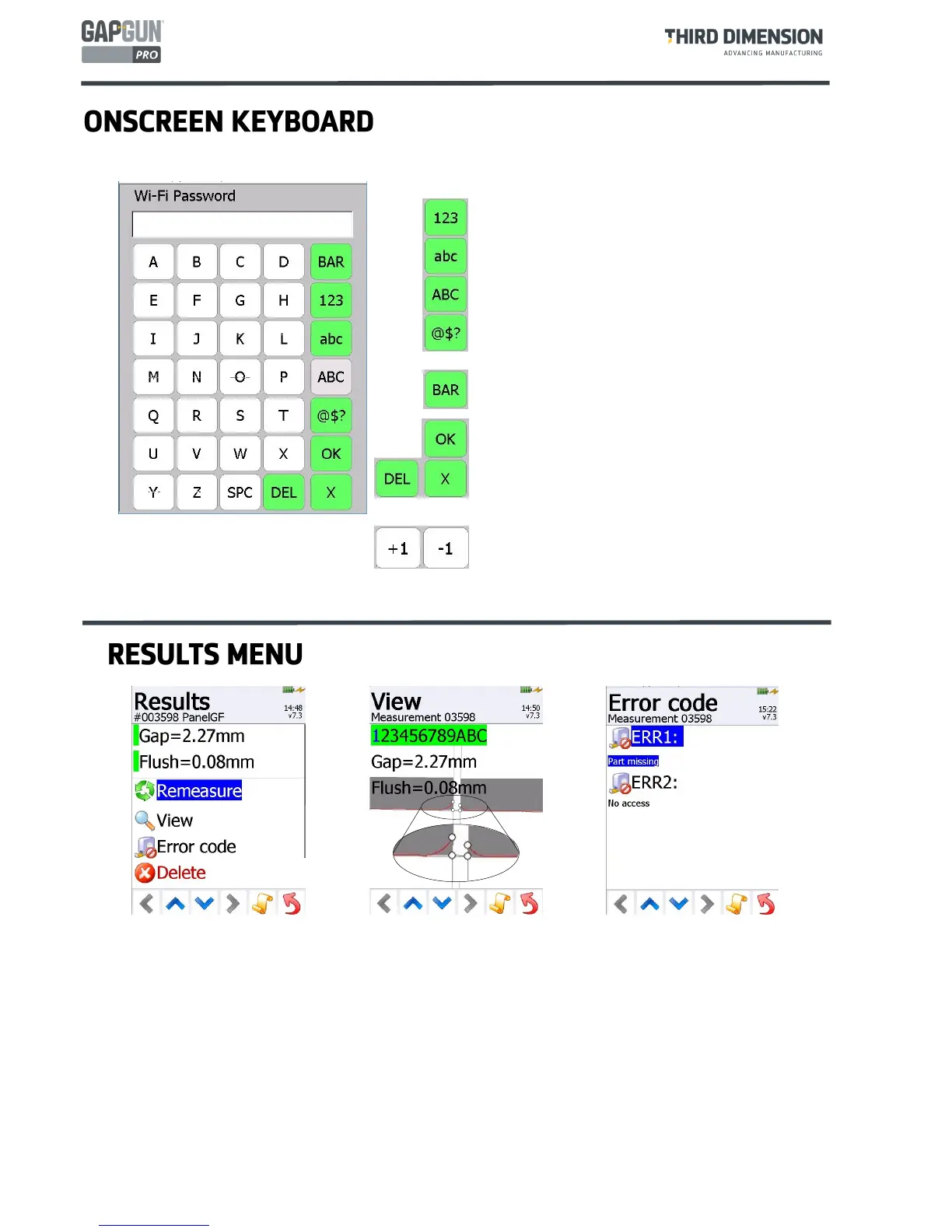
After a measurement has been made, tapping on the measurement again will display the Results Menu. The
GapGun will also show this screen if the measurement results in an error. The options available are to
Remeasure the Feature again, the previous result is overwritten.
View the measurement, which shows the processed image . The grey blocks show any line fits made to the
date and the white circles show the measurement points used to define the characteristics. The up and
down arrows moves through each frame allowing the user to examine why some frames did not succeed.
Enter an Error Code instead of a measurement. These codes can be customised for each Feature.
Delete this measurement entirely.
The onscreen keyboard is used at all times when the
user is prompted for information.
The selection of keys shown on the screen can be
changed by clicking the appropriate selector.
The \Tools\Special\Value feature allows the initial
setting to be preset.
Tapping the Bar button enables the barcode reader
which can read Code128, Code39 Interleaved 2/5.
The entry is completed by tapping the OK button.
Tapping the X key cancels the entry.
The DEL button deletes the previous character.
The +/-1 keys will increment the rightmost number
in the entry field wherever it is.



 To Next Page