Controlling the video player
24 TiVo Stream Operator’s Guide v1.1 • TiVo
®
Proprietary and Confidential
About the Video Player Header Bar
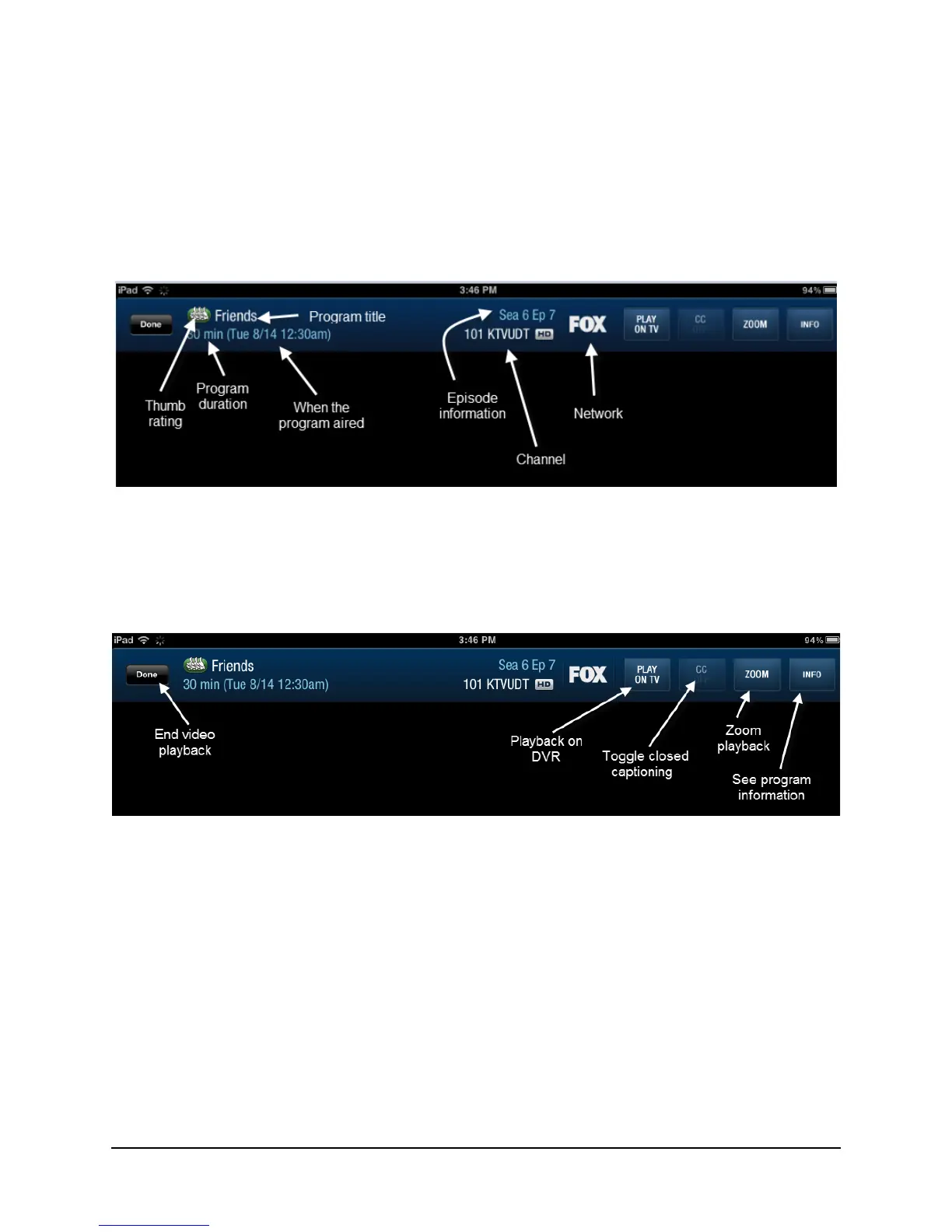
The Video Player Header Bar provides both program information and a set of video controls.
Program information
The program information provided on the Video Player Header Bar is illustrated in Figure 3–7.
Figure 3–7: Program information provided on the Video Player Header Bar
Video controls
The video controls provided on the Video Player Header Bar are illustrated in Figure 3–8.
Figure 3–8: Video controls provided on the Video Player Header Bar
End video playback
The Done button ends video playback on the iPad and takes you to the previous screen.
Start playback on the DVR
The Play on TV button ends playback on the iPad and begins playback on the DVR. When you use
this feature, the program will play back on the DVR that the TiVo App is currently connected to.
This button doesn’t display if the program is currently playing on the DVR.



 To Next Page