The cruise is repeated at ten-second intervals.
To stop running a cruise
● Drag the (red) mouse pointer across the live view pane in any direction.
The current cruise stops and is no longer repeated.
8.3 Autopan
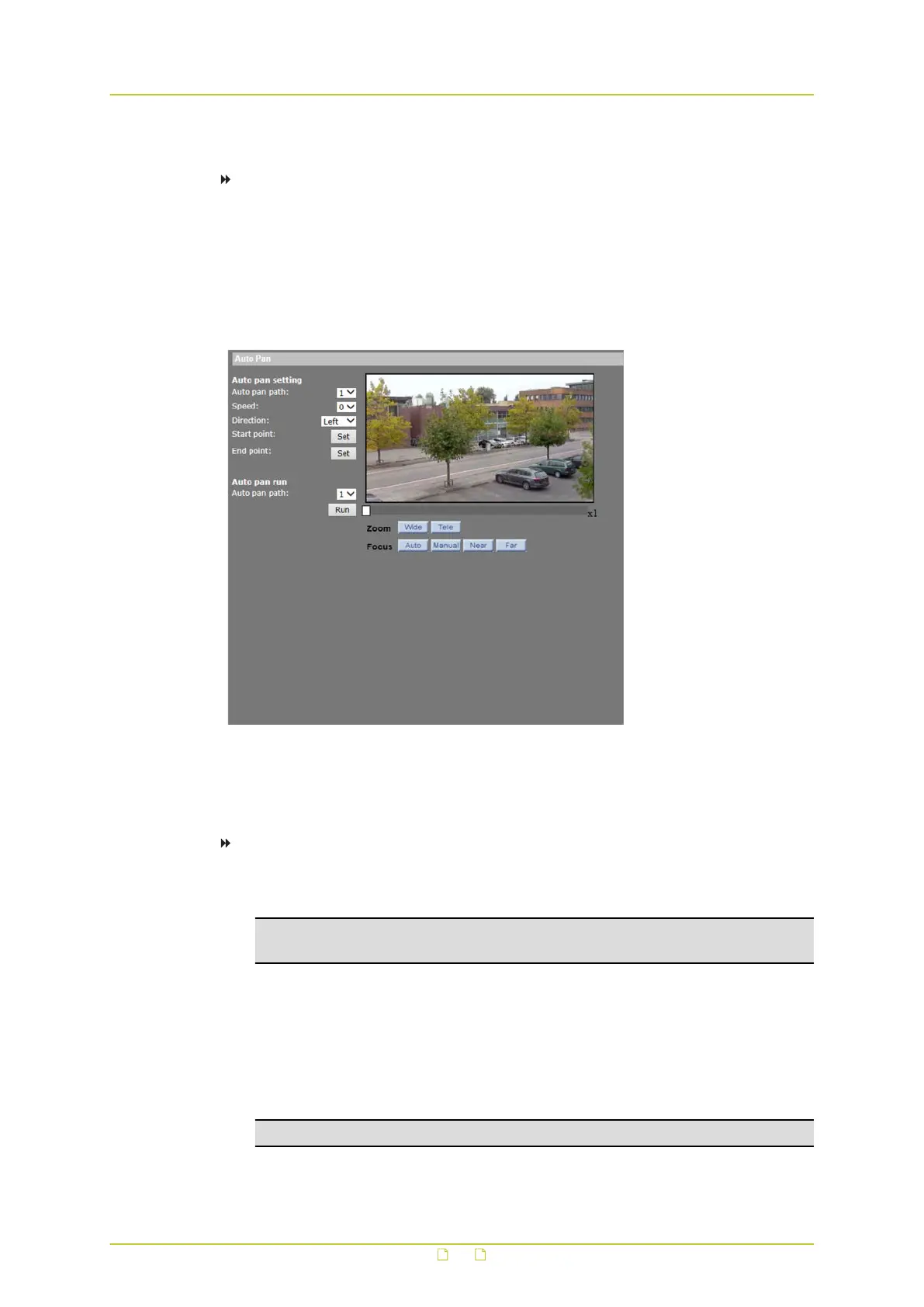
PTZ&IMAGE > Autopan
Autopan is the motion of scanning an area horizontally so the dome camera captures a
horizontal view. The HSD820v2H3-E supports up to four programmable autopan paths.
To record an autopan path
1 On the PTZ&IMAGE tab, click Autopan in the menu on the left.
2 Under Autopan setting, select a path number on the Autopan path list.
Note: An existing recording stored under the selected path number will be overwritten
with the new recording.
3 Select a pan speed from the Speed list.
4 From the Direction list, select a direction for the autopan. For more information, see the
Direction paragraph below.
5 Position the pointer on the live view pane.
6 Keeping the left mouse button pressed, drag the (red) pointer across the live view to
move the camera to the starting point of the autopan path.
7 Click the Set button of Start point.
Note: The zoom ratio of an autopan start point will persist throughout the entire path.
PTZ&IMAGE
83



 To Next Page