31
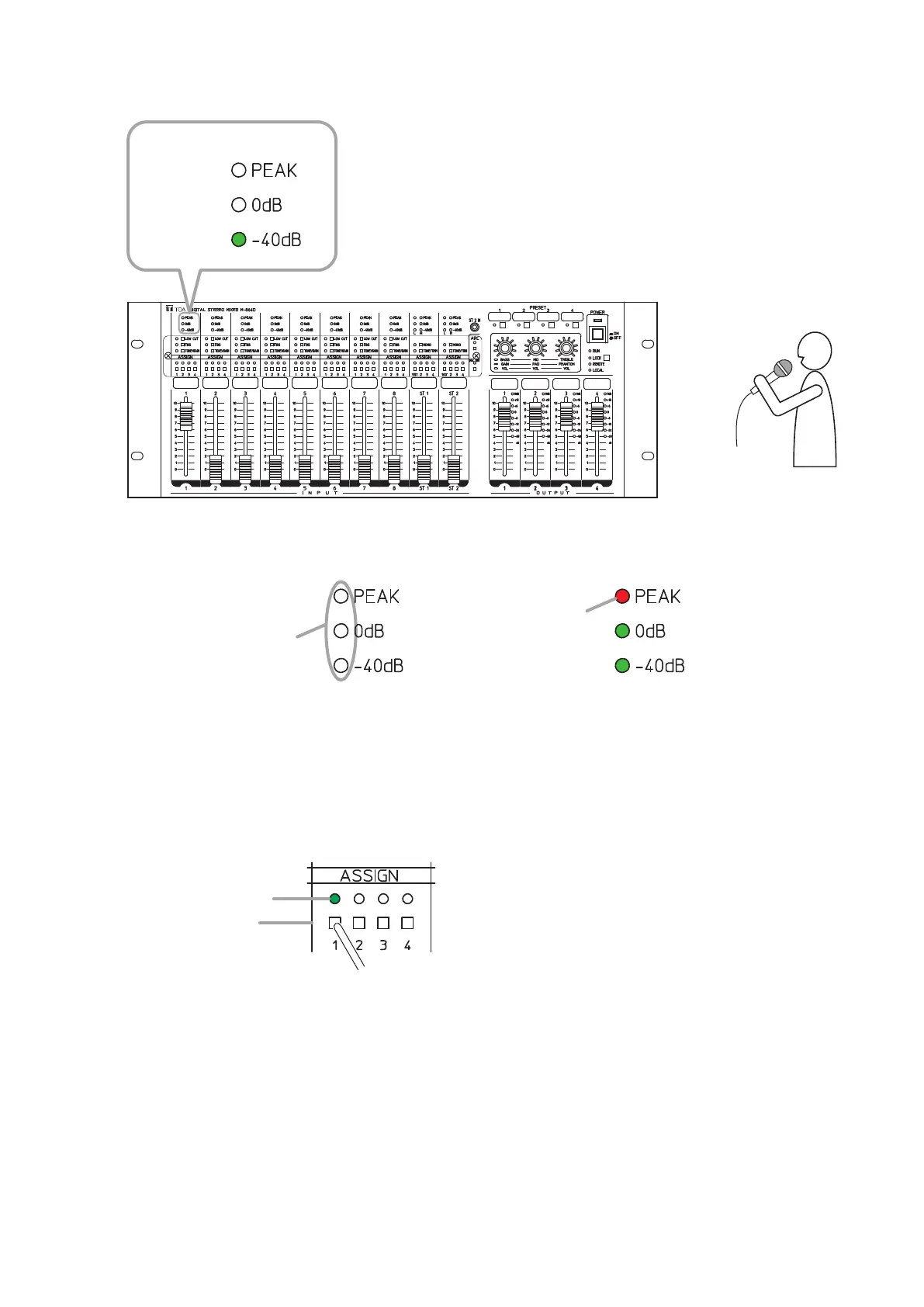
Step 3. Check to see if the microphone works correctly.
SpeakintothemicrophoneandconrmthattheINPUT1’slevelindicatorlightsgreen.
Input level indicator
M-864D
Lights green.
Notes
• Holdthemicrophoneabout7cm(3”)fromthemouth.Speakata
normal voice level.
• Soundisnotoutputfromthespeakersatthisstageastheoutput
amplier’svolumeknobissettotheminimumposition.
Adjust the MONO INPUT 1’s gain if the indicators are in the status below. (See p. 25.)
Input level is too low. Input level is too high.
Lights red.
Do not light.
Step 4. Set the MONO INPUT 1’s output destination.
AssigntheMONOINPUT1’soutputdestinationtothechanneltowhichtheARClterisassigned.
Press the MONO INPUT 1’s Assignment switches 1 through 4.
It is also possible to select multiple output channels.
Step 5. Adjustthevolumeleveloftheoutputamplier.
Speaking into the connected measuring microphone, adjust the volume to the level of normal use with
thevolumecontrolknoboftheamplierconnectedtotheM-864D.
MONO INPUT 1
Assignment switch
Assignment indicator
Note
Useane-tippedobjecttopress
in the Assignment switch.



 To Next Page