45
2. Operation indicators
Light if the assigned function is enabled when the
Function button is pressed.
3. Address selector [ADDRESS]
UsedtosettheZM-9011address(0–F).
Set the address value not overlapping with the
value assigned to other ZM Remote controller.
The address number ranges from 0 to 9, and A to
F in numerical and alphabetical order.
4. Data line connection terminals
[LINK A, LINK B]
Connect the communication line from the M-864D.
The communication line has polarities. Match the
polarities of data line connection terminals to those
of the D-864D’s data line connection terminals. As
2 sets of these terminals are internally connected
in parallel, either can be used to connect to other
ZM Remote controller.
5. 24 V DC terminals
Connect the power cable from the M-864D.
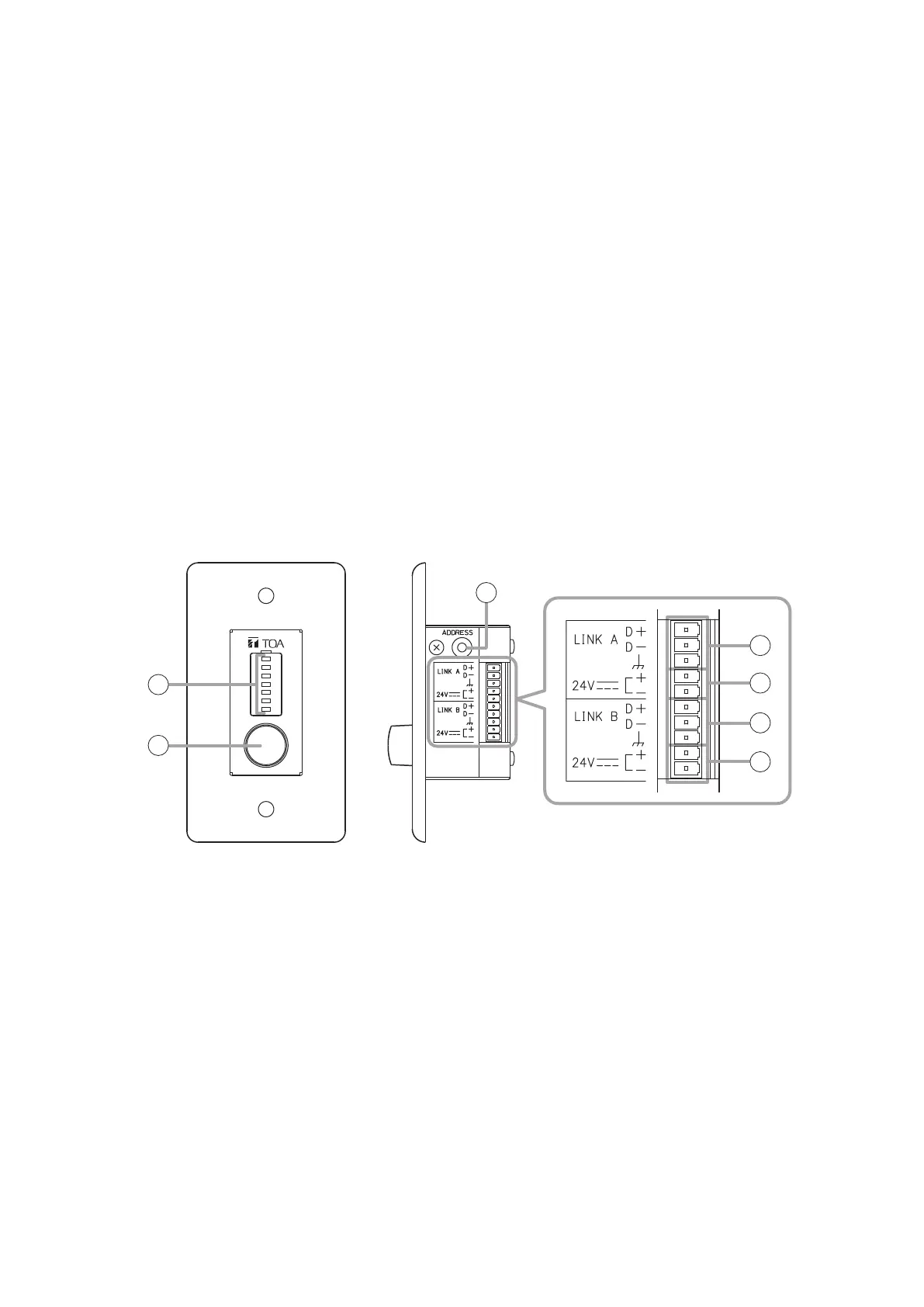
24.1.2. ZM-9012 Remote Control Panel
TheZM-9012performsvolumecontroloftheassignedinput/outputchannelwiththevolumecontrolknobin
connection to the M-864D, and also indicates the volume set position of the assigned channel.
It can be mounted in one-gang electrical box.
[Front] [Side]
1
2
3
4
5
4
5
1. Volume set position indicator
Indicates the volume level set with the volume
control knob.
The set level is indicated with 7-point LED.
2. Volume control knob
Adjusts the volume level of the EXT VOL or Cross
point gain.
Channel assignment for which volume level is to be
controlled is performed by the PC with the supplied
M-864D PC Software installed. For details, read
the separate Software instructions.
3. Address selector [ADDRESS]
UsedtosettheZM-9012address(0–F).
Set the address value not overlapping with the
value assigned to other ZM Remote controller. The
address number ranges from 0 to 9, and A to F in
numerical and alphabetical order.
4. Data line connection terminals
[LINK A, LINK B]
Connect the communication line from the M-864D.
The communication line has polarities. Match the
polarities of data line connection terminals to those
of the D-864D’s data line connection terminals. As
2 sets of these terminals are internally connected
in parallel, either can be used to connect to other
ZM Remote controller.
5. 24 V DC terminals
Connect the power cable from the M-864D.



 To Next Page