EasyManua.ls Logo

Topcon PS Series - Mode Structure Overview

Topcon PS Series
183 pages
Print Icon
To Next Page IconTo Next Page
To Previous Page IconTo Previous Page
Loading...
4. PRODUCT OUTLINE
14
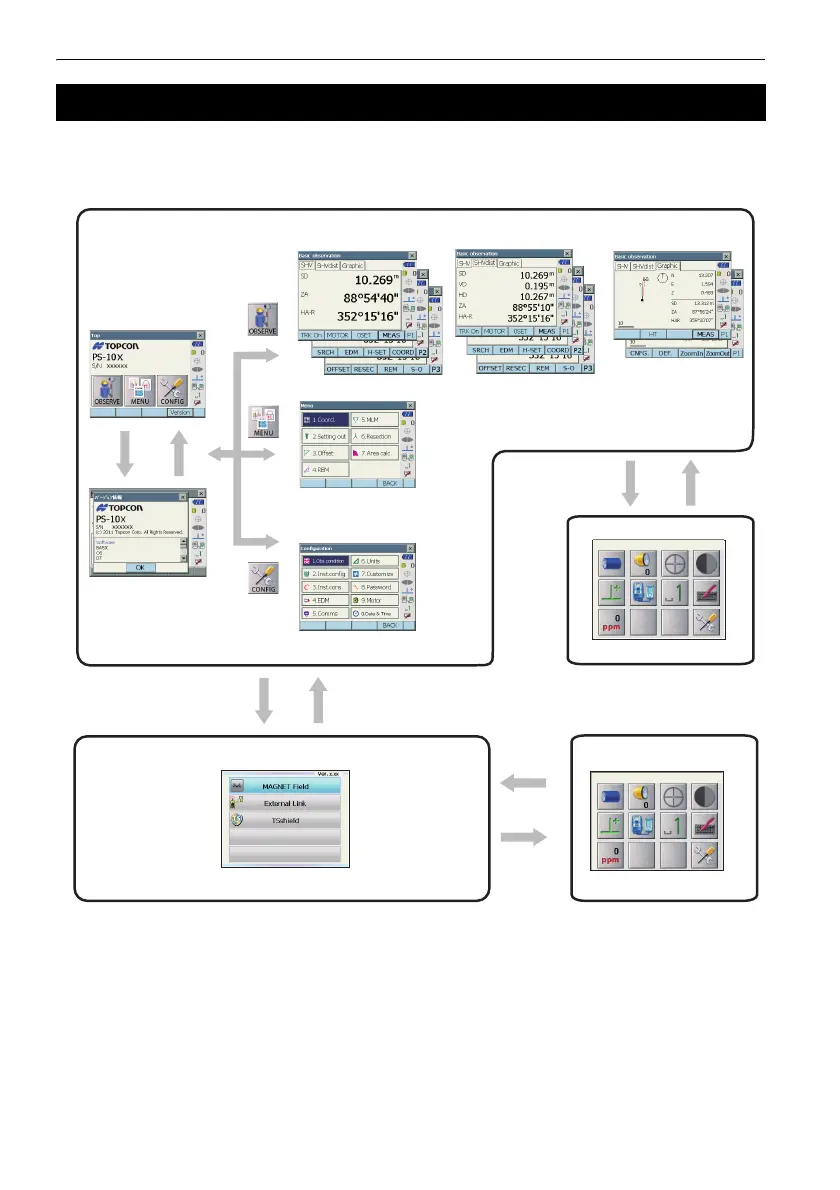
The diagram below describes the different modes of the instrument and key operations for navigating
between them.
G
Switching between modes is not possible during distance measurement.
Do not switch between modes by {PRG} or not turn OFF the power just after pressing {PRG} (during
displaying the message "Executing program mode").
4.2 Mode Structure
●Program mode
●Starkey mode
Top menu
Observation mode (switching by tab)
Menu mode
Config mode
C“5.2 Display
Functions
”Graphic“ tab”
ÛVersionÝ
=OK?
]ڎ_
●Basic mode
C“5.4 Starkey mode”
]PRG_
]ڎ_
]ESC_
C“20.Changing the settings”
C“14. to 19”

Table of Contents

Related product manuals