User Authentication
3-57
3
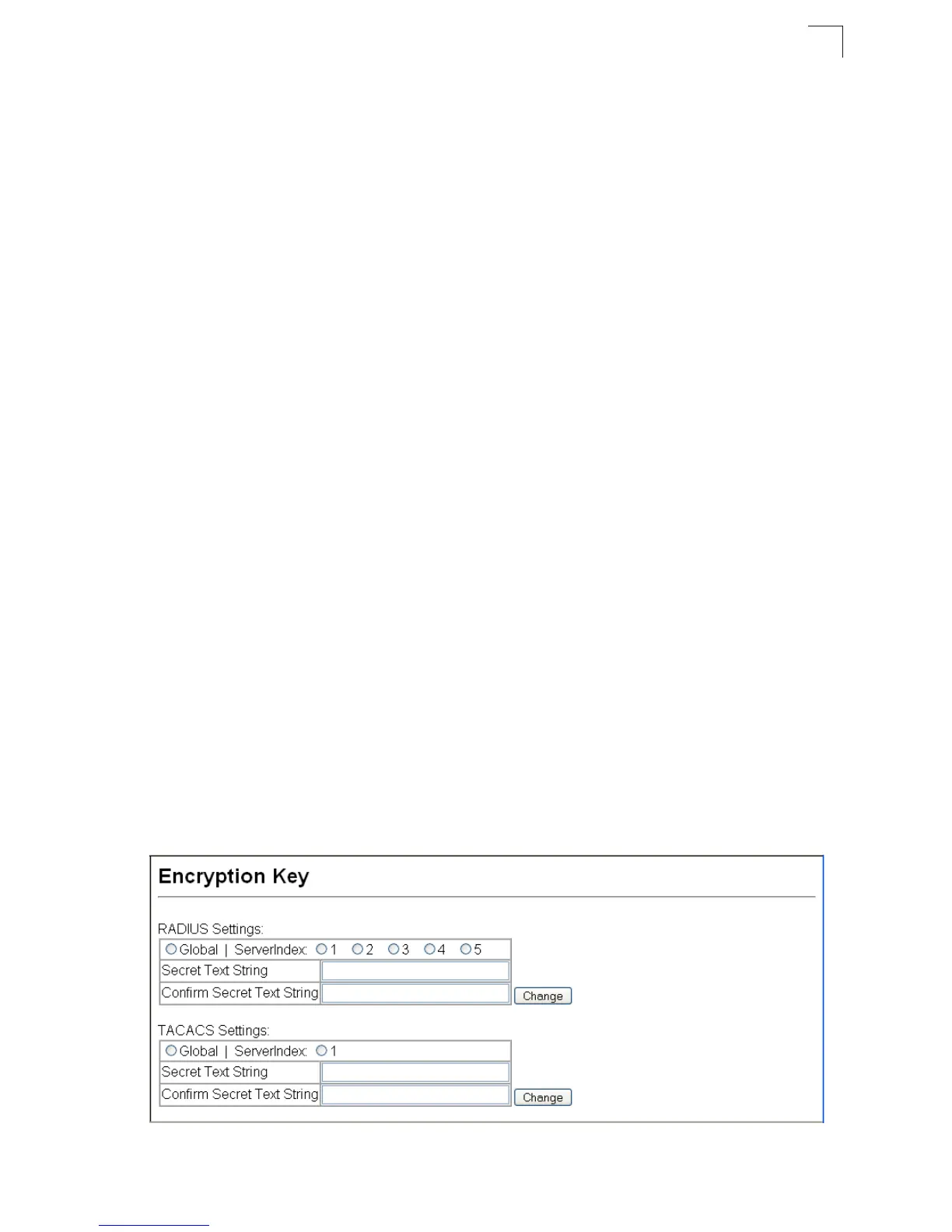
Configuring Encryption Keys
The Encryption Key feature provides a central location for the management of all
RADIUS and TACACS+ server encryption keys.
Command Attributes
• RADIUS Settings
- Global – Provides globally applicable RADIUS encryption key settings.
- ServerIndex – Specifies one of five RADIUS servers for which an encryption
key may be configured.
- Secret Text String – Encryption key used to authenticate logon access for
client. Do not use blank spaces in the string. (Maximum length: 20 (48?)
characters)
- Confirm Secret Text String – Re-type the string entered in the previous field to
ensure no errors were made. The switch will not change the encryption key if
these two fields do not match.
- Change – Clicking this button adds or modifies the selected encryption key.
• TACACS+ Settings
- Global – Provides globally applicable TACACS+ encryption key settings.
- ServerIndex – Specifies the index number of the TACACS+ server for which an
encryption key may be configured. The switch currently supports only one
TACACS+ server.
- Secret Text String – Encryption key used to authenticate logon access for
client. Do not use blank spaces in the string. (Maximum length: 20 (48?)
characters)
- Confirm Secret Text String – Re-type the string entered in the previous field to
ensure no errors were made. The switch will not change the encryption key if
these two fields do not match.
- Change – Clicking this button adds or modifies the selected encryption key.
Web – Click Security, Encryption Key. Choose the appropriate RADIUS or
TACACS+ ServerIndex, enter Secret Text String and confirm it, then click Change.
Figure 3-35 Encryption Key Settings



 To Next Page