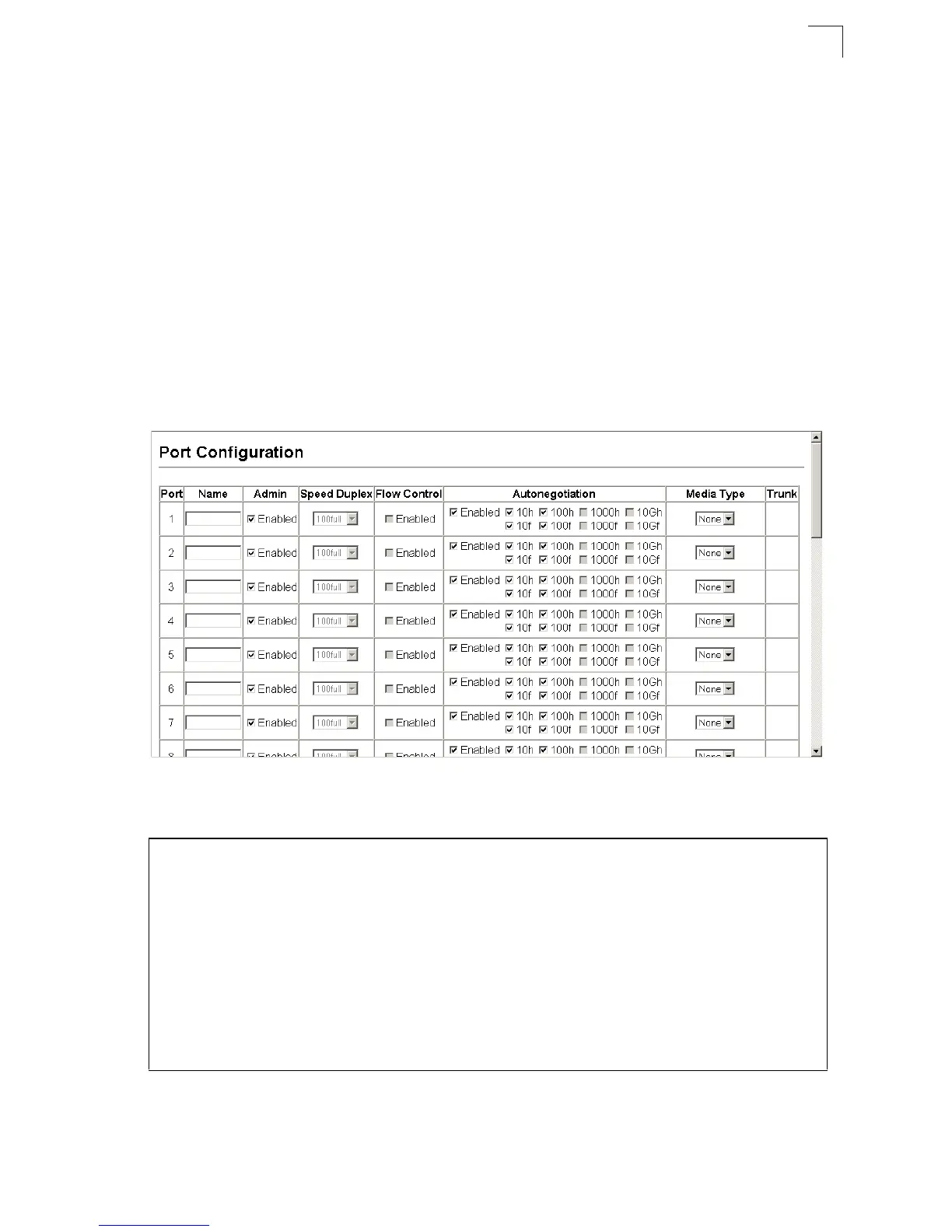
Port Configuration
3-113
3
(Default: Autonegotiation enabled; Advertised capabilities for 100BASE-TX –
10half, 10full, 100half, 100full; 1000BASE-T – 10half, 10full, 100half, 100full,
1000full; 1000BASE-SX/LX/LH – 1000full)
• Media Type – Media type used for the combo ports. (Options: Coppper-Forced,
SFP-Forced, or SFP-Preferred-Auto; Default: SFP-Preferred-Auto)
• Trunk – Indicates if a port is a member of a trunk. To create trunks and select port
members, see “Creating Trunk Groups” on page 3-114.
Notes: 1.
Auto-negotiation must be disabled before you can configure or force the
interface to use the Speed/Duplex Mode or Flow Control options.
2. 1000full operation cannot be forced. The Gigabit Combo ports can only
operate at 1000full when auto-negotiation is enabled.
Web – Click Port, Port Configuration or Trunk Configuration. Modify the required
interface settings, and click Apply.
Figure 3-73 Port/Trunk Configuration
CLI – Select the interface, and then enter the required settings.
Console(config)#interface ethernet 1/13 4-166
Console(config-if)#description RD SW#13 4-167
Console(config-if)#shutdown 4-171
.
Console(config-if)#no shutdown
Console(config-if)#no negotiation 4-168
Console(config-if)#speed-duplex 100half 4-167
Console(config-if)#flowcontrol 4-170
.
Console(config-if)#negotiation
Console(config-if)#capabilities 100half 4-169
Console(config-if)#capabilities 100full
Console(config-if)#capabilities flowcontrol



 To Next Page