TracVision TV3 User’s Guide
63
Switching Satellites
Automatic Satellite Switching – DIRECTV
In Automatic satellite switching mode, the TV-Hub can accept
commands from SWM-compatible DIRECTV receivers to
automatically switch between the 101W and 119W satellites. (To learn
more about SWM technology, see “Understanding DIRECTV SWM
Technology” on page 65.) It receives these commands via your
onboard local area network (LAN). See “Network Settings” on page 15
for network setup details.
NOTE: The 119W satellite only carries local channels for certain regions of
the country. (You can find a list of these regions in the Setup Wizard.) If your
locals are carried on DIRECTV’s main 101W satellite, you do not need to
switch satellites.
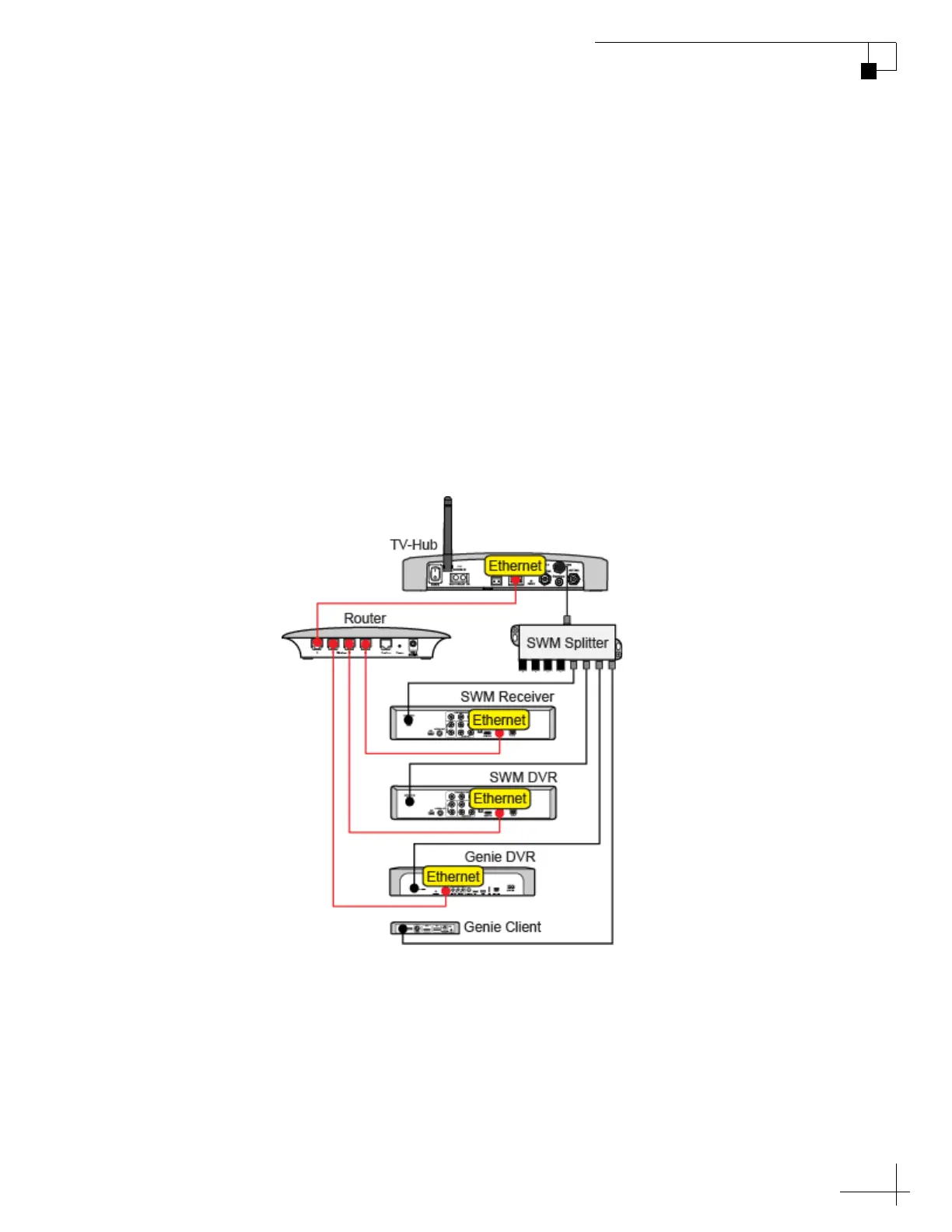
Figure 7-3 Example of Network Connections for DIRECTV
If the receiver does not have an Ethernet port, or is not MoCA
®
-
enabled, additional equipment may be required – contact a KVH
authorized dealer/distributor or KVH Technical Support for details.
Genie clients cannot switch satellites; they can only view
programming carried by the satellite that is currently selected.
Once your receiver is connected to the network, follow the steps in
“Setting Up a DIRECTV Receiver for Automatic Switching” on
page 64 to set it up for automatic switching.



 To Next Page