TracVision TV3 User’s Guide
17
Network Settings
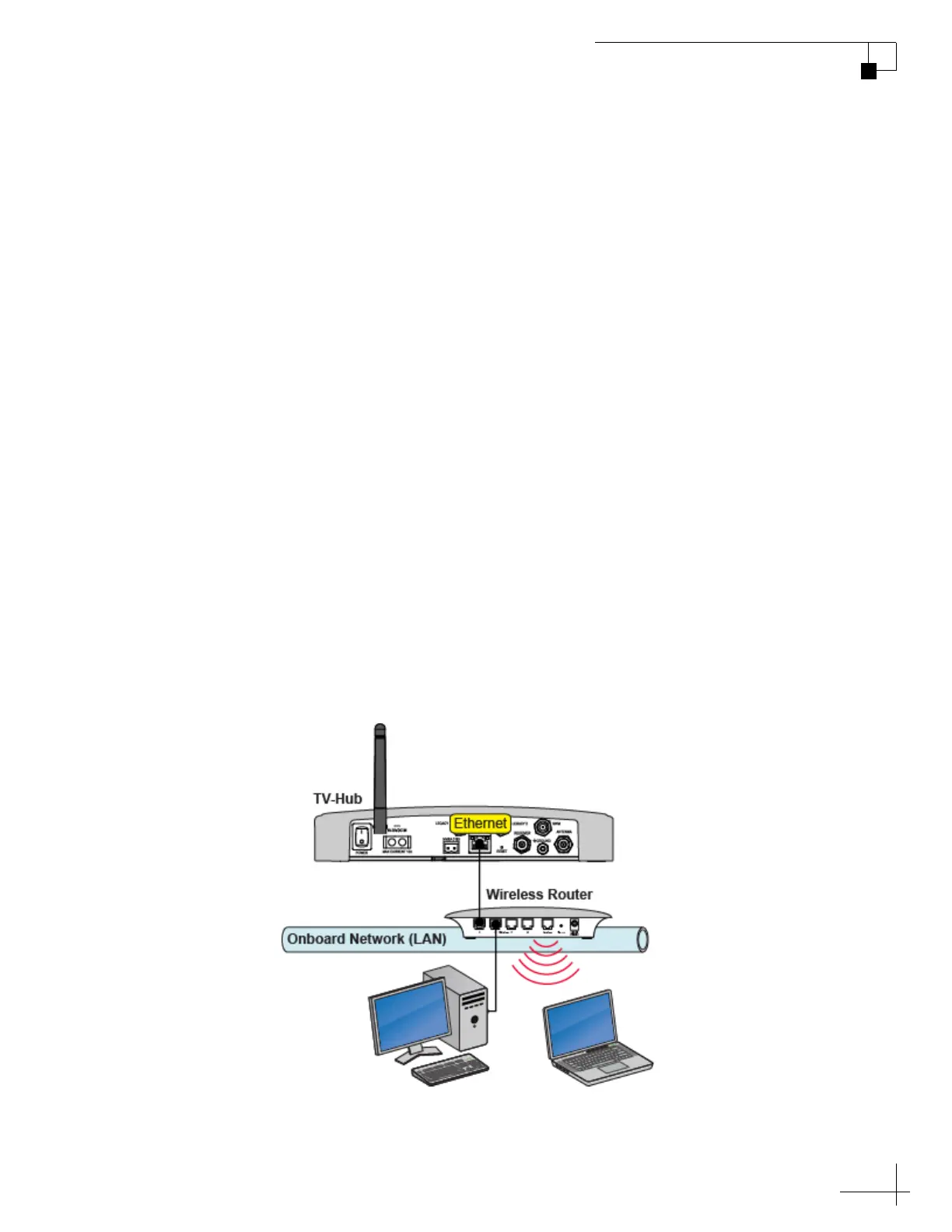
Connecting the TV-Hub to Your Onboard Network
You can connect the TV-Hub to an onboard local area network (LAN).
A network connection is necessary if any of the following conditions
apply:
• You have one or more IP AutoSwitches installed to enable
automatic satellite switching (Linear/DISH Network/Bell TV
only).
• You have one or more DIRECTV SWM-compatible
receivers connected to the system and require automatic
switching between the 101W and 119W satellites.
• You want to have the ability to access the TV-Hub’s web
interface using any device connected to your onboard
network.
By default, the TV-Hub’s Ethernet port is configured as a DHCP client,
which means your network’s router will automatically assign it an IP
address. Simply connect the TV-Hub’s Ethernet port to your onboard
network then turn on the TV-Hub.
NOTE: Use a straight-through 100 Mbps fast Ethernet UTP CAT5 cable (or
better) with RJ45 connectors.
Figure 3-1 TV-Hub Wired Network Connection (TV-Hub A shown)



 To Next Page