SRTM files provide elevation for 1 degree of latitude by 1 degree of longitude at a resolution of 30m
between points for the US and 90m between points elsewhere. DTED data come in various
resolutions and require a specific directory structure of folders named by longitude containing .dt
files named by latitude.
2.9.4 Map Imagery
If the PC has an internet connection, SkyLink will automatically download imagery for the area the
map is looking. Higher resolution images will be downloaded as the map is zoomed in just like
elevation data. This data will persist between sessions. SkyLink also supports loading most
common geo referenced image formats. Any images SkyLink finds in the MapImagery folder of the
Trillium Data Folder will be loaded at startup.
2.9.5 Map Data Dialog (Automatic Download)
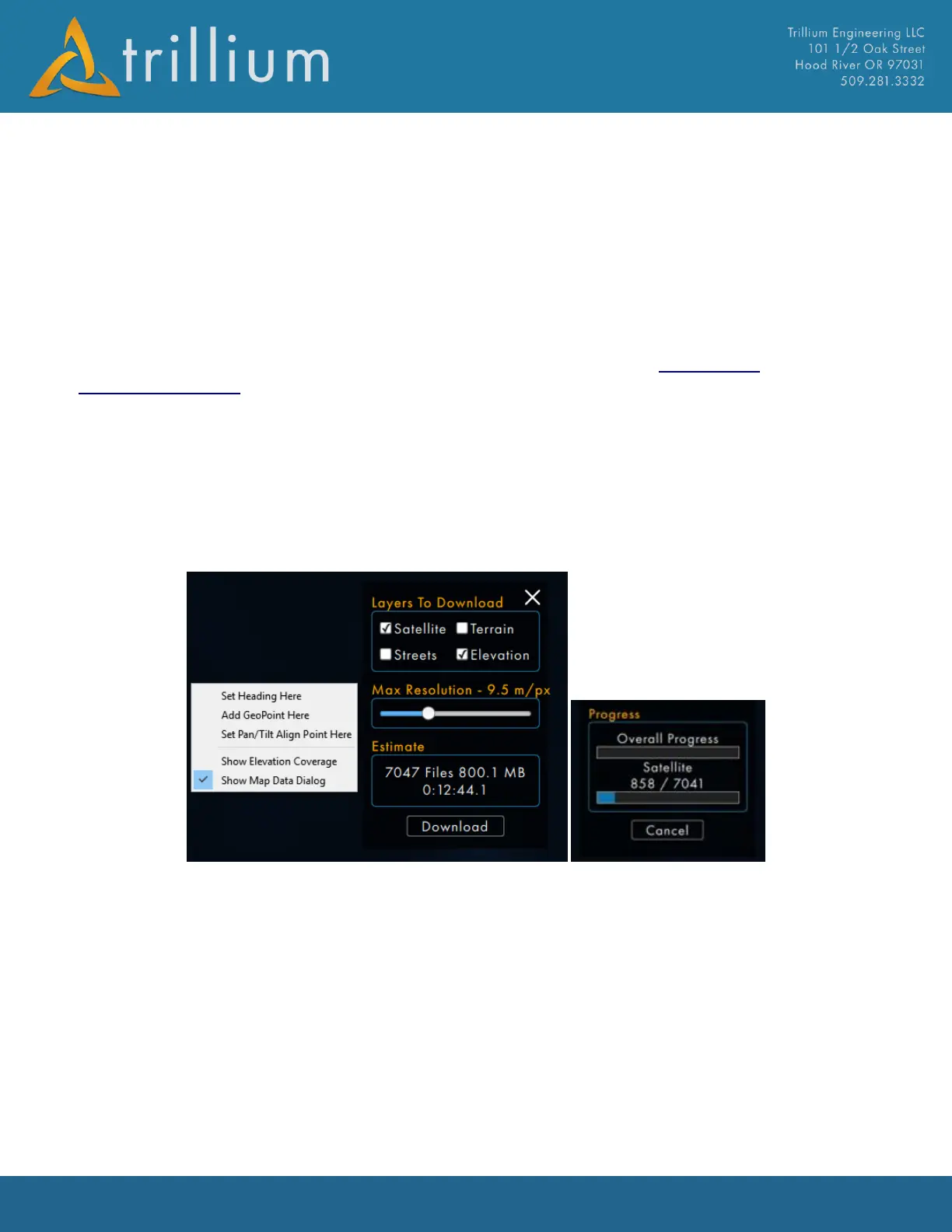
The “Show Map Data Dialog” can be accessed by right clicking on the map. This dialog allows for
Maps and Elevation data to be downloaded automatically for the area currently in the map view.
Specific layers (Satellite, Terrain, Streets and Elevation), and desired max resolutions can be
selected before downloading. The Dialog will provide an estimated number of files, files size and
time for download. When the Download button is clicked a progress bar will appear.



 To Next Page