COMMANDER / EMBASSY
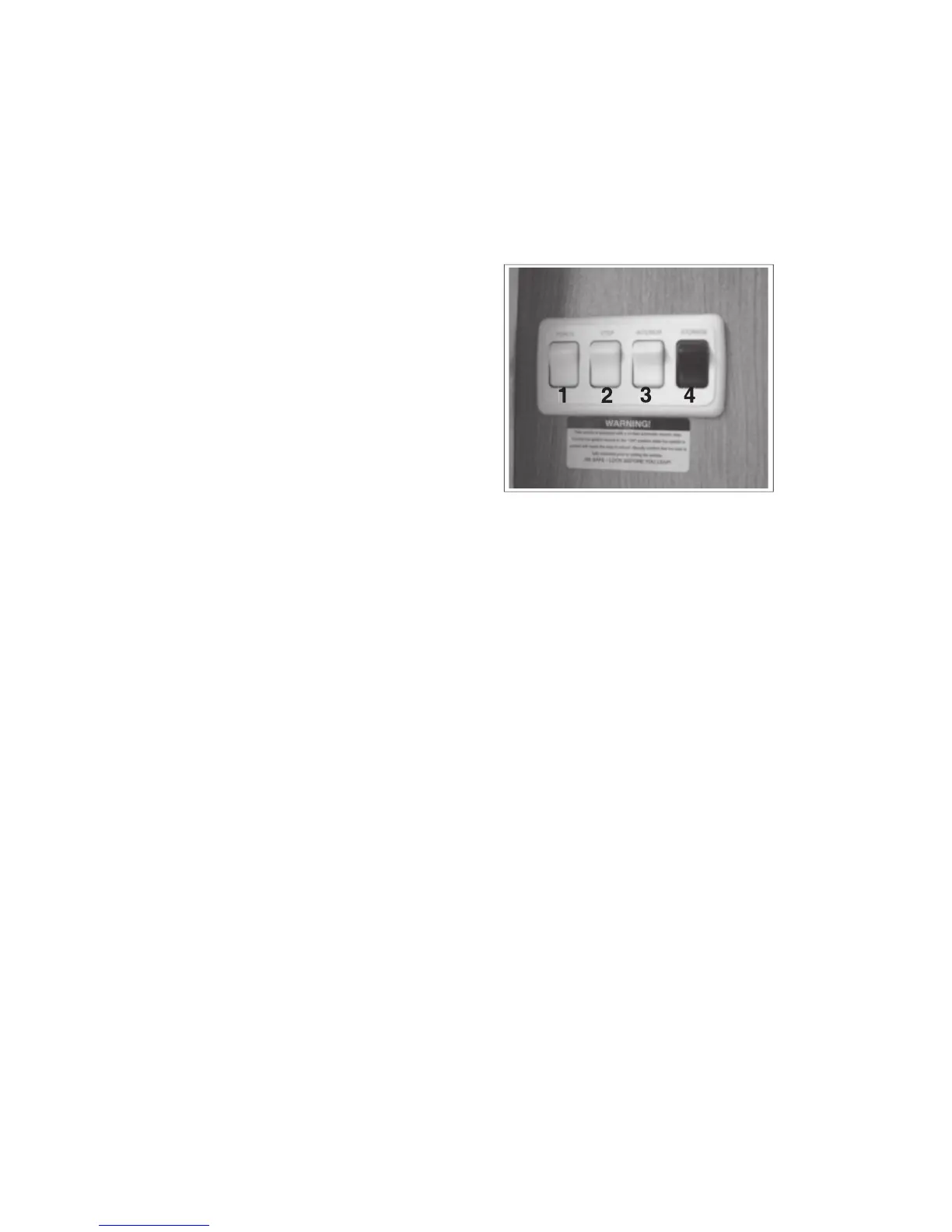
The side entry doorway left wall is
equipped with a switch panel that
controls the following functions:
This 2 position rocker switch
controls the power to the outside
porch light. Depress the upper
portion of the switch to turn the
porch light on and the lower por-
This 2 position rocker switch con-
trols the power to the side entry
step. Depress the upper portion of
the switch to turn the step mecha-
nism power on and the lower por-
tion for off. The step will extend
and retract when the door is closed. Refer
to the Step System Operator's Manual in the
information package for more detailed instruc-
tions on step extension when occupied, “last
out” feature and retraction for driving.
This 2 position rocker switch controls the
power to a coach interior light. Depress the
upper portion of the switch to turn the light on
and the lower portion for off. The switch on the
light must be in the 'on' position.
This 2 position rocker switch controls the
power to the lights in all the exterior storage
compartments. Depress the upper portion of
the switch to turn the power to the lights on
and the lower portion to turn off. This mas-
ter switch must be on before any of the light
switches in any exterior compartment will work.



 To Next Page