Home
Trocen
Control Unit
AWC708C Plus
Page 47
Trocen AWC708C Plus - Page 47
116 pages
Manual
Save Page as PDF
To Next Page
To Next Page
To Previous Page
To Previous Page
Loading...
A
WC708C
PLUS
Motion
Control
User
Manual
WWW
.SZTROCEN.COM
46
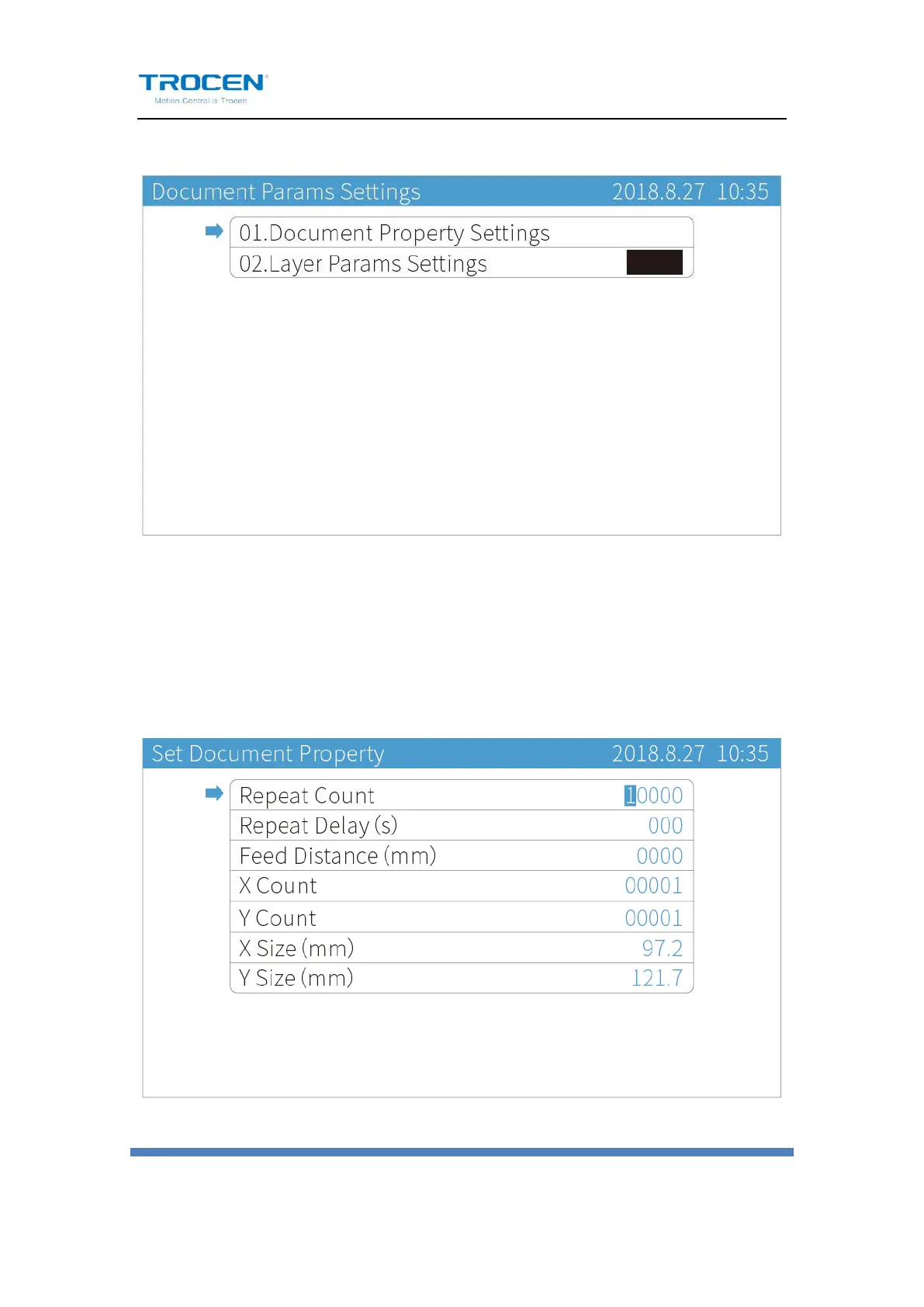
Figure5-1-
2
Documen
t Par
ams Settings
Move
the
cursor
to
【
Docum
ent
Property
Set
tings
】
,
press
【
Enter
】
.
Press
【↑
】
【
↓】
【
←
】
【→】
t
o
mov
e
cur
sor
,
press
number
k
ey
s
to
modify
par
ameter
s, and pr
es
s
【
Enter
】
t
o sav
e set
tings.
Figure5-1-
3
Set Documen
t Property
46
48
Table of Contents
Main Page
Default Chapter
6
Table of Contents
6
1 Product Introduction
9
System Introduction
9
Terms and Explanation
10
Unpack
10
Panel Preview
12
Buttons
13
Function Keys
13
Direction Keys
16
Number Keys
18
Wiring Board
18
Wiring Board Appearance
19
Port Instruction
20
2 Lasercad Installation
35
3 Simplified Installation
36
Hardware Connection
36
Input Test
37
Set the Origin Point of Machine
38
Key Direction
39
Distance Per Pulse
39
Hard Limit and Range
42
4 Main Interface Preview
43
5 Main Page Function Introduction
46
File
46
Document Params Settings
46
Layer Params Settings
48
Count
50
Working Property
52
6 System Menu
54
U Disk Files
54
Work Files
56
Config Files
57
Upgrade Files
58
Save Current Config to U Disk
59
Origin Manage
59
Jog Control
61
Cut Box
62
Axes Control
63
Motion Parameters Settings
64
Common Parameters Settings
68
Work Mode
68
Common Parameters
74
Axis Speed Parameters
76
Rotate Engraving & Cutting
78
CCD Config
82
Network Settings
83
Language
85
System Version
85
7 Manufacture Params Settings
88
Axis Parameters
88
Laser Parameters
91
I/O Parameters
93
Auto Reset Settings
94
Hardlimit Settings
96
Multihead Settings
97
Function Config
103
8 Fqa
105
Appendix 1: Wiring Diagram of Servo Driver
106


 To Next Page