84
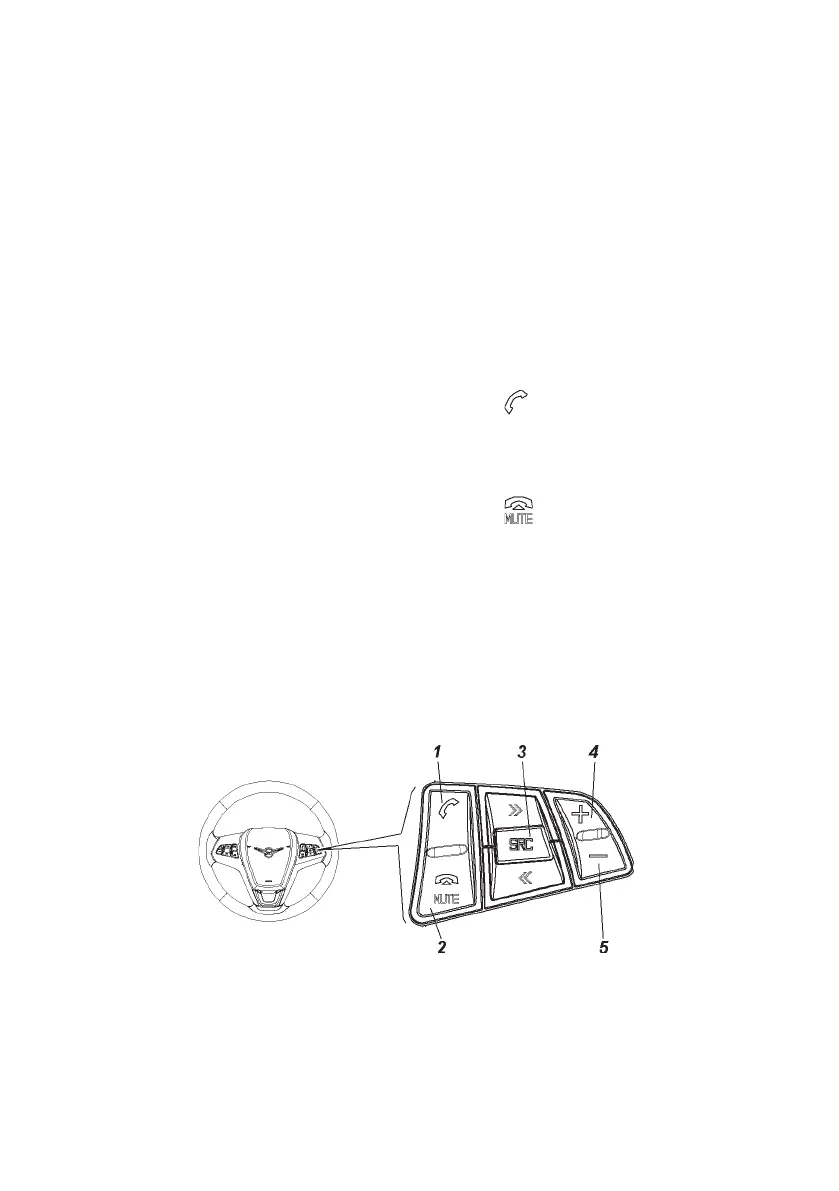
Fig. 3.19. Multimedia system steering keys unit
(for names of items, see the relevant text)
To avoid engine torque decrease, to roll the vehicle when stuck
in snow or mud turn ESP off.
WARNING. If the vehicle is stuck in snow, mud, sand, etc.,
try to release the vehicle by rolling it forward-backward. Do not
proceed like this if any people or subjects are near the vehicle.
During rolling, the vehicle may be released and suddenly move
forward or backward, which can lead to injuries or property damage.
MULTIMEDIA SYSTEM KEYS UNIT
Function of multimedia system keys (Fig. 3.19).
1 — input key in the “Phone” mode
.
Short pressing: answering the incoming phone call or dialing
the phone number from the calls list.
Long pressing: shows the list of the calls.
2 — input key in the “Phone” mode
.
Short pressing: phone call nishing or declining or closing the
calls list or turning the sound on/off;
3 — key “SRC»”/“SRC«” (up/down) sound source selection.
If radio is activated: press to select the next/previous preset
radio station tuning.


 To Next Page