12
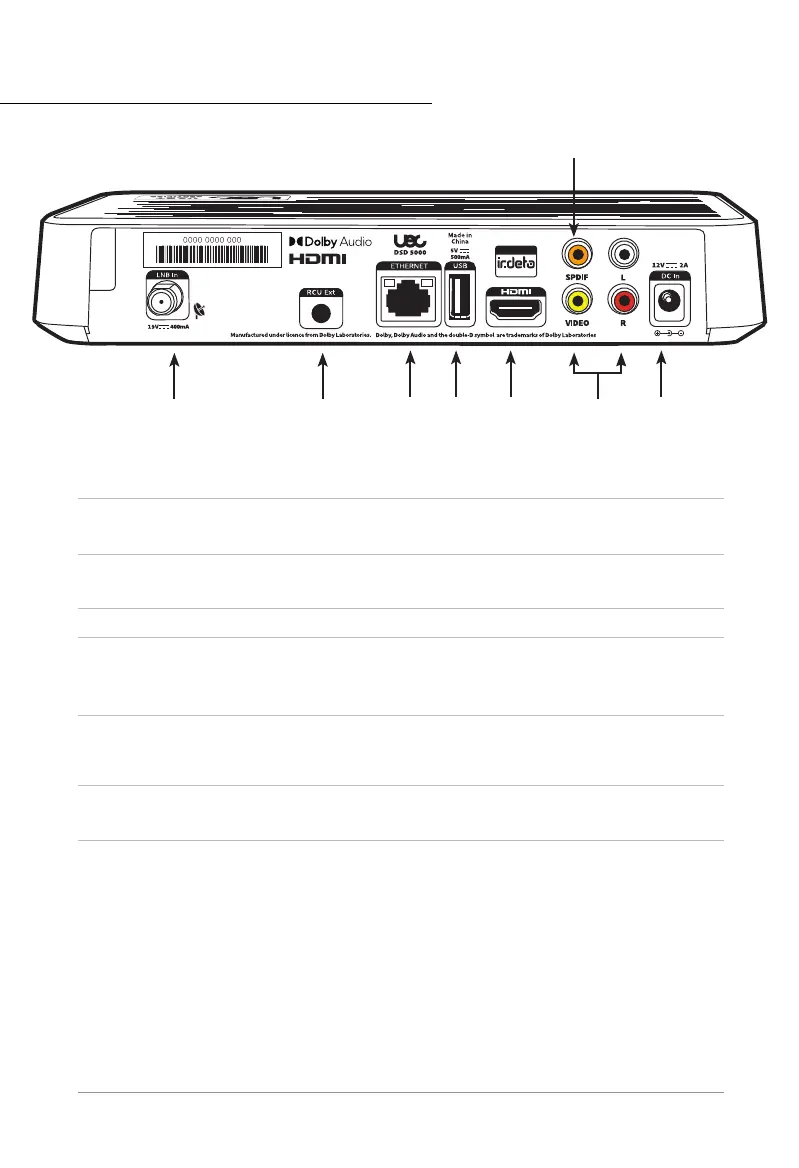
Rear Panel
1 LNB In
Connect the satellite antenna coaxial connector to the
LNB In socket on the STB.
2
RCU Ext
(Optional accessory)
IR extender, used for extending the range of the RCU if the
STB is in a cabinet.
3 ETHERNET Ethernet Socket to connect the STB to the internet.
4 USB Socket Connecting external HDD and loading software upgrades.
5 HDMI®
HDMI® cable connects to HDMI® input on TV (or Home
Theatre System). Provides HD video, digital audio and
Dolby Digital surround sound (when available).
*
6
SPDIF
(Optional cable)
Connect Digital Audio to AV Home Theatre for digital
audio and Dolby Digital Surround if available in the
broadcast.*
7
Video/L/R
(Optional cable)
AV RCA cable connects audio and video to older style TVs,
VCRs and other video devices.
8
DC In
12V–2A
Socket for the DC power cable.
NOTE: Dolby Surround Sound*
The STB passes this feature of a program to the AV processor or soundbar but ONLY if it is
accurately contained in the received broadcast. Some broadcasters may not accommodate
this feature and/or it may be corrupted by bad connections or if the signal is passed through
a VCR or similar device between the STB and the AV processor or soundbar.
* Dolby, Dolby Audio, and the double-D symbol are trademarks of Dolby Laboratories.
21
6
3 4 5 7 8



 To Next Page